Aeon Wide (1366x768) (10 Viewers)

deebo

Portal Pro
April 19, 2006
233
3
Hmm, I just installed this skin (from SVN) along with mp tvseries, mes films etc.

Mes Films works fine, but the logos in mp tvseries dont work at all for some reason?

i copied the logo folder to c:\program files\team mediaportal\ and imported all the rules but nothing happens. TvSeries log has nothing that tells me whats wrong (it seems to think nothing is wrong).

Im using tvseries 2.0 (since the SVN version isnt available anymore)

Any tips?

And also, since 80 pages is a loooong read, ill ask: how do i add "fan art", and how does it actually work, is it per view (ie like one for tv series, one for my films, one for tv etc) or do they change randomly?
 

Crusnik01

New Member
August 2, 2008
4
0
Home Country
Norway Norway
DVD button

Tried to play a real-life, shiny in the hand DVD today for the first time today since installing Aeon Wide, and noticed that the DVD button in BasicHome.xml takes me to the My Videos screen rather than playing the DVD. That is, the functionality of the button is exactly the same as the 'Movies' button. I could, of course, navigate to the DVD from there, and also just switch to the normal Home screen to click on Play DVD, but it would be nice if the DVD link worked in the same way as the main home Play DVD button.

Is this by design, or a bug?

Cheers,

Rob.


Any solution to this?

Wondering about the same issue here... Would be great to get some hints or an answer to this. =)
 

rmeredit

MP Donator
  • Premium Supporter
  • April 10, 2007
    164
    20
    Melbourne
    Home Country
    Hi,

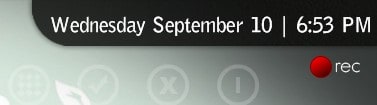
    Just updated to AW 1.1. For some reason, the red recording pin now appears on the other side of the screen, overlaying the date/time. Is this deliberate, or accidental? If I go and move it back, will I be breaking something?

    Cheers,

    Rob.
     

    thesystemera

    Portal Pro
    May 26, 2008
    807
    22
    44
    Auckland
    Home Country
    New Zealand New Zealand
    Hey guys, has any one noticed that MyWorldMap doesn't work any more with the skin... They updated the plugin and it seems to of died with the search fields... In each search field now comes up with an "X" where you have Street, City and Town...

    I should ad that how I know this is skin related is that it seems to work absolutely fine with the original Blue-two skin... If any one could help that would be awsome as this is a really cool plug-in and don't want to have to go back to the old skin. Thanks.
     

    trevor

    Portal Pro
    October 17, 2006
    1,601
    952
    Chelmsford
    Home Country
    United Kingdom United Kingdom
    Hey guys, has any one noticed that MyWorldMap doesn't work any more with the skin... They updated the plugin and it seems to of died with the search fields... In each search field now comes up with an "X" where you have Street, City and Town...

    I should ad that how I know this is skin related is that it seems to work absolutely fine with the original Blue-two skin... If any one could help that would be awsome as this is a really cool plug-in and don't want to have to go back to the old skin. Thanks.

    Just checked this using MyWorldMap.922.mpi as the plugin version and the 4 skin files from the Aeonwide1.1 release and all looks fine....

    Are you using the same versions? Had a look and could not find a newer version of the plugin than one I built the skin files against.

    Heading off on holiday...well...now so if still problems will not be able to look till next w/e....

    Trevor
     

    Djang

    Portal Pro
    November 3, 2007
    79
    6
    Home Country
    Netherlands Netherlands
    Tried to play a real-life, shiny in the hand DVD today for the first time today since installing Aeon Wide, and noticed that the DVD button in BasicHome.xml takes me to the My Videos screen rather than playing the DVD. That is, the functionality of the button is exactly the same as the 'Movies' button. I could, of course, navigate to the DVD from there, and also just switch to the normal Home screen to click on Play DVD, but it would be nice if the DVD link worked in the same way as the main home Play DVD button.

    Is this by design, or a bug?

    Cheers,

    Rob.


    Any solution to this?

    Wondering about the same issue here... Would be great to get some hints or an answer to this. =)

    Me Three!
    I was wondering the exact same thing.
     

    rmeredit

    MP Donator
  • Premium Supporter
  • April 10, 2007
    164
    20
    Melbourne
    Home Country
    Fix for Recording Pin Overlapping Date/Time

    Hi,

    Just updated to AW 1.1. For some reason, the red recording pin now appears on the other side of the screen, overlaying the date/time. Is this deliberate, or accidental? If I go and move it back, will I be breaking something?

    Cheers,

    Rob.

    Tracked this down to changes that went through two weeks ago in the SVN. The relevant file (tvOverlay.xml) doesn't have the reason documented (other than it's in response to a forum post), but I'm guessing it's in relation to this post here, where there is a comment that the old location for the recording pin overlapped the weather icon from the RSS Ticker plugin.

    Attached is a screenshot of the problem. You can see from that, that there are two small alignment issues. The first is the pin itself (perhaps aligned on systems that have a much shorter date/time string so that it appears to show to the left of the text, but on systems that include AM/PM and with long day/month names clashes). The second is the alignment of the date/time string itself, which is too long for the background graphic.

    I've tweaked both of these alignments so that the date/time is shifted to the right a bit, so that the string more neatly fits the background, and moved the recording pin down and to the right.

    I've clicked around a bit to make sure that this doesn't stuff up any other screens, but let me know if you come across one that's a problem.

    Updated version screenshot shown, and modified common.time.xml (for the date/time string fix) and tvOverlay.xml (for the recording pin fix) files attached.

    Cheers,

    Rob.
     

    Attachments

    • overlapping record pin.jpg
      overlapping record pin.jpg
      10.9 KB
    • fixed record pin.jpg
      fixed record pin.jpg
      9.5 KB
    • common.time.xml
      30.6 KB
    • tvOverlay.xml
      30.6 KB

    damaster

    Portal Pro
    November 23, 2007
    412
    35
    Home Country
    Canada Canada
    rmeredit said:
    Tried to play a real-life, shiny in the hand DVD today for the first time today since installing Aeon Wide, and noticed that the DVD button in BasicHome.xml takes me to the My Videos screen rather than playing the DVD. That is, the functionality of the button is exactly the same as the 'Movies' button. I could, of course, navigate to the DVD from there, and also just switch to the normal Home screen to click on Play DVD, but it would be nice if the DVD link worked in the same way as the main home Play DVD button.

    Is this by design, or a bug?

    Cheers,

    Rob.

    Any solution to this?

    Wondering about the same issue here... Would be great to get some hints or an answer to this. =)

    Me Three!
    I was wondering the exact same thing.

    Ya, I also have the same problem and wondering if there's a fix. I checked basichome.xml and the <hyperlink> tag for the DVD button has a value of 6. What's the right value to just play the DVD? Any ideas?
     

    Darre

    Portal Pro
    April 21, 2007
    925
    80
    Home Country
    Norway Norway
    I don't think anyone knows ^^

    You would have to ask someone to check the code of MP.
     

    Sambal

    Portal Pro
    February 4, 2008
    144
    144
    Home Country
    Netherlands Netherlands
    Looking at the MP code the DVD id seems to be 3001

    Don't have MP installed here so can't verify if this is actually correct.
     

    Users who are viewing this thread

    Top Bottom