Sweden
TV-Server Version:
MediaPortal Version: 0.2.3.0
MediaPortal Skin: Project Mayhem III
Windows Version: Vista Ultimate 64
CPU Type: AMD Athlon 64
HDD:
Memory: 2GB
Motherboard: Asrock Live SataII
Motherboard Chipset:
Motherboard Bios:
Video Card: ATI HD2400
Video Card Driver:
Sound Card:
Sound Card AC3:
Sound Card Driver:
1. TV Card:
1. TV Card Type:
1. TV Card Driver:
2. TV Card:
2. TV Card Type:
2. TV Card Driver:
3. TV Card:
3. TV Card Type:
3. TV Card Driver:
4. TV Card:
4. TV Card Type:
4. TV Card Driver:
MPEG2 Video Codec:
MPEG2 Audio Codec:
Satelite/CableTV Provider:
HTPC Case:
Cooling:
Power Supply:
Remote:
TV:
TV - HTPC Connection:
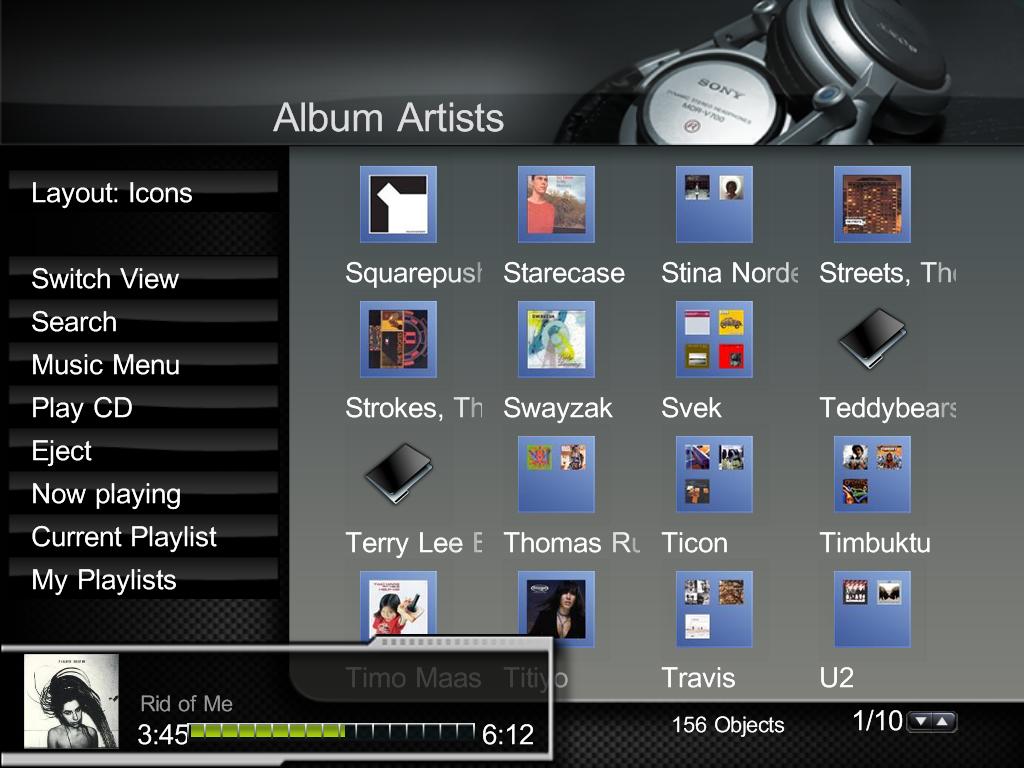
Hi, I have a strange "error" in my music visualization. When I use Icons to visualize the album, I get a blue frame around the album art. This is valid for all skins I have tested so far (Mayhem, Core, Spincycle etc.). But when I click the albumartist image the albums show without the frame. have anyone else encountered this before? As far as I can see, there are no obvious settings in the configuration program.
Also, is there a way to control how the albumart looks like when there are multiple albums on one artist?
Look at the attached image, and you will see what I mean.
MediaPortal Version: 0.2.3.0
MediaPortal Skin: Project Mayhem III
Windows Version: Vista Ultimate 64
CPU Type: AMD Athlon 64
HDD:
Memory: 2GB
Motherboard: Asrock Live SataII
Motherboard Chipset:
Motherboard Bios:
Video Card: ATI HD2400
Video Card Driver:
Sound Card:
Sound Card AC3:
Sound Card Driver:
1. TV Card:
1. TV Card Type:
1. TV Card Driver:
2. TV Card:
2. TV Card Type:
2. TV Card Driver:
3. TV Card:
3. TV Card Type:
3. TV Card Driver:
4. TV Card:
4. TV Card Type:
4. TV Card Driver:
MPEG2 Video Codec:
MPEG2 Audio Codec:
Satelite/CableTV Provider:
HTPC Case:
Cooling:
Power Supply:
Remote:
TV:
TV - HTPC Connection:
Hi, I have a strange "error" in my music visualization. When I use Icons to visualize the album, I get a blue frame around the album art. This is valid for all skins I have tested so far (Mayhem, Core, Spincycle etc.). But when I click the albumartist image the albums show without the frame. have anyone else encountered this before? As far as I can see, there are no obvious settings in the configuration program.
Also, is there a way to control how the albumart looks like when there are multiple albums on one artist?
Look at the attached image, and you will see what I mean.