Analog graph building Issue (1 Viewer)

Witchgirl

Portal Member
September 11, 2011
10
0
Home Country
New Zealand New Zealand
MediaPortal Version: 1.2.0 RC
MediaPortal Skin: Streamed MP 1.6
Windows Version: 7 Sp1
CPU Type: AMD Athlon XP 1800+
HDD: 250 gb
Memory: 1.5 GB DD2
Motherboard: gigabyte
Video Card: gigabyte radeon 9600
Video Card Driver:
Sound Card:
Sound Card AC3:
Sound Card Driver:
1. TV Card: hauppauge 3000
1. TV Card Type: analog, DVB-S, DVB-T
1. TV Card Driver: 2.126.28225.0
2. TV Card: Pinnacle PCTV analog
2. TV Card Type: analog
2. TV Card Driver: 1.0.2.35
3. TV Card: HDhomerun
3. TV Card Type: DVB-T
3. TV Card Driver:
4. TV Card:
4. TV Card Type:
4. TV Card Driver:
MPEG2 Video Codec:
MPEG2 Audio Codec:
h.264 Video Codec:
Satelite/CableTV Provider: Optus D1
HTPC Case:
Cooling:
Power Supply:
Remote:
TV:
TV - HTPC Connection: Component

I have an old pinnacle pctv pci card that windows 7 installs drivers for as pinnacle WDM PCTV Video Capture and mediaportal lists it in available tv cards but when I go to scan or use the s-video channels I get a message saying "Unable to Scan. The Graph building. Most of your card is not supported in TV Server. Please create a report in our forum." So here I am creating a report.

I installed a trial version of chris tv to see if it worked with it and it does beautifully so there is not a problem with the card or its drivers. Would love to be able to get it working in Mediaportal as I want to be able to feed sky through the s-video connection on the card.

Would love it if someone can help me with this. Totally love the program and look forward to be able to get some great use out of it. :D
 

mm1352000

Retired Team Member
  • Premium Supporter
  • September 1, 2008
    21,544
    8,236
    Home Country
    New Zealand New Zealand
    Hi and welcome Witchgirl :)

    Unfortunately the fact that the card works in other software doesn't mean it will work in MP/TV Server. The reason is that TV Server supports timeshifting and recording, which means that software encoders are required. The requirements for such cards are listed in our wiki -->here<--. Note that cards that *require* a connection to a soundcard for audio to work are not supported as MP can't control the audio when timeshifting or recording. To confirm whether your Pinnacle card is supported, please post logs using the watchdog:

    1. Find the "debug mode" link in the "Team MediaPortal" folder in your start menu and start it.
    2. Select option 3 "export all currently present logs".
    3. Click proceed. A zip file will be created on your desktop.
    4. Post the zip file here.

    There are instructions for attaching files to posts in the watchdog link if you get stuck with that.

    mm
    :)
     

    Witchgirl

    Portal Member
    September 11, 2011
    10
    0
    Home Country
    New Zealand New Zealand
    Hi there,

    Thank you so much for your reply. I think I love the software more and more. Sorry for not attaching logs. Have attached them now.
     

    mm1352000

    Retired Team Member
  • Premium Supporter
  • September 1, 2008
    21,544
    8,236
    Home Country
    New Zealand New Zealand
    Hi again

    The logs I was expecting aren't in there, so I guess you're running a multi-seat setup (ie. TV Server is installed on a different machine) - my mistake for not asking. Could you please:

    1. Open TV Server configuration on the TV Server machine.
    2. Click "open log directory" in the top left hand corner.
    3. Zip up all the files you find there and post that zip file here.

    Sorry once again for that oversight.
    mm
     

    Witchgirl

    Portal Member
    September 11, 2011
    10
    0
    Home Country
    New Zealand New Zealand
    Hi there,

    Yes I the specs I put up are for the dedicated server that I am using to feed tv to the rest of my network. I have attached the logs from the server here. Thank you so much for you help with this. :D
     

    Attachments

    • Mediaportal.rar
      476.2 KB

    mm1352000

    Retired Team Member
  • Premium Supporter
  • September 1, 2008
    21,544
    8,236
    Home Country
    New Zealand New Zealand
    Hi again

    Thanks for the new logs :D
    By the looks of things, it may be possible to support your Pinnacle tuner. It just isn't supported right now. I'll have to check out the code and get back to you on this one. It could take at least a couple of days...

    mm
     

    Witchgirl

    Portal Member
    September 11, 2011
    10
    0
    Home Country
    New Zealand New Zealand
    Wow you are fantastic. Thank you so much. If ever I can do something in return let me know. Am more of a hardware geek than software though but I am going to be running this on a network with dedicated server with 5 client pcs so I can prob do testing for you. Regards Stacy.
     

    mm1352000

    Retired Team Member
  • Premium Supporter
  • September 1, 2008
    21,544
    8,236
    Home Country
    New Zealand New Zealand
    Hi Witchgirl

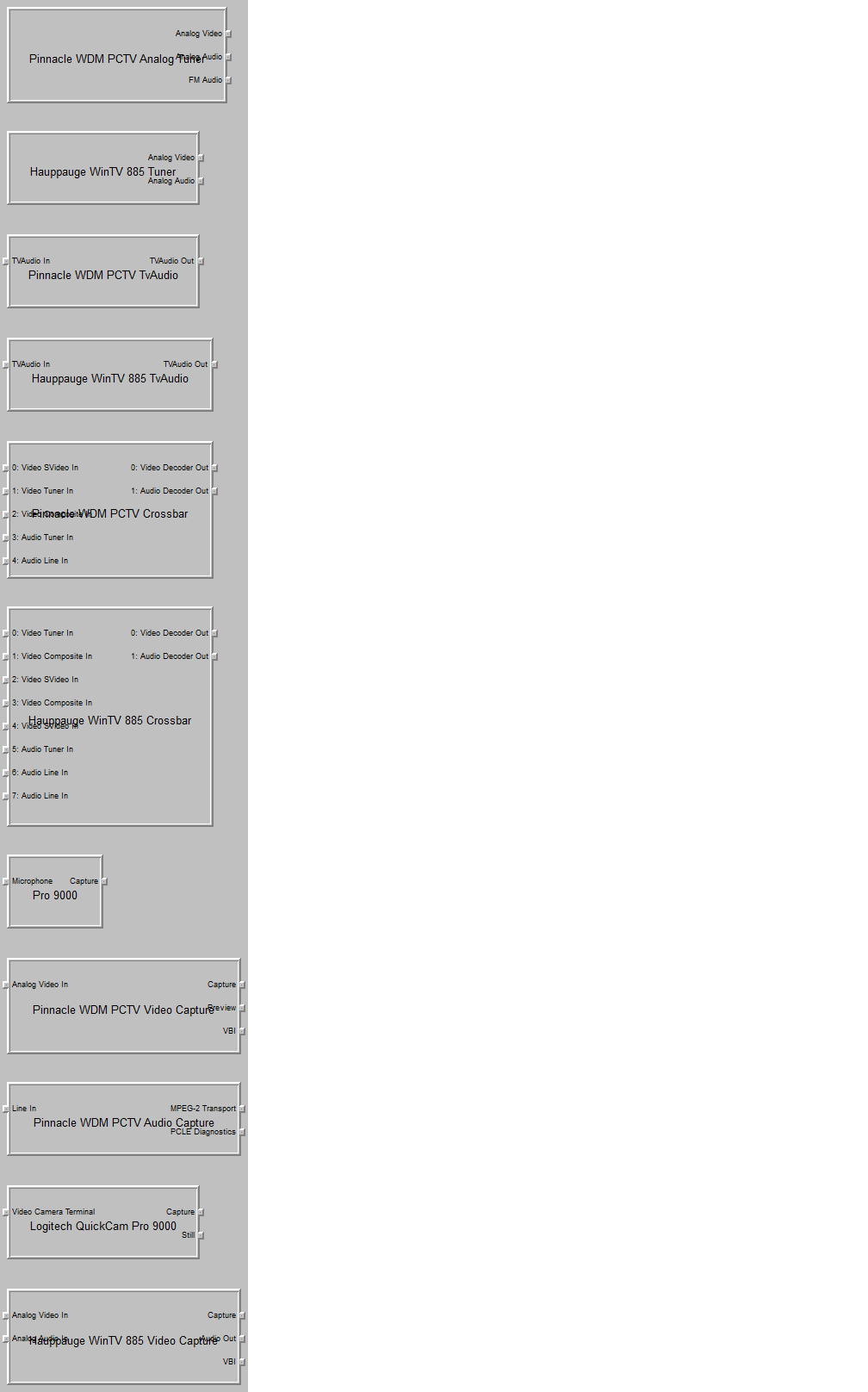
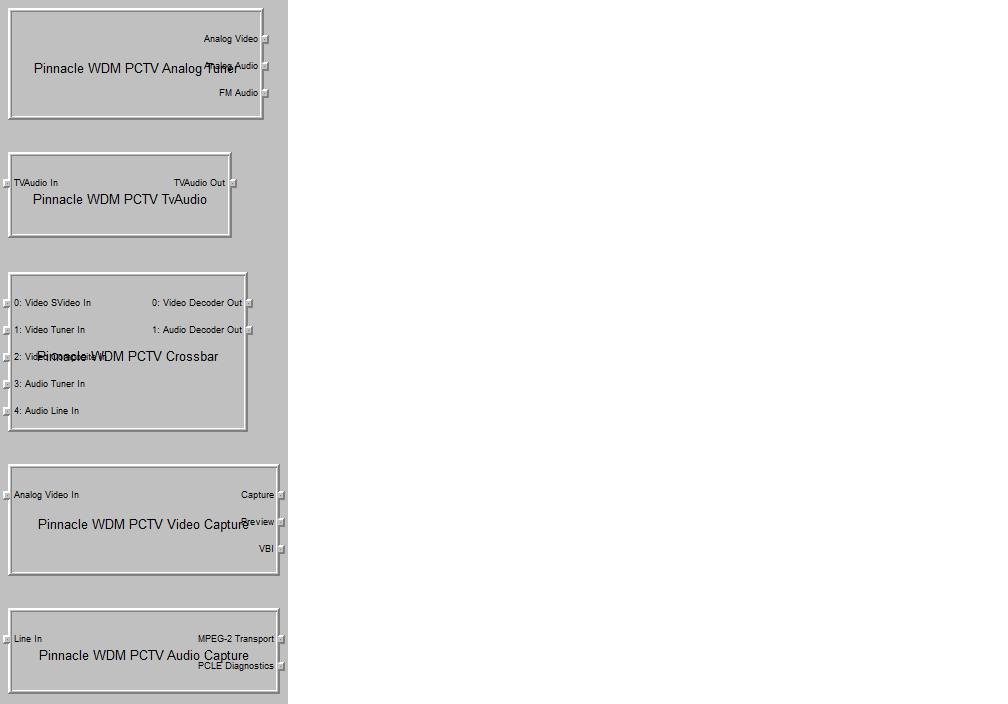
    Looking at this issue now. Could you do something for me:

    1. Download GraphStudio from -->here<-- and run it (no installation required).
    2. Select "Graph" -> "Insert filter...".
    3. Select "WDM Streaming Capture Devices".
    4. Double click on each entry in the list (or select item + click insert + repeat for each item).
    5. Repeat steps 3 and 4 for "WDM Streaming Crossbar Devices", "WDM Streaming TV Audio Devices" and "WDM Streaming TV Tuner Devices".
    6. Close the popup window.
    7. Press CTRL+F12 to take a screenshot (don't worry about resizing the window).
    8. Paste the picture into paint, photoshop, gimp or similar and save.
    9. Post the screenshot here.

    :D

    mm
     

    Witchgirl

    Portal Member
    September 11, 2011
    10
    0
    Home Country
    New Zealand New Zealand
    Hi there,

    I was not sure if you want all or just the pinnacle information so I did both and attached them here. Thank you so much for doing this. :)
     

    Attachments

    • pinnacle.png
      pinnacle.png
      25.3 KB
    • all.png
      all.png
      57 KB

    mm1352000

    Retired Team Member
  • Premium Supporter
  • September 1, 2008
    21,544
    8,236
    Home Country
    New Zealand New Zealand
    Hi again Witchgirl

    :D for the screenshots - perfect. :)
    Question for you after seeing them: the "line in" input on the audio capture filter suggests that a connection to the sound card may be required. Is that the case? In other words, does this Pinnacle tuner of yours require a connection to the line in on the sound card for audio to work? It may just be an unusual arrangement of filters that we've never encountered before, but if the tuner requires the connection to the sound card then I'm sorry to say that we can't support it...

    mm
     

    Users who are viewing this thread

    Top Bottom