
Hey all,
After testing MP on my regulair pc I tought i install it on my htpc (mce2005)
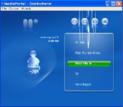
I only found that on startup, there seems to be all kind's of 3d artifacts in the ui. The effect looks like the effect what ye get with an broken 3d card (yeah, i had my share of broken card's in the past )
)
Allso all kind's of letter's are missing. I tried different skin's, adjusted all different kind's of setting's in the configuration, updated xp mce, reïnstalled a load of drivers, buth nothing seems to work.
I noticed btw that the artifact's only occure when I mousover a button (Thus highlighting it) or near text. The artifact's seem to originate from these 2.
While playing video's everything seems fine. It's just the UI.
I searched the forum buth coudn't find annything related to my problem. (only playback artifact's 'n stuff)
I normaly never post question's on forum's, i just try and try and try untill i figure the problem out . Allas i can't find an sollution, and as i have grown fond of MP i really want to use it on my htpc.
As i am quite new to ask annything on a forum, it's possible i forgot some info 'r something. Just ask, and i'll supply
picture with standard skinn
:
You really don't want to see it with xface skinn
log's:
View attachment 19197
TV-Server Version:
MediaPortal Version: 0.2.3.0
MediaPortal Skin: xface or standard
Windows Version: mce 2005 sp2
CPU Type: amd 1800, 1500mhz
HDD: western digital 80gb
Memory: 768mb ddr
Motherboard: ECS KM400-M2
Motherboard Chipset: ati km400
Motherboard Bios: award bios
Video Card: nvidia NF6200
Video Card Driver: 6.14.11.6921
Sound Card: onboard realtek ac97
Sound Card AC3:
Sound Card Driver: 5.10.0.6240
1. TV Card: none yet
1. TV Card Type:
1. TV Card Driver:
2. TV Card:
2. TV Card Type:
2. TV Card Driver:
3. TV Card:
3. TV Card Type:
3. TV Card Driver:
4. TV Card:
4. TV Card Type:
4. TV Card Driver:
MPEG2 Video Codec: nvidia purevideo
MPEG2 Audio Codec:
Satelite/CableTV Provider:
HTPC Case:
Cooling:
Power Supply:
Remote: mce remote
TV:
TV - HTPC Connection:
After testing MP on my regulair pc I tought i install it on my htpc (mce2005)
I only found that on startup, there seems to be all kind's of 3d artifacts in the ui. The effect looks like the effect what ye get with an broken 3d card (yeah, i had my share of broken card's in the past
)Allso all kind's of letter's are missing. I tried different skin's, adjusted all different kind's of setting's in the configuration, updated xp mce, reïnstalled a load of drivers, buth nothing seems to work.
I noticed btw that the artifact's only occure when I mousover a button (Thus highlighting it) or near text. The artifact's seem to originate from these 2.
While playing video's everything seems fine. It's just the UI.
I searched the forum buth coudn't find annything related to my problem. (only playback artifact's 'n stuff)
I normaly never post question's on forum's, i just try and try and try untill i figure the problem out
. Allas i can't find an sollution, and as i have grown fond of MP i really want to use it on my htpc. As i am quite new to ask annything on a forum, it's possible i forgot some info 'r something. Just ask, and i'll supply
picture with standard skinn
:
You really don't want to see it with xface skinn
log's:
View attachment 19197
TV-Server Version:
MediaPortal Version: 0.2.3.0
MediaPortal Skin: xface or standard
Windows Version: mce 2005 sp2
CPU Type: amd 1800, 1500mhz
HDD: western digital 80gb
Memory: 768mb ddr
Motherboard: ECS KM400-M2
Motherboard Chipset: ati km400
Motherboard Bios: award bios
Video Card: nvidia NF6200
Video Card Driver: 6.14.11.6921
Sound Card: onboard realtek ac97
Sound Card AC3:
Sound Card Driver: 5.10.0.6240
1. TV Card: none yet
1. TV Card Type:
1. TV Card Driver:
2. TV Card:
2. TV Card Type:
2. TV Card Driver:
3. TV Card:
3. TV Card Type:
3. TV Card Driver:
4. TV Card:
4. TV Card Type:
4. TV Card Driver:
MPEG2 Video Codec: nvidia purevideo
MPEG2 Audio Codec:
Satelite/CableTV Provider:
HTPC Case:
Cooling:
Power Supply:
Remote: mce remote
TV:
TV - HTPC Connection:

 United Kingdom