ATI EHomeWonder with TVServer? (1 Viewer)

PayterX

Portal Member
February 27, 2012
5
0
34
Home Country
United States of America United States of America
All I get when trying to scan channels is it telling me that this card is not supported. I can google this card along with MediaPortal and see that it is at least with 0.6 and before. Also on the changelogs it looks like the last time support was changed was in 1.2.0

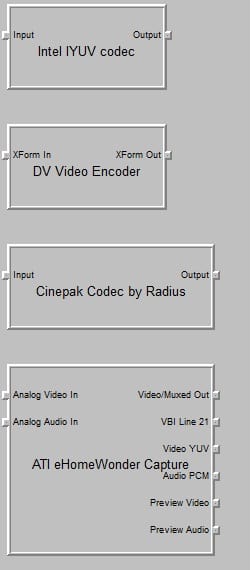
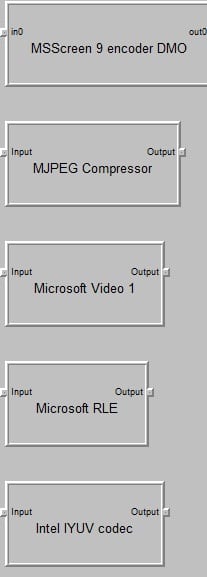
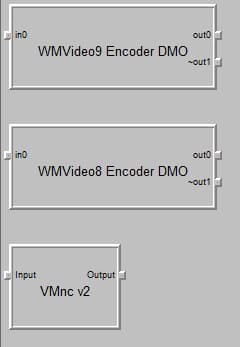
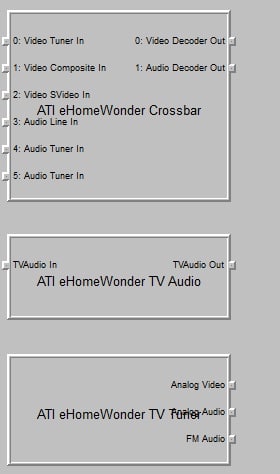
I have included pictures of my graphstudio output, because I think this is what you request for support to be added.

This card has a Composite in, SVideo in, Audio in, and the standard cable in. All I use is the cable coaxial connector, and this card does not need an audio cable for sound to work. I use it just fine in WMC with only a coaxial cable connected.

4444:0016

Here's to having this card supported so I can break away from WMC!
 

Attachments

  • 1.jpg
    1.jpg
    28.4 KB
  • 2.jpg
    2.jpg
    28 KB
  • 3.jpg
    3.jpg
    22.2 KB
  • 4.jpg
    4.jpg
    15.4 KB

mm1352000

Retired Team Member
  • Premium Supporter
  • September 1, 2008
    21,544
    8,236
    Home Country
    New Zealand New Zealand
    Hello and welcome PayterX

    First, sorry nobody responded to your earlier thread in February - lets see if we can get the card working.
    The information that you've supplied is good, but the other thing I really need to see is the TV Server log files. Please can you do the following:
    1. Open TV Server configuration.
    2. Click "open log directory" in the top left corner.
    3. Zip up all the files you find there and post them here.

    Cheers,
    mm
     

    mm1352000

    Retired Team Member
  • Premium Supporter
  • September 1, 2008
    21,544
    8,236
    Home Country
    New Zealand New Zealand
    Thanks for that

    Technically it looks like the issue is that your tuner has two output pins for audio - one for TV and one for FM radio. That is quite unique.

    We may be able to try and trick TV Server into working by doing the following:
    1. Open TV Server configuration.
    2. Go to the "manual control" section.
    3. Click "stop service".
    4. Open Windows Explorer.
    5. Paste the following path into the address bar and press enter: C:\ProgramData\Team MediaPortal\MediaPortal TV Server\AnalogCard\.
    6. There should be a file in that folder named like "Configuration... .xml". Take a backup of that file.
    7. Open the original file in any text editor such as notepad or wordpad. You should see a section that looks something like this:
    <crossbar>
    ...
    </crossbar>
    Please replace that section with the following:
    <crossbar>
    <name>ATI eHomeWonder Crossbar 0</name>
    <videoOut>0</videoOut>
    <audioOut>1</audioOut>
    <videoPin type="0" index="0" related="4" />
    <videoPin type="1" index="1" related="3" />
    <videoPin type="4" index="2" related="3" />
    <audioPin type="5" index="3" />
    <audioPin type="1" index="4" />
    </crossbar>
    8. Save and close the file.
    9. Go back to TV Server configuration.
    10. Click "start service" in the "manual control" section.
    11. Now attempt to tune/scan/test again.

    Let me know if any of the above instructions aren't clear.

    Step 11 may still fail if further modifications are required. If that happens, please be sure to post the log files again so that I can check to see what the next issue is.

    Thanks,
    mm
     

    PayterX

    Portal Member
    February 27, 2012
    5
    0
    34
    Home Country
    United States of America United States of America
    Thanks for the help. It still has the same problem though. Here is the new log files, and my analogcard folder if that helps at all.
     

    mm1352000

    Retired Team Member
  • Premium Supporter
  • September 1, 2008
    21,544
    8,236
    Home Country
    New Zealand New Zealand
    Alright, looks like that approach is going to be too fiddly - sorry about that. Lets try a different tach...
    1. Open TV Server configuration.
    2. Go to the "manual control" section and click "stop service".
    3. Close TV Server configuration.
    4. Open Windows Explorer and navigate to C:\Program Files (x86)\Team MediaPortal\MediaPortal TV Server.
    5. Take a backup of the TVLibrary.dll in there, then download and extract the attached one to replace the original.
    6. Open TV Server configuration (you should be prompted to start the service - select yes) and try the test again.

    mm
     

    Attachments

    • TVLibrary[1.2.3_ATI_2_tuner_audio].zip
      160.1 KB

    PayterX

    Portal Member
    February 27, 2012
    5
    0
    34
    Home Country
    United States of America United States of America
    Wasn't really expecting anything to work, but pressed the scan button and it's slowly going through them :).

    What did you have to do to get it to work, if it's not too technical?

    And thanks again!
     

    mm1352000

    Retired Team Member
  • Premium Supporter
  • September 1, 2008
    21,544
    8,236
    Home Country
    New Zealand New Zealand
    Well that is good news - I suspected there might be further issues to deal with, but I guess not. :)

    What did I have to do?
    I had to force TV Server to ignore the second "audio tuner in" input on the crossbar shown in the first screenshot that you posted above. A crossbar is the control that allows us to switch between the different inputs (composite, s-video, tuner etc.) available from the card. TV Server doesn't support more than one video tuner input and one audio tuner input per crossbar, so the presence of the second one was causing a little confusion. Your tuner is the first I've ever seen that has more than one audio tuner input, which is why I said it seems to be quite unique.

    That second tuner audio input on the crossbar seems to be for FM radio support... so I don't think FM radio will work with the current "solution".
     

    Users who are viewing this thread

    Top Bottom