Black screen (back) (2 Viewers)

eRJe

MP Donator
  • Premium Supporter
  • January 27, 2009
    34
    0
    Den Helder
    Home Country
    Netherlands Netherlands
    Hello,

    In the past I had issues with a black screen while playing movies. Usually fast forward or jumping to the DVD menu would bring up a picture. Since a few MP version back (can't really remember if it was MP v 1.2.1 of 1.2.2) this issue disappeared. Ever since things were working smooth! Well done on all the stability improvements people!!!!!

    But now... out of the blue (well it seems to be) the black screen issue is back and its tougher then ever before. I can't play any "moving picture" at all. I get black screens in TV, Video's, Moving Pictures, Online Video's... if it's suppose to be moving, it's black!

    I've restored a backup point from windows, hoping some update would have started this. BUt no luck. updated my video drivers and installed the latest version of SAF. I even installed MP v 1.3.0a. No change.

    I went through the log files but it doesn't tell me much. Perhaps someone clever can help me out :)
     

    HomeY

    Test Group
  • Team MediaPortal
  • February 23, 2008
    6,418
    4,717
    51
    ::1
    Home Country
    Netherlands Netherlands
    Could you disable the MiniDisplay plugin and see if that changes anything?
     

    HomeY

    Test Group
  • Team MediaPortal
  • February 23, 2008
    6,418
    4,717
    51
    ::1
    Home Country
    Netherlands Netherlands
    Have you tried playback with a different codec then ffdshow? Could you try the LAVFilters (You can install those with the MediaPortal Extension Installer on your desktop).
     
    Last edited:

    eRJe

    MP Donator
  • Premium Supporter
  • January 27, 2009
    34
    0
    Den Helder
    Home Country
    Netherlands Netherlands
    Yep tried that too. I actually already tried changing the codecs but now I changed them all to LAV, which I already had installed. Didn't change anything.

    Side question: Is this codec preferred above any other?
     
    Last edited:

    HomeY

    Test Group
  • Team MediaPortal
  • February 23, 2008
    6,418
    4,717
    51
    ::1
    Home Country
    Netherlands Netherlands
    Yes, since 1.3Alpha we include it in the install since it plays most common files.

    Also, could you post a screenshot of the graph (with GraphStudio for example)?
     

    eRJe

    MP Donator
  • Premium Supporter
  • January 27, 2009
    34
    0
    Den Helder
    Home Country
    Netherlands Netherlands
    I think I had the LAV also installed because of SAF codec package that I installed previously. But I had most codecs set to ffdshow. I now have the codecs where ever possible set to LAV.

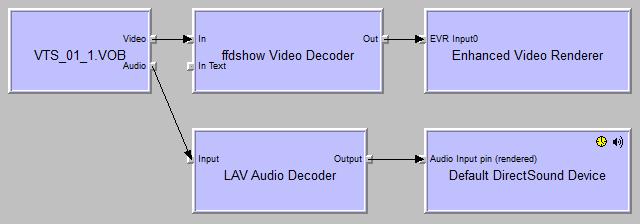
    I have the Graph screenshot but I'm not sure if I did it right. I drag-n-drop the video file that I tried to watch in MP that I tried to watch in MP.

    btw I forgot to mention that I can watch the video in WMP. Also the movie played in MP over a remote desktop control. But that stopped working too.
     

    Attachments

    • RJ-HTPC_graph01.jpg
      RJ-HTPC_graph01.jpg
      32 KB

    HomeY

    Test Group
  • Team MediaPortal
  • February 23, 2008
    6,418
    4,717
    51
    ::1
    Home Country
    Netherlands Netherlands
    Best way is to start MP in windowed mode, start the playback of the file and then hit 'Ctrl + G' in GraphStudio and connect to it.
    Could you show the graph with an .mkv also? (I'm thinking about a splitter problem, but since you have LAV installed).

    For LiveTV you could try to update your TsReader.ax file with the TsReader_noStopMod59c from this post (backup your current .ax first) ;)
     

    eRJe

    MP Donator
  • Premium Supporter
  • January 27, 2009
    34
    0
    Den Helder
    Home Country
    Netherlands Netherlands
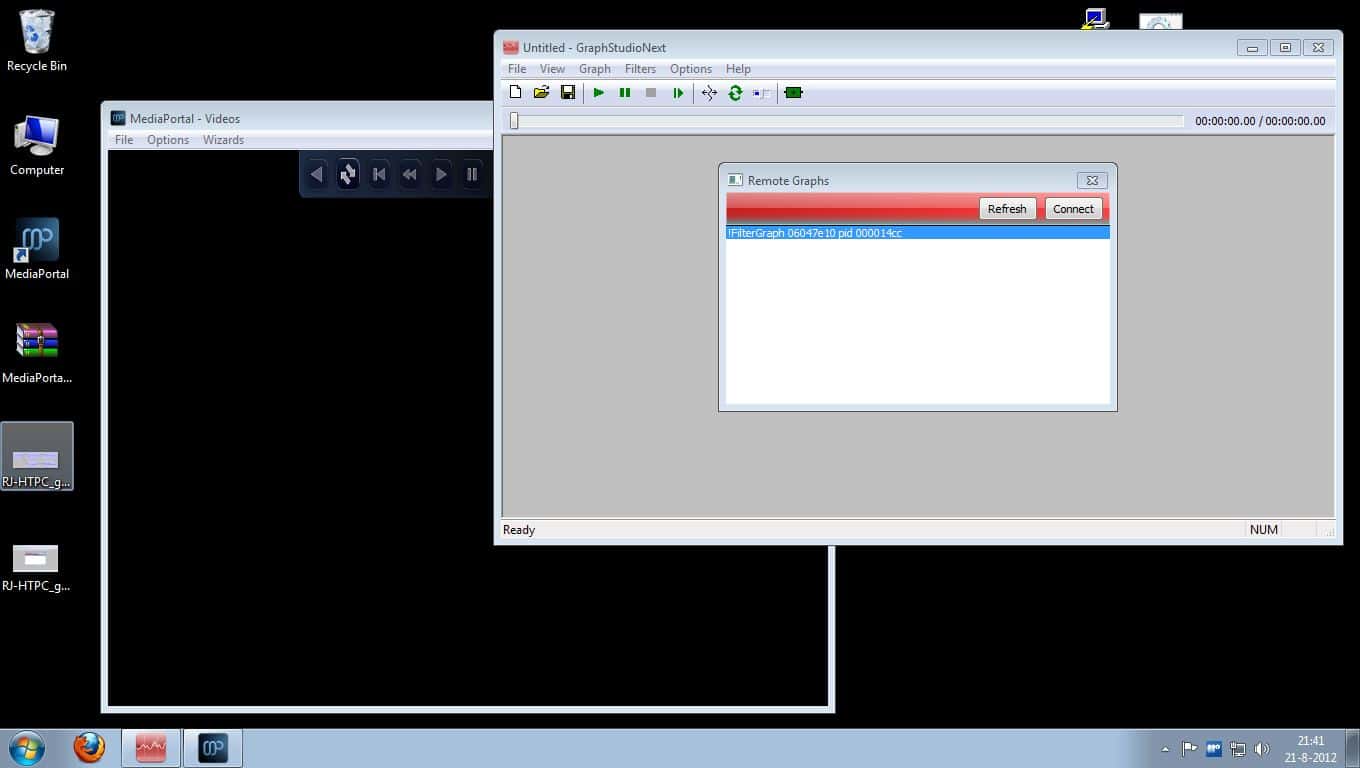
    Hmm I can't seem to connect to it. See the screenshot I have added. When I select connect, graph remains empty. Both with a .ts or .mkv file playing.
     

    Attachments

    • RJ-HTPC_graph02.jpg
      RJ-HTPC_graph02.jpg
      96 KB

    HomeY

    Test Group
  • Team MediaPortal
  • February 23, 2008
    6,418
    4,717
    51
    ::1
    Home Country
    Netherlands Netherlands
    Did you register the proppage.dll (i've attached it)? It should be put in C:\Windows\SysWOW64
     

    Attachments

    • dllvista-proppage.dll.zip
      119.6 KB

    Users who are viewing this thread

    Top Bottom