Blast Satelite Box from MP TV-Guide (1 Viewer)

stdly

MP Donator
  • Premium Supporter
  • April 19, 2008
    238
    41
    Home Country
    Canada Canada
    rekenaar,
    Thanks, Thanks, Thanks! You da man. I appreciate you answering my dumb-azz questions.

    I rebooted and wala it works. I can use the TV-Guide in MP to change channels very SWEET!

    Most of the buttons on my Logitech 510 and my MCE remotes don't work and never have since using IRSS (eg. back, volume, tv, tvguide ect.) and Windows Media Center keeps coming up when I push certain buttons (probably the home button) but that is fun part, getting it working the way I need. As I remember getting the IRTrans and my mini-display to work was great fun too.
     

    stdly

    MP Donator
  • Premium Supporter
  • April 19, 2008
    238
    41
    Home Country
    Canada Canada
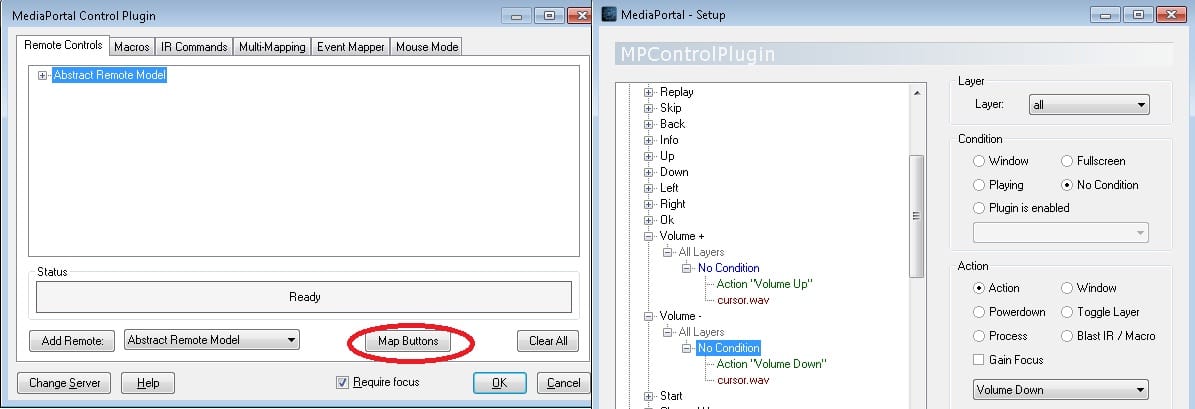
    I turned on MP IRSS Control Plugin in MP process plugins and attempted mapped the buttons, now I have almost all controls working but for some reason the volume buttons do not register in mapping I have tried all my MCE remotes just no response although I do see my HP IR Receiver blinking a received response it just doesn't register in the plugin.

    I could probably use my second IR port on my HP to blast My Stereo System to control my volume but just like to change volume in MP the onscreen volume is great in MP.

    I know I am answering myself but though this might help someone in the future.:confused:

    rekenaar, I don't know where you went but thanks again I like to figure things out by myself and your input gave me just enough, thanks for your work @ MediaPortal.
     

    rekenaar

    Retired Team Member
  • Premium Supporter
  • December 17, 2006
    4,421
    805
    Home Country
    South Africa South Africa
    Hi stdly

    Sorry, been a hectic few days. I saw your earlier post two days ago and kept it in a saved browser tab but just had no time to respond. I am very glad your blasting is solved.

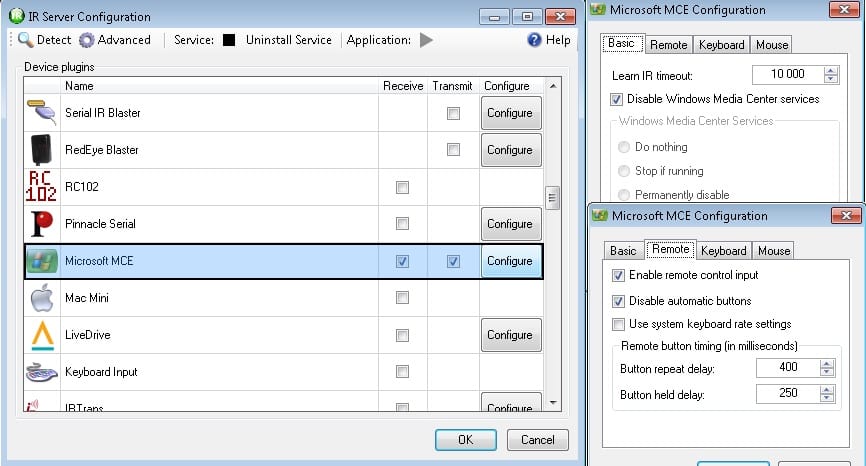
    I am also using IRSS Control Plugin but my volume work. Unfortunately I have no idea what could be causing that. Here's a few more screenshots. Maybe you pick up something.
     

    Attachments

    • irss3.jpg
      irss3.jpg
      118.5 KB
    • irss4.jpg
      irss4.jpg
      108.4 KB

    stdly

    MP Donator
  • Premium Supporter
  • April 19, 2008
    238
    41
    Home Country
    Canada Canada
    rekenaar,
    Don't say sorry, you got me going in the right direction for sure and I can tell you are a very busy person.
    It seems even though I can't map the volume buttons they are working just no OSD so I guess it it's using windows volume and not MP's I will keep reading/working on it because I like the volume GUI in MP a great visual indicator.
    Also Windows Media Player has stopped opening up which is great news too.
    Thank again for your time.
     

    rekenaar

    Retired Team Member
  • Premium Supporter
  • December 17, 2006
    4,421
    805
    Home Country
    South Africa South Africa
    Just a few "blind" (and maybe stupid) ideas I would have tried:

    1. Is the MCE services disabled? MP Configuration; 3rd Party checks. Thinking, if not disabled, it intercepts and handles the volume without MP knowing.
    2. Is your MP set to be "Always on top". Not sure if it can influence, but worth a try.
    3. Is the "MP Control Plugin for IRSS set to "require focus". See my previous screenshot.
    4, Combination of 2 and 3 above?
    5. MP Config option "Show default volume OSD for fullscreen video" ticked?
     

    stdly

    MP Donator
  • Premium Supporter
  • April 19, 2008
    238
    41
    Home Country
    Canada Canada
    rekenaar,
    Thanks for your reply!

    Will check these items ASAP. 1&3 are set correct without looking.

    While I am bugging you the only other thing is that the home button starts MP from windows as it should but in MP the home button does not react (take me to my home screen) all the rest is working great and as expected.
    But maybe has something to do with your last post.
     

    stdly

    MP Donator
  • Premium Supporter
  • April 19, 2008
    238
    41
    Home Country
    Canada Canada
    Tried your suggestions still no volume or mute osd not to worry being able to change channel this way is well worth it and I haven't given up yet
    I got the home button working inside MP.:)
     

    Users who are viewing this thread

    Top Bottom