...but I already have WMP11 (1 Viewer)

chemelli

Retired Team Member
  • Premium Supporter
  • September 28, 2006
    6,159
    2,264
    51
    Milano, Italy
    Home Country
    Italy Italy
    odd, will look into it.

    Simone

    EDIT:

    Try newly version of the previously attached version.

     

    brentk

    Portal Member
    January 23, 2008
    11
    0
    Home Country
    United States of America United States of America
    Still shows version # matching DLL, button now gives error message "Minimum WMP to check against is 11.0.0.0" followed by "Sorry your WMP is too old"
     

    brentk

    Portal Member
    January 23, 2008
    11
    0
    Home Country
    United States of America United States of America
    desired wmp to check against is 11.0.0.0
    current wmp to check against is 11.0.5721,5230
    sorry your wmp version is too old.
     

    brentk

    Portal Member
    January 23, 2008
    11
    0
    Home Country
    United States of America United States of America
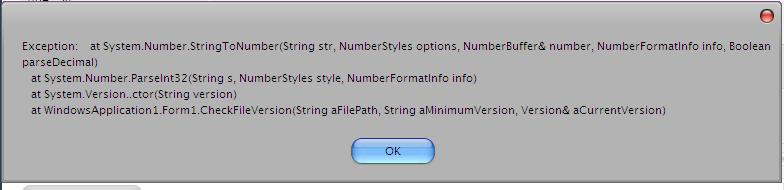
    after 2nd message from previous post get box attached followed by third from previous post.
     

    Attachments

    • error.JPG
      error.JPG
      22.3 KB

    brentk

    Portal Member
    January 23, 2008
    11
    0
    Home Country
    United States of America United States of America
    Comma is not a typo. Shows comma upon first launch as well. DLL File properties shows dot not comma though.
     

    chemelli

    Retired Team Member
  • Premium Supporter
  • September 28, 2006
    6,159
    2,264
    51
    Milano, Italy
    Home Country
    Italy Italy
    What you have as regional settings ?
    Can you test using something like UK ?

    Simone
     

    brentk

    Portal Member
    January 23, 2008
    11
    0
    Home Country
    United States of America United States of America
    Region was US, now UK, same results.

    Add remove programs shows both WMP 11 and WMP 11 Runtime
     

    Users who are viewing this thread

    Top Bottom