CableCARD Channels Not Working (3 Viewers)

mm1352000

Retired Team Member
  • Premium Supporter
  • September 1, 2008
    21,578
    8,228
    Home Country
    New Zealand New Zealand
    But, then like you suggested I used the Ceton tool (the app, not the website) to tune to both channels and they did just fine. So, shouldn't I be able to get it in MP?
    Do you mean the screen shown here?
    http://www.missingremote.com/sites/default/files/ceton-card.png

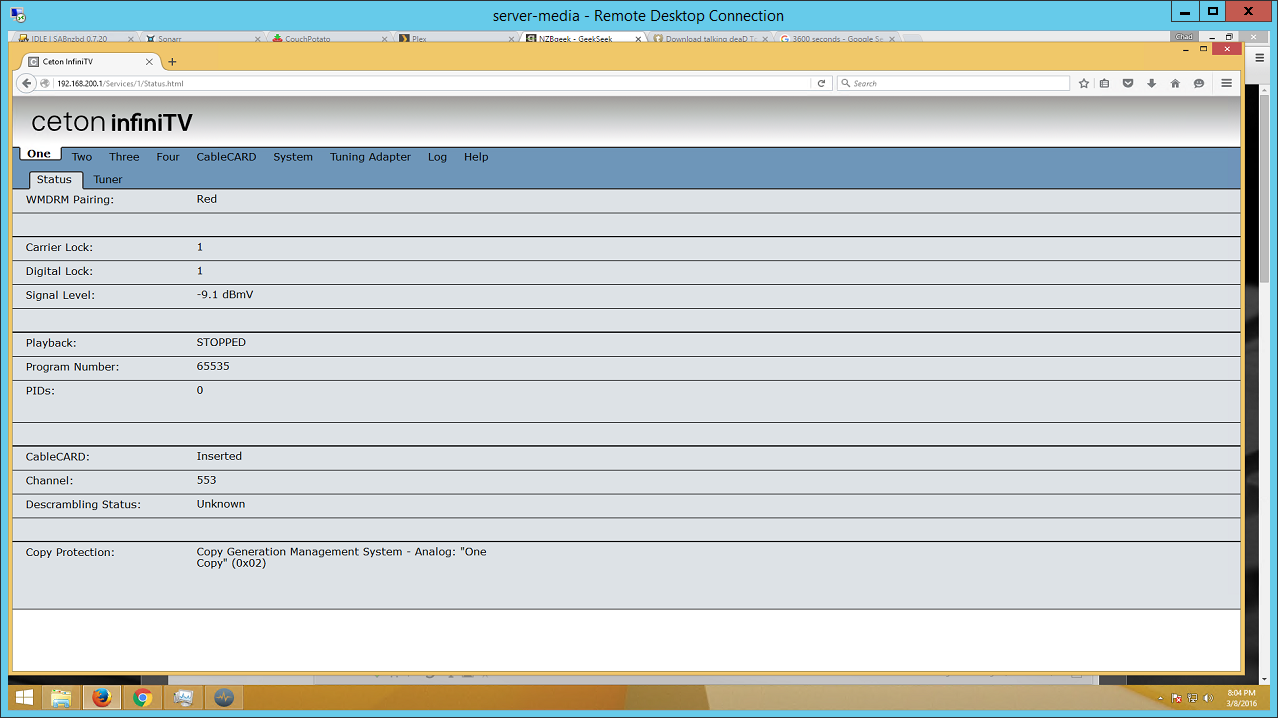
    If yes, I think that only shows whether the channel is part of your subscription or not... which it is. You then need to check the CCI flags in the tuner web page as shown here:
    http://33.media.tumblr.com/a5d337901cfec7792592190c70eb707d/tumblr_inline_mwwfni70KZ1solnq2.bmp

    I think that screen is accessed via the CableCARD tab, but I could be wrong.

    0x00 means copy freely (ie. watchable in MP). Anything else - including 0x02, which means copy once - is not watchable in MP due to DRM protection. You can find all of the codes and meanings here:
    https://en.wikipedia.org/wiki/Copy_Control_Information
     

    Lyfesaver74

    Public Relations
  • Premium Supporter
  • September 25, 2010
    1,544
    1,122
    Texas
    Home Country
    United States of America United States of America
    The first image you showed is the CableCARD tab in the diagnostic tool. I cant find the other one. It looks like website, but I do not know how to use the website interface to get that infomation.
     

    Lyfesaver74

    Public Relations
  • Premium Supporter
  • September 25, 2010
    1,544
    1,122
    Texas
    Home Country
    United States of America United States of America
    upload_2016-3-8_20-4-57.png
     

    Attachments

    • upload_2016-3-8_20-4-16.png
      upload_2016-3-8_20-4-16.png
      202.3 KB

    mm1352000

    Retired Team Member
  • Premium Supporter
  • September 1, 2008
    21,578
    8,228
    Home Country
    New Zealand New Zealand

    Lyfesaver74

    Public Relations
  • Premium Supporter
  • September 25, 2010
    1,544
    1,122
    Texas
    Home Country
    United States of America United States of America
    I will do so, altho the 2nd post on that page you linked says it does not help FiOS customers :( and there is a beta firmware out there for my Ceton, it only says it has stability fixes, but I will try the beta.
     

    Lyfesaver74

    Public Relations
  • Premium Supporter
  • September 25, 2010
    1,544
    1,122
    Texas
    Home Country
    United States of America United States of America
    Upgrading to the beta 13.5..6.132 via the Ceton tool failed and I downloaded firmware ceton_infinitv_beta_fw_15_1_13_152.IMAGE from that link you posted, but no idea how to use the image file with Ceton. I submitted a ticket to get latest firmware and get it installed. Will report back.
     

    Lyfesaver74

    Public Relations
  • Premium Supporter
  • September 25, 2010
    1,544
    1,122
    Texas
    Home Country
    United States of America United States of America
    Hi Chad,

    The diagnostic from your InfiniTV 4 may be suffering from hardware damage or failure. Unfortunately, this model was discontinued over two years and has been fully end of life'd. There are no software updates or warranty services available for our InfiniTV 4 models. Our newer InfiniTV 6 models are available for purchase and enjoys full warranty services.

    We do offer a special price for our InfiniTV 4 users of $169.00 plus shipping for a refurbished InfiniTV 6 . This unit would come with a 90-day warranty and is available for immediate shipment.
     

    Lyfesaver74

    Public Relations
  • Premium Supporter
  • September 25, 2010
    1,544
    1,122
    Texas
    Home Country
    United States of America United States of America
    @mm1352000

    Seeing as how I have to replace it, N, do you suggest I stick with Ceton or do you think going to SiliconDust or Hauppage would be better?
     

    Users who are viewing this thread

    Top Bottom