Calling all MP New Zealanders (Both of you!!) (36 Viewers)

mruane

Portal Pro
June 4, 2006
182
5
Wellington
Home Country
New Zealand New Zealand
I also downloaded the "fossie" ts HD sample files and the TV ONE and TV3 versions played through Media Portal v1.0 SVN19127 (using the CoreAVC codec) correctly i.e. audio and video in sync etc. The Freeview | HD sample did not play.

Cheers Mike
 

Datagrafx

Portal Member
October 24, 2007
26
0
Auckland
Home Country
New Zealand New Zealand
Is there any way to get MediaPortal to play a .ts file that was not recorded in MediaPortal? I have some samples here but they do not show up in Recorded TV listing.
The samples are from Fossie: Because Your Opinion Doesn't Matter
Nothing I have seems to play any of them properly.
Probably the simplest way is to load the samle.ts files into you're recordedTV folder, then inside MP click 'my videos', then 'recordedTV' (if its not the default folder in MP config) & if they will play you should be go to go.

Ok I got it, many thanks.

Got TV1 and TV3 to play also but not the FreeviewHD title. I can record and playback via MP the FreeviewHD channel no problem, also C3, TV6 and 7.

No interest in Parliment and Maori channels so they are disabled.
 

Bleazle

Portal Pro
July 14, 2007
1,122
257
Pukekohe
Home Country
New Zealand New Zealand
Prime Issues...

Hi All

I've spent some time researching this but haven't been able to find the answer. Up until today I had the feed from my Sky dish being split and going to two Technisat cards (for Freeview DVB-s) and an analogue aerial going to the PVR 150 for Prime. The Prime signal was rubbish so today I got Sky to "install" a STB just for Prime (don't want/need Sky).

To get Prime set up I disconnected the incoming feed from the splitter & plugged it into the STB. Once Prime was all good on the TV I plugged the STB analogue out into the PVR150 in (at this stage the 2 Technisat tuners were not hooked up because the main feed was still disconnected from the splitter) and tuned it in on TVServer - previewed the channel - all good :) Too easy...

Then I plugged a 3 way splitter into the feed from the dish (has one power pass Out) and plugged the STB and the 2 Technisat tuners into this. It doesn't matter which way around I hook these things up I can't get Prime to preview on the PVR150 when the Technisats are hooked up - I just get the "can't find audio/video" warning - the Freeview stations are OK though. Do I need a different splitter? or LNB? or something else I haven't even considered??

Any advice would be greatly appreciated.

Dave
 

kuku

Portal Member
May 7, 2008
33
3
Hi, did anybody in NZ manage to turn on the DVB subtitles? I have enabled them from the Mediaportal configuration. When I press the "L" button, MP shows "eng 1/2" or "eng 2/2", but no subtitles are displayed on the screen. Sometimes the teletext subtitles would show up, but they would be out of sync.

I have installed C++ 2005 redistributable and I have MP 1.0 RC1, the latest SVN. My tuner card is Hauppauge HVR 3000, and my OS is Windows XP.

On the other hand, DVB Viewer shows the DVB subtitles just fine.
 

mcraenz

MP Donator
  • Premium Supporter
  • July 28, 2007
    646
    46
    Auckland
    Home Country
    New Zealand New Zealand
    I just get the "can't find audio/video" warning
    But this is on the analog side isn't it? The splitter can't effect this, I mean if you're using svideo in on the PVR150 you should ways get a/v even if there is no input to the a/v, (just black and silence). Your splitter configuration is exactly correct although you might consider putting the power pass side on one of the ss2 cards since the power might stop if you turn off the sky dec but I guess you never would .
     

    Bleazle

    Portal Pro
    July 14, 2007
    1,122
    257
    Pukekohe
    Home Country
    New Zealand New Zealand
    Hey mcraenz, thanks for your reply! I looked for your Google pages site to see if the answer was there the other day - why'd you ditch it? it was an excellent starting point!

    O.K., there are a couple of things I'm not "getting" here:

    1)
    .. if you're using svideo in on the PVR150 you should ways get a/v ...

    So to do this I plug svideo into the card and then what? Do I have to do anything in TVServer? i.e Add/Delete/Scan for channels etc I tried scanning for a channel when I had it hooked up with svideo but I didn't get anything which is why I ended up connecting it via a "traditional" analogue feed from the "analogue out" on the STB. How does MP know that when I click "Prime" on the TV guide it should show the feed from the PVR150? I'm confused here.. :confused:

    2)
    .. Your splitter configuration is exactly correct ....

    I'll have another look at this - I'll try connecting the ss2 card with priority 1 into the power pass and the other card and the STB into the other outputs and see what I get. I've already tried this but I'll try again because I can't remember if I checked to see if I was still getting a Prime signal on the TV which if I do obviously means the splitter setup is fine and my problem lies in the answer to my first question...

    Thanks again.
     

    mcraenz

    MP Donator
  • Premium Supporter
  • July 28, 2007
    646
    46
    Auckland
    Home Country
    New Zealand New Zealand
    why'd you ditch it?
    my google page should just redirect to the NZ Wiki page; I think it's better to keep info in the Wiki rather than floating here and there, otherwise things tend to get stale. In the Wiki everyone can update it and benefit :)

    Speaking of the Wiki I've started a Sky via STB guide, which answer most of these questions, hopefully can others can chip in and help since I'm too cheap to get Sky :0

    Bleazle:
    You need to go into TV Channels in TVServer configuration and manually add a channel and set the input as SVHS1, use this channel to receive video from the svideo input on the PVR-150. I guess you don't have to worry about infrared blasters since you won't ever be changing channel :)
     

    Bleazle

    Portal Pro
    July 14, 2007
    1,122
    257
    Pukekohe
    Home Country
    New Zealand New Zealand
    .. my google page should just redirect to the NZ Wiki page...
    It did.

    Thanks for the pointers - here's the update:

    Plugged STB in -> Prime (on the TV) and SS2 cards all worked so as you said the splitter configuration was fine.

    Then added the channel manually and mapped to PVR150 - previewed OK so I combined it with Sky Prime for the TV Guide - once again it previewed fine in TVServer. Refreshed the EPG.

    Started MP, checked out the other channels (all good) then checked Prime and got the "No Video/Audio Detected" message again! :mad: Closed MP, opened TVS tried to preview and got the same message :mad: :mad:

    I've always thought MP was a bit dodgy when it came to detecting the PVR150 - whenever I click "preview" in TVS or select Prime on the Guide I can tell if I'm going to get a picture or not because if the HDD is silent I invariably get the "error" message, but if the HDD is "working" (i.e. making a bit of noise) Prime loads. :confused: When I had the analogue aerial going into the card I thought maybe it was just because the signal was so bad at times that it wasn't good enough for the card to detect but that argument doesn't hold now that the feed is coming from the Sky stb....

    So I have yet to see the Sky feed of Prime actually working in MP... Any idea on what's going on here?

    Thanks Again

    David
     

    mcraenz

    MP Donator
  • Premium Supporter
  • July 28, 2007
    646
    46
    Auckland
    Home Country
    New Zealand New Zealand
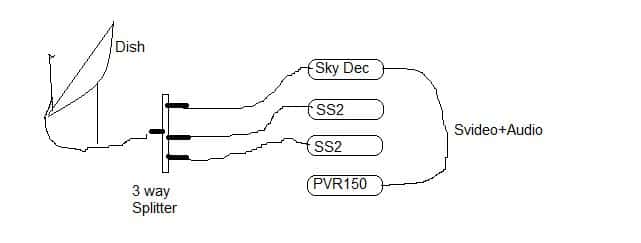
    Ok I'm confused... Is your config like this: (sorry about the drawing)
    attachment.php


    And you have an analog channel mapped to the PVR150 with the source set as SVHS.

    Get that working first.

    Next, if you're wanting to combine the analog channel with the encrypted DVB-S Sky channel (for EPG only) then check this section in the Wiki

    Basically you want to perform an "EPG Only" mapping otherwise TVServer will think that the DVB-S card is usable for watching prime which is not true, it can only be used for EPG grabbing; make sense?
     

    Attachments

    • LiekThis.jpg
      LiekThis.jpg
      13.8 KB

    Users who are viewing this thread

    Top Bottom