Germany
Hi,
Executive summary: While attempting to setup my PCTV 100e, I might have found a bug in MP routines to create a graph.
I'm trying to setup MediaPortal on my machine and have one of those damn PCTV 100e (aka PCTV USB2 2821) devices.
For some reason, although I do have the MainConcept codec, I cannot get the capture to work. I can only see that damn old "cannot create graph" error message.
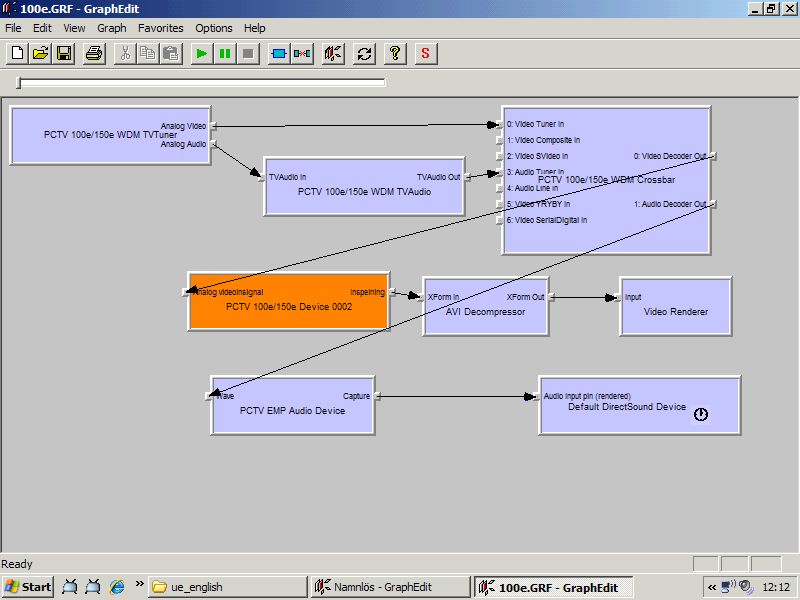
I already put down some significant amount of testing into this, and figured out that there seems to be some kind of problem connecting the "PCTV USB2 2821 Crossbar" audio output (pin 1) with the "PCTV USB2 2821 Audio" microphone input (pin 0). (This has been tested using GraphEdit).
Just to be clear: the video track is fine - just the audio cannot connect.
So my question to MediaPortal users is: can anyone post a screenshot of a working graph for that device?
--- in-depth details ---
What's happening is quite interesting: it seems that in my machine, if I create the filter "PCTV USB2 2821 Audio" from the "Audio Capture Source" group in GraphEdit, the graph connects, although I have no sound.
If I create the filter from the filter "PCTV USB2 2821 Audio" from the "WDM Streaming Capture Devices", then GraphEdit is not able to connect them. The exact error message is:
"These filter cannot agree on a connection. Verify type compatibility of input pin and output pin. (Retun code: 0x80040217)"
Just as a reminder: for the Video, the WDM filters work just fine. We are just talking about the audio here.
It is like something is wrong with the WDM side of that filter, but I need some kind of reference here.

--- even more in-depth details, obtained after some investigation ---
This is the log from the graph creation attempt:
The programmer in me whispered: "Use the Source, Luke".
After consulting the SVN repository (see code), this is what the GraphHelper class has on that "FindUniqueFilter" method:
...meaning that MP only supports devices that have a filter moniker of the form:
"@devicenp:\\?\usb#vid_2304&pid_0208&mi_00#6&3b618d17&0&0000#{65e8773d-8f56-11d0-a3b9-00a0c9223196}\global"
Since on my setup, the PCTV USB2 2821 Audio filter has the following moniker:
"@device:cm:{33D9A762-90C8-11D0-BD43-00A0C911CE86}\PCTV USB2 2821 Audio"
... the parsing routine, which relies on the presence of "#", fails miserably.
The funny thing is, as I said previously, there is a WDM equivalent for the PCTV USB2 2821 Audio filter. Its moniker is:
@devicenp:\\?\usb#vid_2304&pid_0208&mi_01#6&3b618d17&0&0001#{65e8773d-8f56-11d0-a3b9-00a0c9223196}\wave
But this moniker is not being found by MP.
Any ideas on the next steps here?
Executive summary: While attempting to setup my PCTV 100e, I might have found a bug in MP routines to create a graph.
I'm trying to setup MediaPortal on my machine and have one of those damn PCTV 100e (aka PCTV USB2 2821) devices.
For some reason, although I do have the MainConcept codec, I cannot get the capture to work. I can only see that damn old "cannot create graph" error message.
I already put down some significant amount of testing into this, and figured out that there seems to be some kind of problem connecting the "PCTV USB2 2821 Crossbar" audio output (pin 1) with the "PCTV USB2 2821 Audio" microphone input (pin 0). (This has been tested using GraphEdit).
Just to be clear: the video track is fine - just the audio cannot connect.
So my question to MediaPortal users is: can anyone post a screenshot of a working graph for that device?
--- in-depth details ---
What's happening is quite interesting: it seems that in my machine, if I create the filter "PCTV USB2 2821 Audio" from the "Audio Capture Source" group in GraphEdit, the graph connects, although I have no sound.
If I create the filter from the filter "PCTV USB2 2821 Audio" from the "WDM Streaming Capture Devices", then GraphEdit is not able to connect them. The exact error message is:
"These filter cannot agree on a connection. Verify type compatibility of input pin and output pin. (Retun code: 0x80040217)"
Just as a reminder: for the Video, the WDM filters work just fine. We are just talking about the audio here.
It is like something is wrong with the WDM side of that filter, but I need some kind of reference here.
--- even more in-depth details, obtained after some investigation ---
This is the log from the graph creation attempt:
17/4/2007 00:59:49 SinkGraphEx:CreateGraph() IN
17/4/2007 00:59:49 key
17/4/2007 00:59:49 LoadDefs for device at
17/4/2007 00:59:49 key
17/4/2007 00:59:49 defs loaded for device at
17/4/2007 00:59:49 video device moniker
17/4/2007 00:59:49 captureDeviceDeviceName
17/4/2007 00:59:49 FindInstance
17/4/2007 00:59:49 key
17/4/2007 00:59:49 serviceName
17/4/2007 00:59:49 key
17/4/2007 00:59:49 Number of cards:1
17/4/2007 00:59:49 card#0=USB#Vid_2304&Pid_0208&MI_00#6&3b618d17&0&0000
17/4/2007 00:59:49 using card:#0
17/4/2007 00:59:49 Using card#0
17/4/2007 00:59:49 filter tvtuner='PCTV USB2 2821 TVTuner' check:True
17/4/2007 00:59:49 filter tvaudio='PCTV USB2 2821 TVAudio' check:True
17/4/2007 00:59:49 filter crossbar='PCTV USB2 2821 Crossbar' check:True
17/4/2007 00:59:49 filter capture='PCTV USB2 2821 Capture' check:True
17/4/2007 00:59:49 filter audcapture='PCTV USB2 2821 Audio' check:True
17/4/2007 00:59:49 CheckDevice:@device:cm:{33D9A762-90C8-11D0-BD43-00A0C911CE86}\PCTV USB2 2821 Audio
17/4/2007 00:59:49 FindUniqueFilter:card#0 filter:@device:cm:{33D9A762-90C8-11D0-BD43-00A0C911CE86}\PCTV USB2 2821 Audio
17/4/2007 00:59:49 Exception
Parameter name: length
at System.String.InternalSubStringWithChecks(Int32 startIndex, Int32 length, Boolean fAlwaysCopy)
at MediaPortal.TV.Recording.GraphHelper.FindUniqueFilter(String monikerName, Int32 instance)
at MediaPortal.TV.Recording.GraphHelper.LoadDefinitions(String videoDevice, String videoDeviceMoniker)
17/4/2007 00:59:49 Exception :Length cannot be less than zero.
Parameter name: length
17/4/2007 00:59:49 site
17/4/2007 00:59:49 source :mscorlib
17/4/2007 00:59:49 stacktrace: at System.String.InternalSubStringWithChecks(Int32 startIndex, Int32 length, Boolean fAlwaysCopy)
at MediaPortal.TV.Recording.GraphHelper.FindUniqueFilter(String monikerName, Int32 instance)
at MediaPortal.TV.Recording.GraphHelper.LoadDefinitions(String videoDevice, String videoDeviceMoniker)
17/4/2007 00:59:49 SinkGraphEx: Create new filter graph (IGraphBuilder)
17/4/2007 00:59:49 SinkGraphEx: Get the Capture Graph Builder (ICaptureGraphBuilder2)
17/4/2007 00:59:49 SinkGraphEx: Link the CaptureGraphBuilder to the filter graph (SetFiltergraph)
17/4/2007 00:59:49 SinkGraphEx: Add graph to ROT table
17/4/2007 00:59:49 SinkGraphEx: Adding configured filters...
17/4/2007 00:59:50 SinkGraphEx: adding filter <PCTV USB2 2821 TVTuner> with moniker <@device
17/4/2007 00:59:50 SinkGraphEx: Added filter <PCTV USB2 2821 TVTuner> with moniker <@device
17/4/2007 00:59:50 SinkGraphEx: adding filter <PCTV USB2 2821 TVAudio> with moniker <@device
17/4/2007 00:59:50 SinkGraphEx: Added filter <PCTV USB2 2821 TVAudio> with moniker <@device
17/4/2007 00:59:50 SinkGraphEx: adding filter <PCTV USB2 2821 Crossbar> with moniker <@device
17/4/2007 00:59:50 SinkGraphEx: Added filter <PCTV USB2 2821 Crossbar> with moniker <@device
17/4/2007 00:59:50 SinkGraphEx: adding filter <PCTV USB2 2821 Capture> with moniker <@device
17/4/2007 00:59:50 SinkGraphEx: Added filter <PCTV USB2 2821 Capture> with moniker <@device
17/4/2007 00:59:50 Exception
at System.Runtime.InteropServices.Marshal.MkParseDisplayName(IBindCtx pbc, String szUserName, UInt32& pchEaten, IMoniker& ppmk)
at System.Runtime.InteropServices.Marshal.BindToMoniker(String monikerName)
at MediaPortal.TV.Recording.SinkGraphEx.CreateGraph(Int32 Quality)
17/4/2007 00:59:50 Exception :Value does not fall within the expected range.
17/4/2007 00:59:50 site :Void MkParseDisplayName(System.Runtime.InteropServices.ComTypes.IBindCtx, System.String, UInt32 ByRef, System.Runtime.InteropServices.ComTypes.IMoniker ByRef)
17/4/2007 00:59:50 source :mscorlib
17/4/2007 00:59:50 stacktrace: at System.Runtime.InteropServices.Marshal.MkParseDisplayName(IBindCtx pbc, String szUserName, UInt32& pchEaten, IMoniker& ppmk)
at System.Runtime.InteropServices.Marshal.BindToMoniker(String monikerName)
at MediaPortal.TV.Recording.SinkGraphEx.CreateGraph(Int32 Quality)
The programmer in me whispered: "Use the Source, Luke".
After consulting the SVN repository (see code), this is what the GraphHelper class has on that "FindUniqueFilter" method:
309 Log.Info(" FindUniqueFilter:card#{0} filter:{1}", instance, monikerName);
310
311 int pos1 = monikerName.IndexOf("#");
312 int pos2 = monikerName.LastIndexOf("#");
313 string left = monikerName.Substring(0, pos1);
314 string mid = monikerName.Substring(pos1 + 1, (pos2 - pos1) - 1);
315 mid = mid.Replace("#", "/");
316 string right = monikerName.Substring(pos2 + 1);
317 string registryKeyName = left + @"\" + mid + @"\" + right;
318
319 if (registryKeyName.StartsWith(@"@device
320 registryKeyName = registryKeyName.Substring(@"@device
...meaning that MP only supports devices that have a filter moniker of the form:
"@device
np:\\?\usb#vid_2304&pid_0208&mi_00#6&3b618d17&0&0000#{65e8773d-8f56-11d0-a3b9-00a0c9223196}\global"Since on my setup, the PCTV USB2 2821 Audio filter has the following moniker:
"@device:cm:{33D9A762-90C8-11D0-BD43-00A0C911CE86}\PCTV USB2 2821 Audio"
... the parsing routine, which relies on the presence of "#", fails miserably.
The funny thing is, as I said previously, there is a WDM equivalent for the PCTV USB2 2821 Audio filter. Its moniker is:
@device
np:\\?\usb#vid_2304&pid_0208&mi_01#6&3b618d17&0&0001#{65e8773d-8f56-11d0-a3b9-00a0c9223196}\waveBut this moniker is not being found by MP.
Any ideas on the next steps here?