
Can someone tell me how to add "overscan"? (1 Viewer)

kkozma

Portal Pro
February 16, 2009
189
6
Dayton, OH
Home Country
United States of America United States of America
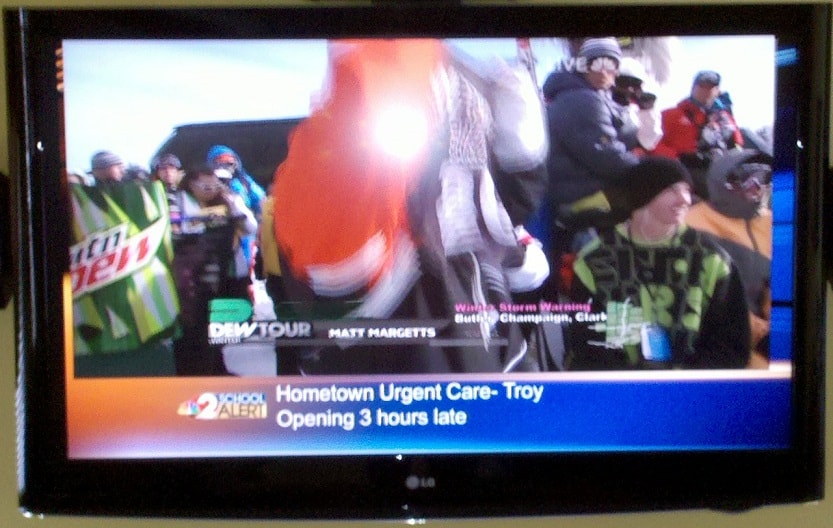
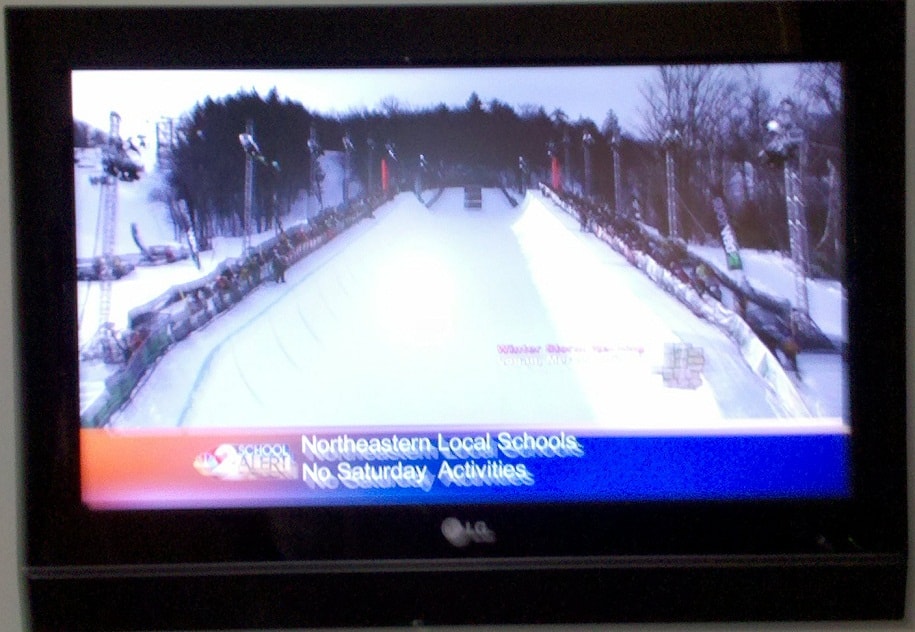
I need a way to add some overscan to my live TV and I can't for the life of me figure out how to do it... I'll attach two pictures to thispost to show why.

The first picture (HTPC.jpg) is of a local NBC Affiliate running a crawl for closings and delays during the last snow storm we got here on my HTPC.

The second picture (OTA_DTV.jpg) is of my TV in our bedroom running the same channel with the same crawl and as you can see there is quite a bit of overscan to "correct" the image.

Now normally I could live with something like this, but the local CBS affiliate has made some changes to their broadcast recently and there is a 3/4 inch border along the right side and bottom of my screen.

Can anyone please help? I'm lost as to how to acomplish this and I know it's got to be possible. Thanks in advance!
 

Attachments

  • HTPC.jpg
    HTPC.jpg
    178.1 KB
  • OTA_DTV.jpg
    OTA_DTV.jpg
    192 KB

STuNZ

MP Donator
  • Premium Supporter
  • December 25, 2008
    101
    10
    Home Country
    New Zealand New Zealand
    I need a way to add some overscan to my live TV and I can't for the life of me figure out how to do it... I'll attach two pictures to thispost to show why.

    The first picture (HTPC.jpg) is of a local NBC Affiliate running a crawl for closings and delays during the last snow storm we got here on my HTPC.

    The second picture (OTA_DTV.jpg) is of my TV in our bedroom running the same channel with the same crawl and as you can see there is quite a bit of overscan to "correct" the image.

    Now normally I could live with something like this, but the local CBS affiliate has made some changes to their broadcast recently and there is a 3/4 inch border along the right side and bottom of my screen.

    Can anyone please help? I'm lost as to how to acomplish this and I know it's got to be possible. Thanks in advance!

    For CRT type TVs, it's an adjustment that can be made from your video card driver so depending on whether you have an Nvidia, ATI or some other manufacturer, the controls will vary but look for Catalyst Control Center if you have an ATI card or Nvidia Control Panel for Nvidia. If you are connected to a CRT type TV they should have overscan or image adjustment controls there.

    You may then have to use the MediaPortal screen calaibration in the settings menu to adjust the menu locations etc of media portal if they have moved too far out as a result.
     

    kkozma

    Portal Pro
    February 16, 2009
    189
    6
    Dayton, OH
    Home Country
    United States of America United States of America
    Two problems with that.

    1. I can't add any more overscan in ccc. I'm already at 0%.
    2. That will make everything overscan, and that's not the outcome I'm looking for.

    Is there a way to do it with post processing? I tried messing around with that but I can make anything other than the cyberlink pdvd9 codec come up in the graph.

    FYI: I'm running MP 1.1b with the latest svn and saf 4.0rc2.
     

    STuNZ

    MP Donator
  • Premium Supporter
  • December 25, 2008
    101
    10
    Home Country
    New Zealand New Zealand
    Sounds like you want the crop settings if it's just for video rather than everything.
    While playing live TV press the info button twice to get the second menu which has a video crop settings options to to allow you to remove the borders from a broadcast.
     

    kiwijunglist

    Super Moderator
  • Team MediaPortal
  • June 10, 2008
    6,743
    1,754
    New Zealand
    Home Country
    New Zealand New Zealand
    Four adjustments

    1. CCC
    2. Run MP, goto home screen select settings -> screen calibration
    3. Watch TV in MP then press F9 -> crop settings
    4. Some TV sets allow pic mode eg. overscan/pixel mapping/zoom/16:9/just scan etc...
     

    kkozma

    Portal Pro
    February 16, 2009
    189
    6
    Dayton, OH
    Home Country
    United States of America United States of America
    Thanks guys. I've played with the crop settings before but didn't realize that it started to zoom the screen when you adjusted all 4 sides... Is there any documentation on how to properly use the crop settings anywhere? I searched the wiki, but couldn't find anything at all.
     

    kiwijunglist

    Super Moderator
  • Team MediaPortal
  • June 10, 2008
    6,743
    1,754
    New Zealand
    Home Country
    New Zealand New Zealand
    oh there is a #5. as well
    you can change the pic mode . eg original/normal/zoom/stretch etc, by press F9 while watching video
     

    redmist

    Portal Member
    June 10, 2011
    42
    25
    Home Country
    The TV cropping/overscan simulation in MediaPortal is flawed IMO. Windows MCE does it properly.

    The MediaPortal cropping settings affect the *input* not the *output*. It also does pixels rather than percentage which doesn't really make sense since you can have 1080 TV signals and 480 signals. It's obviously been created with the mindset of only cropping "garbage" but this is not technically correct.

    In Windows MCE, if you choose "TV" for the display it does no cropping at all which is correct because TVs have overscan. If you choose "Monitor" it crops and zooms the output by ~3% which simulates the overscan of the average TV.

    There is no way to do this in MediaPortal unless you use the "IFC" plugin but it does a weird zooming effect every time you change channel which is disconcerting. It also only does coarse integer percentage cropping for horizontal and vertical cropping which distorts the aspect ratio slightly.
     

    mm1352000

    Retired Team Member
  • Premium Supporter
  • September 1, 2008
    21,544
    8,236
    Home Country
    New Zealand New Zealand
    There is no way to do this in MediaPortal unless you use the "IFC" plugin...
    Do you know about the UI and screen calibration settings described in the wiki -->here<--?
     

    redmist

    Portal Member
    June 10, 2011
    42
    25
    Home Country
    Screen and UI calibration *compensates* for TV overscan. It does not perform video overscan *simulation* cropping for monitors.
     

    Users who are viewing this thread

    Top Bottom