MediaPortal Version: 1.0.2
MediaPortal Skin: Default Blue (Not blue wide)
Windows Version: Windows XP(2002) with SP3
CPU Type: Intel Celeron 3.06 GHz
HDD:
Memory: DDR2 512MB
Motherboard: ECS RC410-M
Video Card: NVIDIA quadro fx 560
Video Card Driver:
Sound Card: Built-in Azalia 8 channel audio
Sound Card AC3:
Sound Card Driver: Realtek High Definition Audio Driver 5.10.0.5694
1. TV Card: Leadtek DTV 1000S
1. TV Card Type: DVB-T
1. TV Card Driver: 1.3.4.5009
2. TV Card:
2. TV Card Type:
2. TV Card Driver:
3. TV Card:
3. TV Card Type:
3. TV Card Driver:
4. TV Card:
4. TV Card Type:
4. TV Card Driver:
MPEG2 Video Codec:
MPEG2 Audio Codec:
h.264 Video Codec:
Satelite/CableTV Provider:
HTPC Case:
Cooling:
Power Supply:
Remote: Leadtek Y04G0051
TV: Panasonic TH-P50 G10
TV - HTPC Connection: DVI(PC) to HDMI(TV)
Hi all,
I am a new user of MediaPortal. Recently installed on my PC (Details give above). I will describe my progress in steps below:
1. Installed MediaPortal successfully using MYSQL Serve 5.0
2. Read through forums and Manuals given and performed following tasks:
2.a: DVBfix - Done
2.b: host file changed to have 127.0.0.1 localhost ::1 localhost
2.c: TVLibrary.dll changed in TVServer installation folder.
3. After performing all above steps and installation Double click on TV-Server Configuration to get started.
4. Popup window saying - The TVService is not running start it now
5. Click on yes nothing happens and TV Server log has follwing error in it
TVServer logfile name: error
2010-02-07 13:10:40.279401 [SetupTv]: ServiceHelper: Could not check whether the tvservice is running. Please check your network as well.
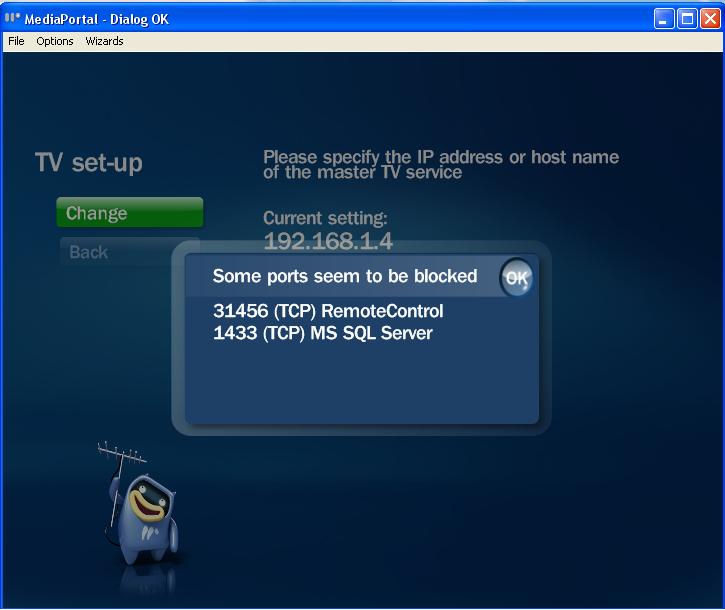
Error: System.Net.Sockets.SocketException: No connection could be made because the target machine actively refused it 127.0.0.1:31456
Server stack trace:
at System.Net.Sockets.Socket.DoConnect(EndPoint endPointSnapshot, SocketAddress socketAddress)
at System.Net.Sockets.Socket.Connect(EndPoint remoteEP)
at System.Runtime.Remoting.Channels.RemoteConnection.CreateNewSocket(EndPoint ipEndPoint)
at System.Runtime.Remoting.Channels.RemoteConnection.CreateNewSocket()
at System.Runtime.Remoting.Channels.RemoteConnection.GetSocket()
at System.Runtime.Remoting.Channels.SocketCache.GetSocket(String machinePortAndSid, Boolean openNew)
at System.Runtime.Remoting.Channels.Tcp.TcpClientTransportSink.SendRequestWithRetry(IMessage msg, ITransportHeaders requestHeaders, Stream requestStream)
at System.Runtime.Remoting.Channels.Tcp.TcpClientTransportSink.ProcessMessage(IMessage msg, ITransportHeaders requestHeaders, Stream requestStream, ITransportHeaders& responseHeaders, Stream& responseStream)
at System.Runtime.Remoting.Channels.BinaryClientFormatterSink.SyncProcessMessage(IMessage msg)
Exception rethrown at [0]:
at System.Runtime.Remoting.Proxies.RealProxy.HandleReturnMessage(IMessage reqMsg, IMessage retMsg)
at System.Runtime.Remoting.Proxies.RealProxy.PrivateInvoke(MessageData& msgData, Int32 type)
at TvControl.IController.get_IdServer()
at SetupTv.ServiceHelper.get_IsRunning()
2010-02-07 20:11:25.109375 [MPMain]: RemoteControl - Error checking connection state
2010-02-07 20:11:35.765625 [MPMain]: RemoteControl - Error checking connection state
2010-02-07 20:11:37.765625 [MPMain]: RemoteControl - Error checking connection state
2010-02-07 20:11:39.984375 [MPMain]: RemoteControl - Error checking connection state
2010-02-07 20:11:46.218750 [MPMain]: RemoteControl - Error checking connection state
6. I tried starting TVService manually by going to services.msc via run i get this following error:
The TVService on Local Computer started and then stopped. Some Services stop automatically if they have no work to do, for example, the Performance logs and Alert Services.
7. I tried using Microsoft SQL server 2005 and after doing all above mentioned steps and installation, when I double click on TV server configuration. I get following error:
Could not start TVService service on Local Computer.
Error 1075: The dependency service does not exist or has been marked for deletion.
I tried everything uninstall and install MediaPortal 1.0.2 many times with system restarts and everything but nothing has worked.
If anyone knows what is wrong in this case please reply......
and also this from General Requirements of MediaPortal:
The MediaPortal installer won't run on the following versions:
* Windows XP 32-bit Edition before service pack 3 ??????????
In my System Properties its says Microsoft Windows XP Professional Version 2002 Service Pack 3
SP3 was released in April 2008 so what does before service pack 3 means in General Requirements?????????
I have also attached log files after running MediaPortal log collector...
Thanks in advance
MediaPortal Skin: Default Blue (Not blue wide)
Windows Version: Windows XP(2002) with SP3
CPU Type: Intel Celeron 3.06 GHz
HDD:
Memory: DDR2 512MB
Motherboard: ECS RC410-M
Video Card: NVIDIA quadro fx 560
Video Card Driver:
Sound Card: Built-in Azalia 8 channel audio
Sound Card AC3:
Sound Card Driver: Realtek High Definition Audio Driver 5.10.0.5694
1. TV Card: Leadtek DTV 1000S
1. TV Card Type: DVB-T
1. TV Card Driver: 1.3.4.5009
2. TV Card:
2. TV Card Type:
2. TV Card Driver:
3. TV Card:
3. TV Card Type:
3. TV Card Driver:
4. TV Card:
4. TV Card Type:
4. TV Card Driver:
MPEG2 Video Codec:
MPEG2 Audio Codec:
h.264 Video Codec:
Satelite/CableTV Provider:
HTPC Case:
Cooling:
Power Supply:
Remote: Leadtek Y04G0051
TV: Panasonic TH-P50 G10
TV - HTPC Connection: DVI(PC) to HDMI(TV)
Hi all,
I am a new user of MediaPortal. Recently installed on my PC (Details give above). I will describe my progress in steps below:
1. Installed MediaPortal successfully using MYSQL Serve 5.0
2. Read through forums and Manuals given and performed following tasks:
2.a: DVBfix - Done
2.b: host file changed to have 127.0.0.1 localhost ::1 localhost
2.c: TVLibrary.dll changed in TVServer installation folder.
3. After performing all above steps and installation Double click on TV-Server Configuration to get started.
4. Popup window saying - The TVService is not running start it now
5. Click on yes nothing happens and TV Server log has follwing error in it
TVServer logfile name: error
2010-02-07 13:10:40.279401 [SetupTv]: ServiceHelper: Could not check whether the tvservice is running. Please check your network as well.
Error: System.Net.Sockets.SocketException: No connection could be made because the target machine actively refused it 127.0.0.1:31456
Server stack trace:
at System.Net.Sockets.Socket.DoConnect(EndPoint endPointSnapshot, SocketAddress socketAddress)
at System.Net.Sockets.Socket.Connect(EndPoint remoteEP)
at System.Runtime.Remoting.Channels.RemoteConnection.CreateNewSocket(EndPoint ipEndPoint)
at System.Runtime.Remoting.Channels.RemoteConnection.CreateNewSocket()
at System.Runtime.Remoting.Channels.RemoteConnection.GetSocket()
at System.Runtime.Remoting.Channels.SocketCache.GetSocket(String machinePortAndSid, Boolean openNew)
at System.Runtime.Remoting.Channels.Tcp.TcpClientTransportSink.SendRequestWithRetry(IMessage msg, ITransportHeaders requestHeaders, Stream requestStream)
at System.Runtime.Remoting.Channels.Tcp.TcpClientTransportSink.ProcessMessage(IMessage msg, ITransportHeaders requestHeaders, Stream requestStream, ITransportHeaders& responseHeaders, Stream& responseStream)
at System.Runtime.Remoting.Channels.BinaryClientFormatterSink.SyncProcessMessage(IMessage msg)
Exception rethrown at [0]:
at System.Runtime.Remoting.Proxies.RealProxy.HandleReturnMessage(IMessage reqMsg, IMessage retMsg)
at System.Runtime.Remoting.Proxies.RealProxy.PrivateInvoke(MessageData& msgData, Int32 type)
at TvControl.IController.get_IdServer()
at SetupTv.ServiceHelper.get_IsRunning()
2010-02-07 20:11:25.109375 [MPMain]: RemoteControl - Error checking connection state
2010-02-07 20:11:35.765625 [MPMain]: RemoteControl - Error checking connection state
2010-02-07 20:11:37.765625 [MPMain]: RemoteControl - Error checking connection state
2010-02-07 20:11:39.984375 [MPMain]: RemoteControl - Error checking connection state
2010-02-07 20:11:46.218750 [MPMain]: RemoteControl - Error checking connection state
6. I tried starting TVService manually by going to services.msc via run i get this following error:
The TVService on Local Computer started and then stopped. Some Services stop automatically if they have no work to do, for example, the Performance logs and Alert Services.
7. I tried using Microsoft SQL server 2005 and after doing all above mentioned steps and installation, when I double click on TV server configuration. I get following error:
Could not start TVService service on Local Computer.
Error 1075: The dependency service does not exist or has been marked for deletion.
I tried everything uninstall and install MediaPortal 1.0.2 many times with system restarts and everything but nothing has worked.
If anyone knows what is wrong in this case please reply......
and also this from General Requirements of MediaPortal:
The MediaPortal installer won't run on the following versions:
* Windows XP 32-bit Edition before service pack 3 ??????????
In my System Properties its says Microsoft Windows XP Professional Version 2002 Service Pack 3
SP3 was released in April 2008 so what does before service pack 3 means in General Requirements?????????
I have also attached log files after running MediaPortal log collector...
Thanks in advance