Can't Play DVD (1 Viewer)

Status
Not open for further replies.

sclec

Portal Member
October 6, 2011
11
1
50
Home Country
France France
MediaPortal Version: 1.2.1
MediaPortal Skin: streamedMP
Windows Version: Win 7 x64
CPU Type: i3 540
HDD: Samsung 1T EcoGreen
Memory: 4 Go
Motherboard:
Video Card:
Video Card Driver:
Sound Card:
Sound Card AC3:
Sound Card Driver:
1. TV Card:
1. TV Card Type:
1. TV Card Driver:
2. TV Card:
2. TV Card Type:
2. TV Card Driver:
3. TV Card:
3. TV Card Type:
3. TV Card Driver:
4. TV Card:
4. TV Card Type:
4. TV Card Driver:
MPEG2 Video Codec:
MPEG2 Audio Codec:
h.264 Video Codec:
Satelite/CableTV Provider:
HTPC Case:
Cooling:
Power Supply:
Remote: Veris RM200
TV:
TV - HTPC Connection:

Hello,

I have update to Media Portal 1.2.1 with alls my plugin since several Days.

In 1.1.3 No Problems, but with 1.2.1 i can't play DVD. If I use "Play DVD" or respond "Yes" to Auto Insert Frame, nothing appends, just return to Media Portal Menu.

I have try several DVD, and y have the same result "Nothing". When i try to play the same dvd in windows, no problem, all work fine.

Thanks for your help.
 

rogerleifert

Retired Team Member
  • Premium Supporter
  • April 22, 2009
    241
    82
    Aachen
    Home Country
    Germany Germany
    AW: Can't Play DVD

    Hi there,

    I've had a similar issue with PureVisionHD skin, but there it was a skin issue!
    Try to go to the plugin-section and try playing the DVD from there ("Play Disc") or from the home menue.
    If playing DVD from there works, report the error to the skin-desinger.
    Then it's not a bug in MP 1.2.1!

    Roger
     

    sclec

    Portal Member
    October 6, 2011
    11
    1
    50
    Home Country
    France France
    Hi,

    I 've allready try this. I 've the same problem, with standard skin or with skin streamedMP.

    I try with "Play DVD" home menu, Auto Insert DVD frame, but same result, nothing happen, just return to menu.

    Hello,

    I 've desactivate streamedMP skin and i trying this :
    - Play Audio CD with Auto insert frame: OK
    - Play Audio CD with "Play dvd" in menu : OK
    - Play DVD with Auto insert frame: nothing append !
    - Play DVD with "Play dvd" in menu : nothing append !
    - Play DVD with configure External player (Windows Media Player) in MP, Auto insert frame : nothing append !
    - Play DVD with configure External player (Windows Media Player) in MP, "Play dvd" in menu : nothing append !
     

    sclec

    Portal Member
    October 6, 2011
    11
    1
    50
    Home Country
    France France
    Hello,

    New Logs with Minidisplay disabled, for reduce log verbose.

    Someone can post his logs for compare please ?
     

    pilehave

    Community Skin Designer
  • Premium Supporter
  • April 2, 2008
    2,566
    521
    Hornslet
    Home Country
    Denmark Denmark
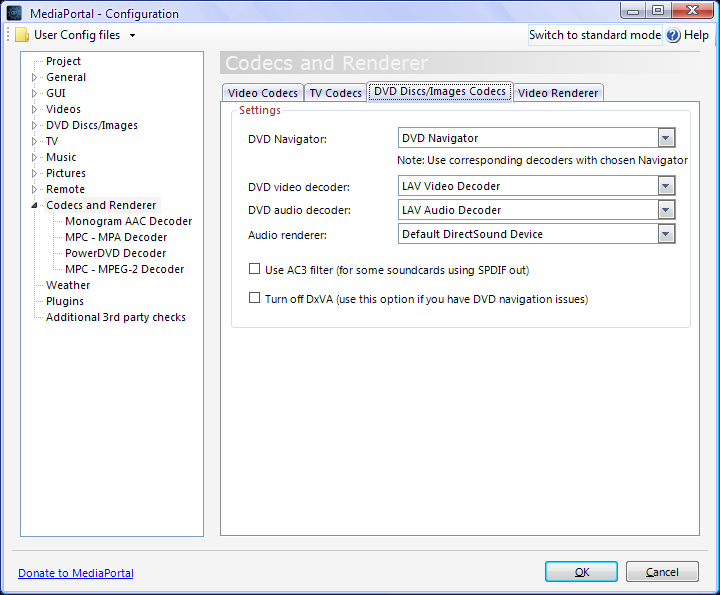
    How does your configuration look here:

    EDIT: Can you play DVD-files with Windows Media Player (as standalone)
     

    Attachments

    • config.png
      config.png
      41.8 KB

    Sebastiii

    Development Group
  • Team MediaPortal
  • November 12, 2007
    16,523
    10,466
    France
    Home Country
    France France
    Hi,

    It's often codec issue, didn't look log right now, but if it's codec issue, it act like you describe.
    Can you try to change setup on this side like Pilehave show you ?
    Thanks.
     

    sclec

    Portal Member
    October 6, 2011
    11
    1
    50
    Home Country
    France France
    Hello,

    I 've uninstall all codec from the pc and only install LAV Filters + MPC-HC.

    After installation and configuration this new Filters. (I 've configured DVD codec like Pilehave).

    Always without streamedMP skin.

    I can play DVD, Divx, Mkv... with Windows Media Player standalone and MPC-HC standalone.

    I can play Divx, Mkv... with Media Portal, but no DVD !!! Same problem, I can select "Yes" in auto insert frame or "Play Dvd" on the menu but nothing append, no error, no video, no sound.

    I don't understand, but i just realized i can play DVD in Moving Picture Plugin ! It 's working fine ! Why Dvd play in moving picture but not in Media portal Menu ????

    I 've modified menu in streamedMP skin, the skin is disabled but...

    Do you think it can cause this problem ?
     

    pilehave

    Community Skin Designer
  • Premium Supporter
  • April 2, 2008
    2,566
    521
    Hornslet
    Home Country
    Denmark Denmark
    I just tested and I don't think the LAV video codec can be used for DVD in MediaPortal. Even if I select LAV as codec for both sound and video, FFDShow is still used for DVD video. DVD audio is decoded by LAV.

    At work I cleaned my machine of all codecs, installed LAV and configured MediaPortal to use it, but that doesn't work. It only works with FFDShow or similar (PowerDVD).

    My suggestion is to install SAF 6.0, it will install both LAV and FFDShow.
     

    sclec

    Portal Member
    October 6, 2011
    11
    1
    50
    Home Country
    France France
    Hello,

    I 've try with SAF 6, but same probleme.

    I can play DVD With Windows Media player standalone.
    I can play DVD in Media Portal with "Moving Picture" Plugin.

    I can't play dvd with auto insert frame or "Play Dvd" in Menu !!!

    "Moving Picture" and "Media Portal" used same codec ? I can play dvd in moving picture why not in Media Portal Menu ?
     
    Status
    Not open for further replies.

    Users who are viewing this thread

    Top Bottom