Comskip is still crashing tv-server (1 Viewer)

gtfreymann

MP Donator
  • Premium Supporter
  • August 3, 2011
    119
    11
    Ontario, Canada
    Home Country
    Canada Canada
    So I used comskip80_038.zip. Rebooted the server. Scheduled a show. Crashes when the show is over and the call to ComSkip is made.

    So I've tried versions 42 down to 38. This is crazy.

    Now I've copied over version 80_037.zip. Did a test on the show that just failed. Works fine like all the others that way.

    I'll reboot the server, schedule another 30 minute show. See what happens.
     

    TLD

    Portal Pro
    October 26, 2007
    989
    429
    Rainy Washington
    Home Country
    United States of America United States of America
    Also if I literally open up two windows and "drop" a recorded show onto comskip I get the old "this program cannot be validated" or whatever the message is, and "Are you sure you want to run this?" to which I click YES and then everything runs fine.


    This sounds like a windows permission issue, maybe try setting comskip to run as administrator in comskip properties.
     

    gtfreymann

    MP Donator
  • Premium Supporter
  • August 3, 2011
    119
    11
    Ontario, Canada
    Home Country
    Canada Canada
    Yes, I can set it to run as administrator too. I've previously disabled UAC so that shouldn't be a problem.

    Even when I copy over a new version I right click and "unblock"

    I spent all day swapping out different versions and setting a 30 minute show to record, rebooting between changes. I managed to lock up our living room machine 3 times and waste plenty of time with no success. Again.

    I will try a little more tomorrow and then just give up. I may give GPVR or whatever it's called a good looking at as any PVR software than can't do basic commercial skipping is a bit, shall we say? awkward?
     

    gtfreymann

    MP Donator
  • Premium Supporter
  • August 3, 2011
    119
    11
    Ontario, Canada
    Home Country
    Canada Canada
    I might add that I've had this problem with MePo 1.2.2 and was hoping the upgrade to 1.2.3 would change things. It didn't. I can't say for sure if this problem existed with MePo 1.2.1 but I wouldn't be surprised.

    So is this a MePo issue or a Comskip Issue? The surprising part is it kills the tv-server process and no comskip ever runs. Why would comskip kill the tv-server process?

    I have a legit copy of win7 32 bit (32 bit because of the two PVR-150 cards I use). Lots of ram. A killer processor. Was using a SATA boot drive but changed that to a SSD drive when I had a hard drive crash. Problem existed before and after. It makes no sense.
     

    TLD

    Portal Pro
    October 26, 2007
    989
    429
    Rainy Washington
    Home Country
    United States of America United States of America
    Well i'd say that if you drop a movie on comskip and it won't run then it's a windows permission problem as this would totally by pass MediaPortal.

    Here's my setup in the zip file, put the folder in the same folder with your recorded movies and point the TV Server at it and set the permissions in comskip properties to run as administrator and see if it will work for you. It works fine here.
     
    Last edited:

    gtfreymann

    MP Donator
  • Premium Supporter
  • August 3, 2011
    119
    11
    Ontario, Canada
    Home Country
    Canada Canada
    When I drop a recorded tv show onto comskip now, I don't get any pop-up windows...

    I'm going to wait for tomorrow (when nobody is using the system) and activate ComSkip, reboot, and set up a recording.

    I will download your file in the meantime and use that if what I have produces the same results. At this point in time it's anybody guess.

    Thanks for you help TLD!
     

    gtfreymann

    MP Donator
  • Premium Supporter
  • August 3, 2011
    119
    11
    Ontario, Canada
    Home Country
    Canada Canada
    An Update..

    Woke up this morning to TV-Server crashed. There was a scheduled recording last night and comskip killed the system. How nice. Rebooted.

    I did a 30 minute recording. TV Server didn't crash, but I also didn't see any commercial skip files created either.

    Rebooted. Installed comskip from zip file in previous message. Rebooted. Scheduled a 30 minute recording. TV Server didn't crash but I also didn't see any commercial skip files.

    The logs indicate comskip was called but nothing.

    I'm going to give up and run ComSkip manually when I remember and have a look at http://www.nextpvr.com/ in the meantime.
     

    Paranoid Delusion

    Moderation Manager
  • Premium Supporter
  • June 13, 2005
    13,052
    2,978
    Cheshire
    Home Country
    United Kingdom United Kingdom
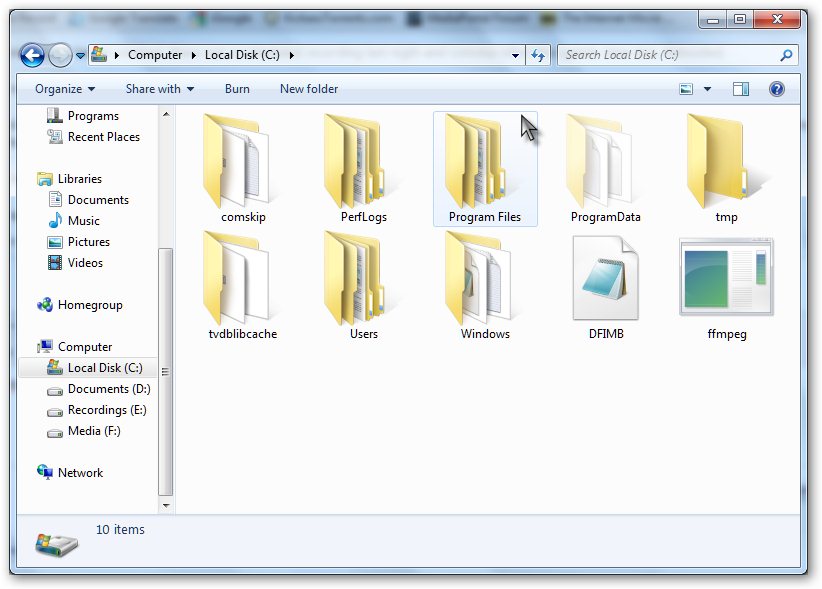
    Where is your comskip folder, mine is in the root of C: drive, and as you can well imagine, if there was a fundamental problem crashing tvserver with comskip, we would be flooded with complaints, so no idea why you are.

    Can we have new logs using debug mode option 3
     

    Attachments

    • sshot-98.jpg
      sshot-98.jpg
      72.7 KB

    gtfreymann

    MP Donator
  • Premium Supporter
  • August 3, 2011
    119
    11
    Ontario, Canada
    Home Country
    Canada Canada
    It was originally under the Team Media Portal portal. Then I changed it to c:\program files\comskip\

    I also disabled UAC.

    I can now drop a recorded video file onto comskip.exe and no warning windows, etc. Comskip does the job and we're all good.

    Like I keep saying. I can run it manually and it works fine.

    But if MePo calls it after a recording is finished, it either a) does nothing or b) crashes the tv-server service and doesn't run comskip

    Over the last couple days I've tried at least 8 different versions of ComSkip. Tried running it at the start of a recording, at the end of a recording. Made sure the file was not "blocked". Set it run as Administrator.

    I'll check into debug mode option 3. I already have it doing something in debug level with watchdog but that's never caught a thing so far.
     

    Users who are viewing this thread

    Top Bottom