conditional visibilty for music playing (1 Viewer)

VdR

MP Donator
  • Premium Supporter
  • October 17, 2006
    612
    16
    Belgium
    Home Country
    Netherlands Netherlands
    I want to make a conditional visibility for when video (movie, TV) is playing to show a 16:9 video window and another one for when only music is playing to show a 1:1 cd cover window.

    But the 'Player.HasVideo' condition is true also if only music is playing (because of the cd cover thumb?), so the 16:9 window also shows if only a cd is playing.

    How do I make a visibility control for audio only?

    VdR
     

    2BitSculptor

    Super Moderator
  • Team MediaPortal
  • January 23, 2008
    2,007
    1,052
    South Central Wisconsin
    Home Country
    United States of America United States of America
    It doesn't work exactly as expected.

    <control>
    <description>music logo</description>
    <type>image</type>
    <id>987</id>
    <posX>30</posX>
    <posY>510</posY>
    <width>70</width>
    <height>70</height>
    <centered>yes</centered>
    <visible>Player.HasAudio</visible>
    <texture>#Play.Current.Thumb</texture>
    </control>

    <control>
    <id>1</id>
    <type>fadelabel</type>
    <posX>110</posX>
    <posY>507</posY>
    <width>180</width>
    <visible>control.hasthumb(987)</visible>
    <label>#Play.Current.Title</label>
    <align>left</align>
    <font>font12</font>
    <textcolor>ffffffff</textcolor>
    </control>

    <control>
    <description>video preview window</description>
    <type>videowindow</type>
    <id>0</id>
    <posX>30</posX>
    <posY>510</posY>
    <width>100</width>
    <height>75</height>
    <action>18</action>
    <textureFocus>tv_green_border.png</textureFocus>
    <visible>Player.HasVideo</visible>
    </control>

    <control>
    <id>1</id>
    <type>fadelabel</type>
    <posX>140</posX>
    <posY>507</posY>
    <width>180</width>
    <visible>Player.HasVideo</visible>
    <label>#Play.Current.Title</label>
    <align>left</align>
    <font>font12</font>
    <textcolor>ffffffff</textcolor>
    </control>

    In the example above I get:

    <visible>Player.HasVideo</visible> displays the Video and Video-Title when Video is playing.

    <visible>Player.HasAudio</visible> displays CD cover (and associated descriptions) when only Music is playing. When used by itself - without the videowindow/video-title section controls

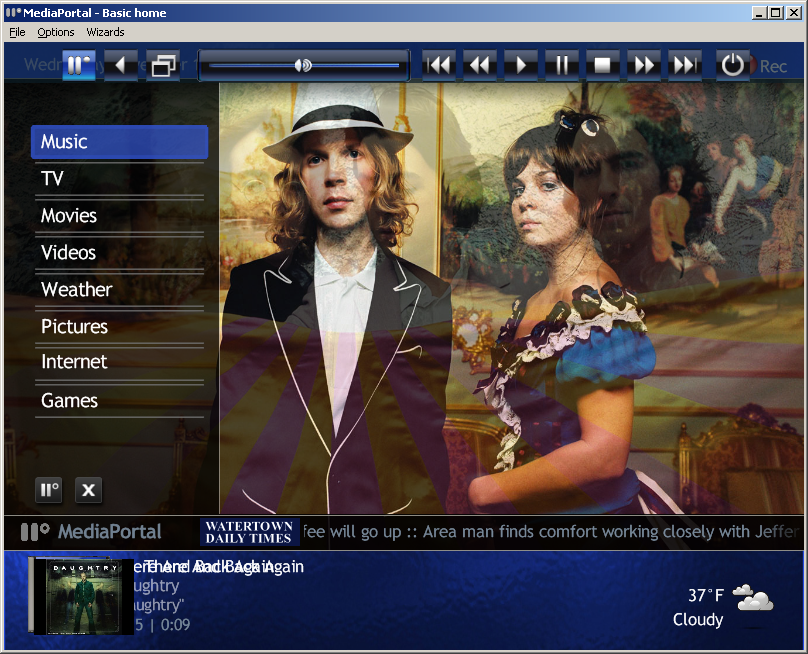
    <visible>Player.HasVideo</visible> displays the CD cover in the video frame when Music is playing and last (immediately) played video title overprints Music Title, if both are used in the same xml:

    Player.HasVideo is behaving the same as Player.HasMedia.

    Regards

    Chuck
     

    Attachments

    • visibility overprint issue.png
      visibility overprint issue.png
      997.1 KB

    VdR

    MP Donator
  • Premium Supporter
  • October 17, 2006
    612
    16
    Belgium
    Home Country
    Netherlands Netherlands
    Chuck, thanks for your reply.

    Indeed

    "<visible>Player.HasVideo</visible> displays the CD cover in the video frame when Music is playing"

    that's the problem I have. The video 16:9 video window shows behind the 1:1 CD thumb because the Player.HasVideo condition is true also if only music is playing.

    I'm looking for a workarround.

    Below is part of the skin file. Attached is a screenshot showing the effect.

    vdR

    <control>
    <type>videowindow</type>
    <description>Video overlay</description>
    <id>0</id>
    <action>18</action>
    <textureFocus>tv_green_border.png</textureFocus>
    <posX>123</posX>
    <posY>600</posY>
    <width>264</width>
    <height>149</height>
    <keepaspectratio>yes</keepaspectratio>
    <centered>yes</centered>
    <!--VdR: note: condition is true even if only playing music-->
    <visible>Player.HasVideo</visible>
    </control>

    <control>
    <type>image</type>
    <description>Music overlay</description>
    <id>0</id>
    <texture>#Play.Current.Thumb</texture>
    <posX>180</posX>
    <posY>600</posY>
    <width>149</width>
    <height>149</height>
    <keepaspectratio>yes</keepaspectratio>
    <centered>yes</centered>
    <!--VdR: thumb is shown as video in video overlay anyway this causes the 16:9 black background-->
    <visible>Player.HasAudio</visible>
    </control>
     

    Attachments

    • overlay issue.jpg
      overlay issue.jpg
      116.6 KB

    2BitSculptor

    Super Moderator
  • Team MediaPortal
  • January 23, 2008
    2,007
    1,052
    South Central Wisconsin
    Home Country
    United States of America United States of America
    In the videoframe control, <visible>Player.HasVideo + !Player.HasAudio</visible> Doesn't work, no videoframe displays when playing Video, but the CD cover displays correctly when playing music.

    In the music-thumb control, <visible>Player.HasAudio + !Player.HasVideo</visible> doesn't work either as the videoframe still displays the CD cover.

    The obvious workarounds aren't working.

    Looks like some refinement needs to be done to the skin engine.

    Until then, maybe using MusicOverlay.xml and VideoOverlay.xml is the only way to get different displays. Then if you have some small incidental display you can just use <visible>Player.HasMedia</visible> in the xml to show that something is playing (such as just the title and duration info without the thumb.)

    regards

    Chuck
     

    catavolt

    Design Group Manager
  • Team MediaPortal
  • August 13, 2007
    14,896
    11,786
    Königstein (Taunus)
    Home Country
    Germany Germany
    The problem is that the player.hasvideo visibilty is also true when playing music only but with visualization activated. This happens with bass player visualization enabled or internal player visualization enabled.

    What we need for that would be a kind of player.hasvisualization item to determin if the player is only playing music with visualization or if we are really playing a video.

    BTW look into BasicHome of the PureVision skins. There I made some workarounds to display a CD Cover or a DVD Cover when playing music only or video.
     

    2BitSculptor

    Super Moderator
  • Team MediaPortal
  • January 23, 2008
    2,007
    1,052
    South Central Wisconsin
    Home Country
    United States of America United States of America
    Thanks for the suggestion, Catavolt....

    I don't have visualization enabled and Player.HasVideo still displays the CD thumb in the videoframe when music is playing. :(

    Chuck

    -------

    I've looked over Purevision running in BasicHome... I noticed you don't have a CD thumb displayed at all when music is playing, but the video frame with video running is nice. I will have to look at it further to see how to add the CD thumb to the screen (small CD thumb ... very big videoframe). I just dont want the videoframe to display the cd thumb.

    Again, Great skin! It was the starting place for my own skin design (TrueView 4X3 - 800x600)

    ... but there are so many dialogs and overlays to go through!!
     

    VdR

    MP Donator
  • Premium Supporter
  • October 17, 2006
    612
    16
    Belgium
    Home Country
    Netherlands Netherlands
    Same here. I thought about the visualization being the culprit and double checked, it is not enabled.

    I'm afraid that the thumb is considered video, it 'plays' in the video window :(

    VdR
     

    2BitSculptor

    Super Moderator
  • Team MediaPortal
  • January 23, 2008
    2,007
    1,052
    South Central Wisconsin
    Home Country
    United States of America United States of America
    The Secret REVELED!!! Just needed to shift the visibility control to something that wasn't shown during a video.

    Thanks to mattsk88 and his team for showing how it's done in 'Streamed MP'.

    Great looking skin, btw .... although I can't use it on my 4X3 TV.

    You guys are top notch!

    Chuck
     

    VdR

    MP Donator
  • Premium Supporter
  • October 17, 2006
    612
    16
    Belgium
    Home Country
    Netherlands Netherlands
    Can you give a little more detail? I'd like to understand the secret.

    VdR
     

    Users who are viewing this thread

    Top Bottom