
Control TV via serial cable (1 Viewer)

MTBikerTim

Portal Member
August 4, 2007
8
0
Home Country
I'll definately try. I really only get a chance on the weekend. I have two couch potatoes who get rather grumpy if anything goes wrong while they are watching tv. so the weekend is about the only time I get to do testing. I really appreciate your help and-81. I am tempted after this weekend that if I can not get this to work I will e-mail LG and ask if they possibly have any example code of some more information that could help me. If I do make progress I will definitely forward on any info/code so you can add or at least help other people.
 

MTBikerTim

Portal Member
August 4, 2007
8
0
Home Country
I finally got something working reliably for this. It's taken me just a little while to get around to it. Here is the code I have currently for it. It's not the best code and I apologise for that now. I'm sure it could be done better too, I'm a noob what can I say.

I was going to stick this into a service which calls this at suspend, resume, shutdown and startup. Haven't worked out what to do for screen saver and for when remote buttons are pressed.

Code:
using System;
using System.Collections.Generic;
using System.Text;
using System.IO.Ports;

namespace TVControlApp
{
    public class TVControl
    {
        public static string cmdPowerOff = "ka 01 00" + (char)0x0D;
        public static string cmdPowerOn = "ka 01 01" + (char)0x0D;
        public static string cmdPowerStatus = "ka 01 FF" + (char)0x0D;
        public static string cmdInputRGB = "xb 01 50" + (char)0x0D;
        public static string cmdInputTV = "xb 01 10" + (char)0x0D;
        public static string cmdInputStatus = "xb 01 FF" + (char)0x0D;
        public static string cmdVolumeLevel = "kf 01 FF" + (char)0x0D;
        public static string cmdVolumeUp = "mc 01 02" + (char)0x0D;
        public static string cmdVolumeDown = "mc 01 03" + (char)0x0D;


        public TVControl()
        {
            //create an Serial Port object
        }

        public string Do(string cmd)
        {
            return SendCommand(cmd);
        }

        private String SendCommand(String Command)
        {
            SerialPort sp = new SerialPort();
            sp.ReadTimeout = 500;
            string ReturnCommand = "";
            
            try
            {
                sp.Open();
                for (int i = 1; i <= 5; i++)
                {
                    //write line to serial port
                    sp.WriteLine(Command);
                    try
                    {
                        ReturnCommand = sp.ReadLine();
                    }
                    catch { }
                    if (ReturnCommand != "") break;
                }
            }
            catch (System.Exception ex)
            {
                ReturnCommand = ex.Message;
            }

            try
            {
                sp.Close();
            }
            catch { }

            return ReturnCommand;
        }
    }
}
 

Marcusb

Retired Team Member
  • Premium Supporter
  • February 16, 2005
    1,994
    29
    Melbourne
    hey, that tv looks great. I love the serial input.
    I have a panasonic plasma that also has a serial input, but most of these just get mentioned in the manual as "For Service only, never touch". Grr...

    Also, Aaron, you can adjust the volume up and down on this set I think. One of the options is to send remote keypresses. So you could send the simulated volume up or down codes via Serial.

    Now I'm going to try and dig up more information on my panasonic and see if I can do this too :) (or blow it up trying so I can then buy an LG)
     

    MTBikerTim

    Portal Member
    August 4, 2007
    8
    0
    Home Country
    On my TV you can definitely turn the volume up and down using the TV remote commands. It works well.

    I'm wondering how this fits in with media portal (with a plug in) or should it be something completely separate.

    I think I have my basic service working which turns the TV on and off with the computer.

    Sorry for the double post but I'm wondering if someone point me in the right direction. I have written a service that makes turns the tv on and off when the computer resumes, suspends and is switch on etc. Now I want to be able to control the TV when buttons on my remote are pressed. I have an Imon remote and I can set keyboard commands to buttons on the remote in the software. My question is how can I connect this somehow to my software so I can control the TV from the remote? Maybe intercept the imon generated keyboard commands? Any hints on how?

    Edit: I'm a bloody moron. My answer is about 2 threads down and is solved by this plugin. Nice And-81. Would a plugin for the IR Server suite something that could do all the tv control?
     

    SandCastle

    Portal Member
    May 13, 2008
    10
    1
    Moscow
    Home Country
    Russian Federation Russian Federation
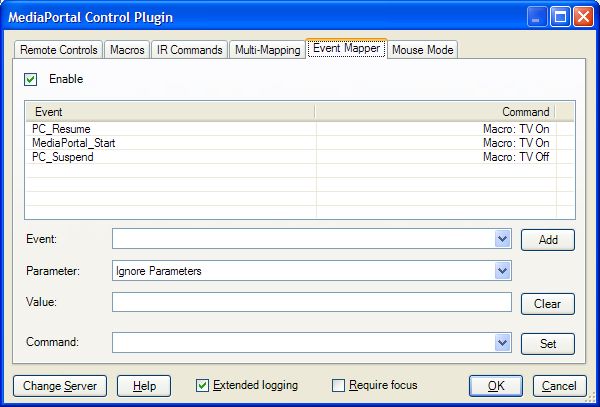
    Turns the TV on and off

    I have learnt IRSS to turns on and off the TV. My TV is LG 32LB75.
    Macros TV On.Macro turns on TV and switch input to HDMI1.
    Macros TV Off.Macro switch input to TV and turns off TV .
    Copy macros to c:\Documents and Settings\All Users\Application Data\IR Server Suite\MP Control Plugin\Macro\
    and tune events.
     

    Attachments

    • event.jpg
      event.jpg
      48.2 KB

    makryger

    New Member
    October 24, 2007
    4
    0
    I have done exactly what you requested with my own TV. I use Media Center Standby tool, which allows you to start programs when my computer turns on and off. I have it run a command prompt, that sends the proper code to the TV. My TV is a Sharp, and it lists all the available codes in the user manual. The cmd code basically sets the com port to the right setting, and sends out the code. Just two lines.

    Check out my post below for more information

    http://thegreenbutton.com/forums/thread/351200.aspx
     

    Users who are viewing this thread

    Top Bottom