United States of America
- Thread starter
- #31
Alright! All of the various bits and pieces I've been waiting on finally arrived in the mail this week, so I spent the day putting my rig into its shiny new home.
Oddly enough I didn't bother to take any photos of the case before starting work, but it's the silver version of this if you're interested: SilverStone Technology Co., Ltd - Designing Inspiration
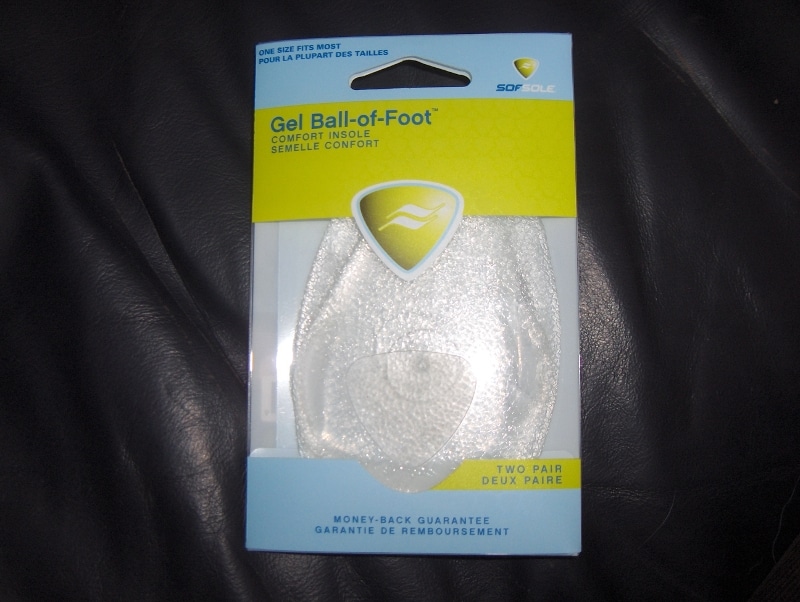
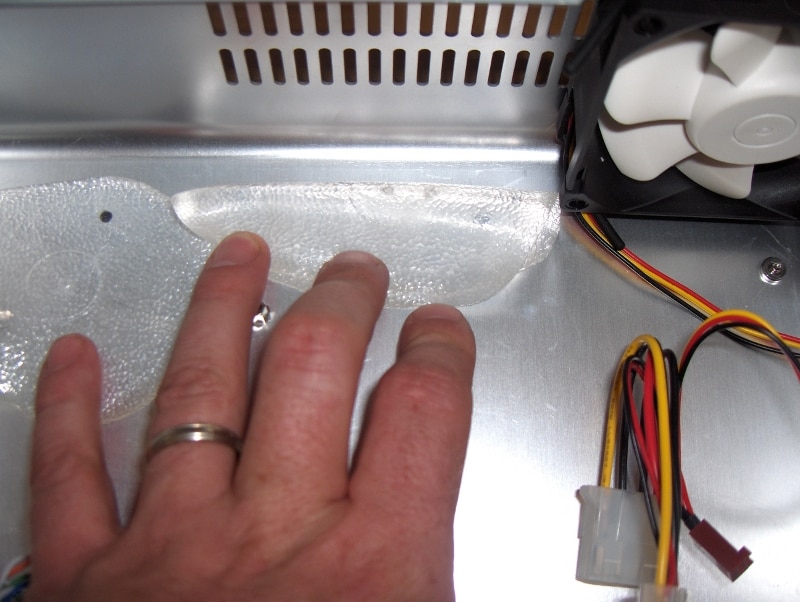
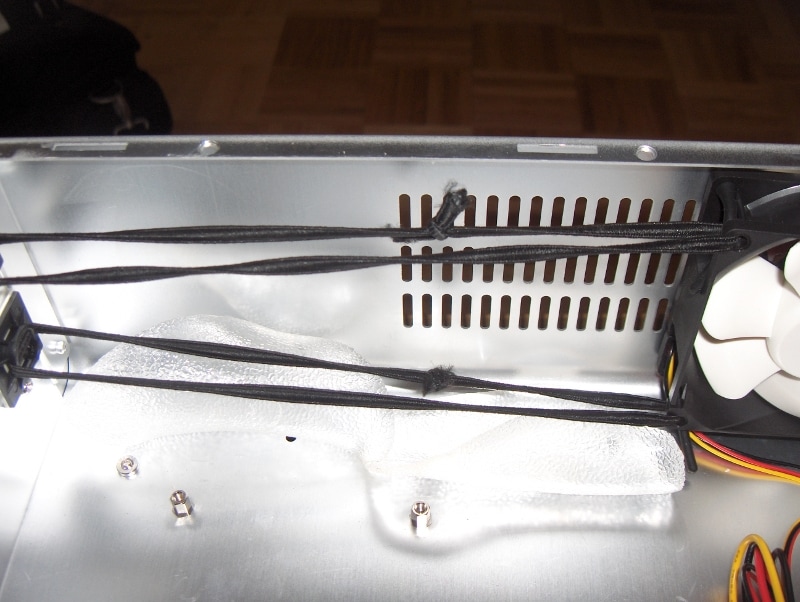
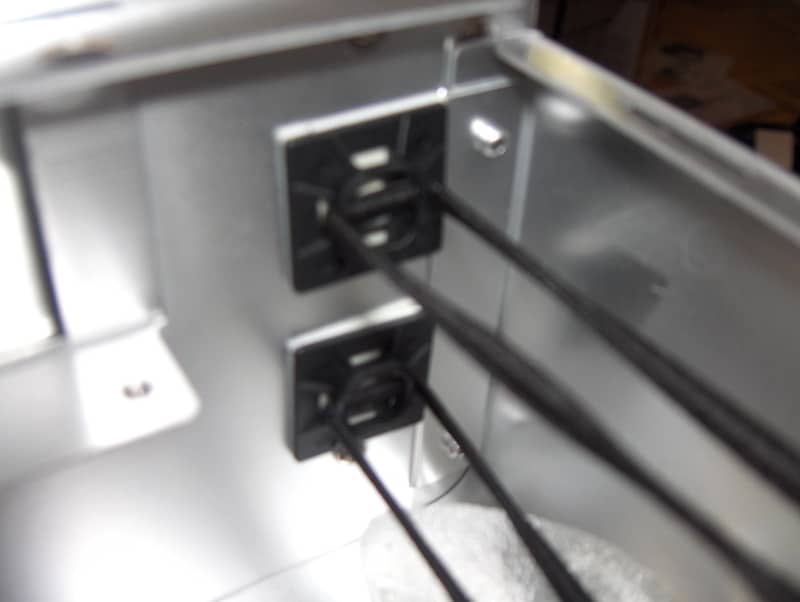
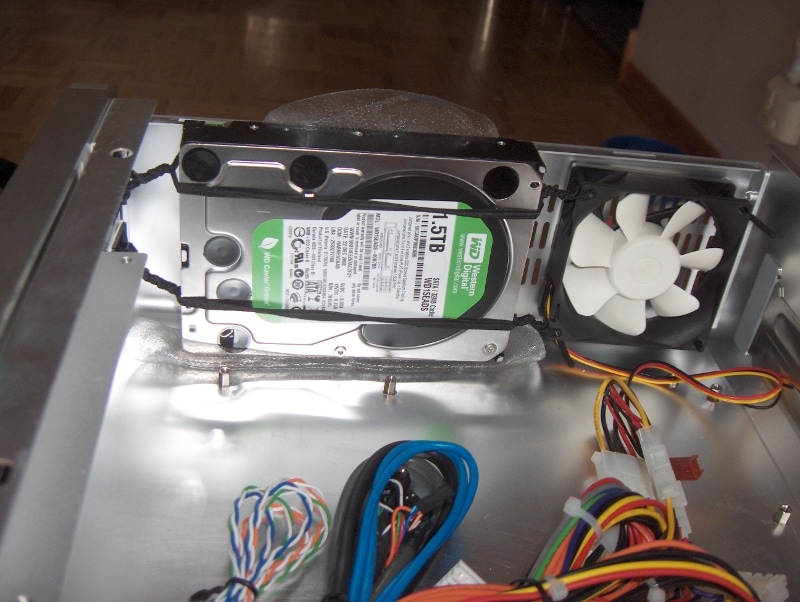
The HDD in this case is to be mounted sideways and directly to the floor, then to a little tab sticking out of the top of the case. In addition to being a pain to drive screws up through the bottom of the case, I wasn't excited about hard mounting the drive. So I found some super flexy insoles from a company called SofSole and placed a pair of them (folded over double) on the base of the case where the HDD is to rest. Instead of using the top bracket, I set up a suspension system by attaching two adhesive anchor points to the front wall of the case. Then I ran a round elastic cord through each of those points and through the unused mounting hole on the case fan at the back and tied the cords in the middle. Then after some twisting for tautness, I had a decoupled HDD system.
I was pretty unsure if this would work, but I think there is less drive noise coming from the computer now than with my old setup, which included a true suspension mount (see upthread). The 80mm Nexus fan in the back is also very quiet. A little hum if you're close to the fan and of course some wind noise when it's blowing 100%. I have found though that even turning it down to 90% with SpeedFan has a drastic effect on audibility. At that point and lower, it's very difficult to hear the fans at all.
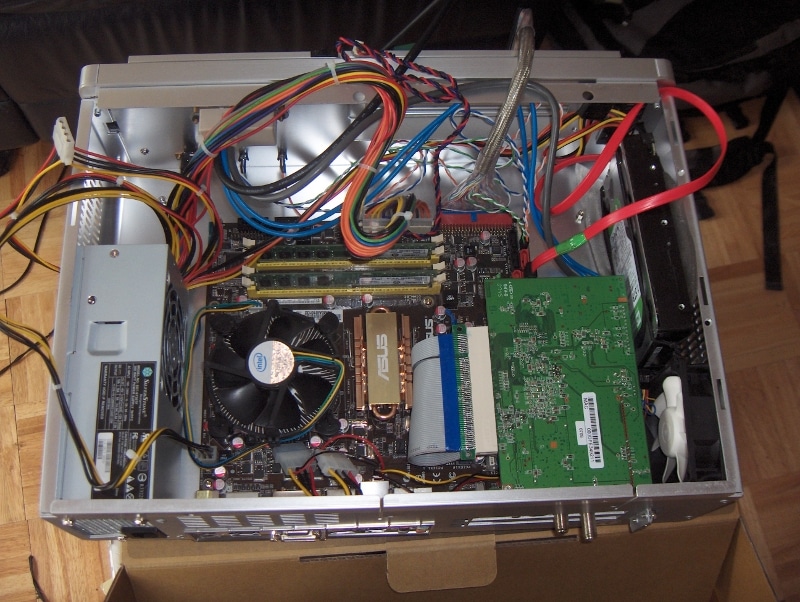
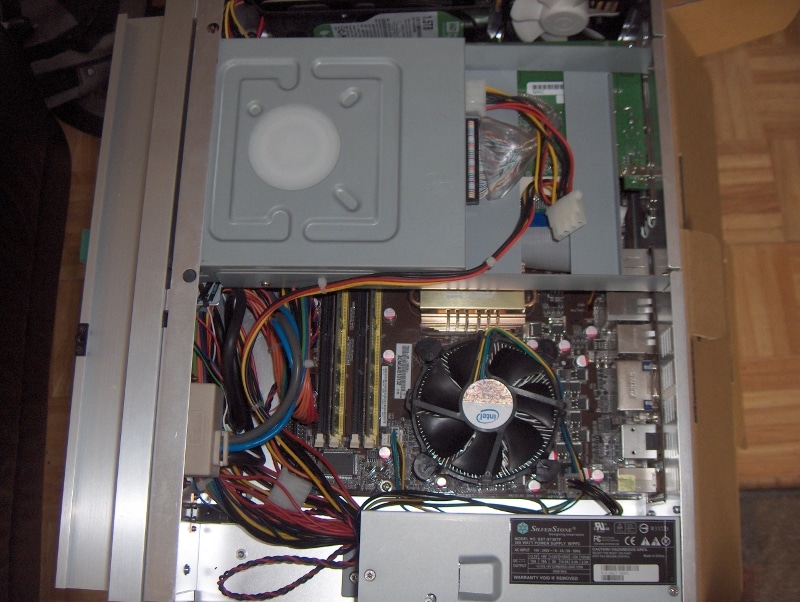
Another interesting part of this build was the PCI tuner card (Hauppauge HVR-1600). Because the case takes expansion cards sideways, a riser card is required, BUT the expansion slots also have to be in just the right place on the MoBo for this to work. Luckily this was not a surprise so I ordered a flexible PCI riser ribbon when I ordered the case. I had nightmares about all the things that could go wrong with this riser, but it was one of the easiest parts of the install. Only $10 including shipping from Hong Kong and really made this build possible! I've seen other threads where people have given up on this case altogether because of the expansion card problems but thankfully I didn't have those problems. I'm not a big fan of how much space the riser takes up, especially close to the chipset heatsink, but I'll take what I can get.
I also was able to hide the RF receiver for my keyboard inside the case. I got a dual-USB header, took it off the expansion card, attached it to the MoBo, and hid the receiver itself near a vent where it seems to receive signals fine but with less range than before. Unfortunately I was not able to continue hiding my IR receiver in this case. I'd like to find a way to get it hidden, but I think the best thing will be to go to an RF remote and I don't feel like laying out the cash for that yet.
Another special cable I bought for this build was a rounded IDE cable. I thought this would help with airflow and every little bit counts in this tiny case. In fact since the cable has to feed over the PCI card and under the 5" drive tray, the flat thin ribbon would have been easier. Oh well.
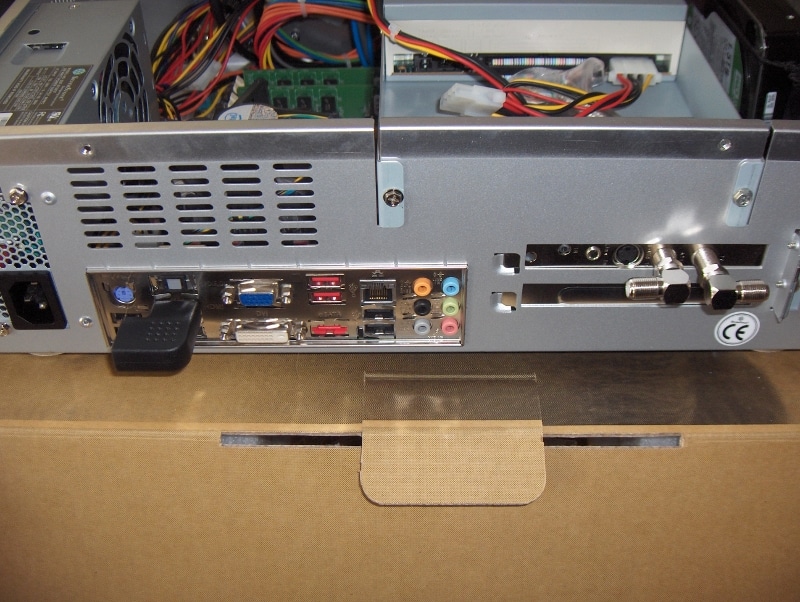
I went a little wild finding special cables; for some reason I got excited about it on this build. On the back of the computer I used two 90 degree angle Coax connectors for the TV inputs and a 90 degree HDMI input so that I can put the case as far back on its shelf as possible. I've got a shallow shelf and every mm counts at this point. What I forgot to count on was that I still had to attach the power cord and it doesn't come with a 90 degree option. Even the IR receiver's USB port cost me a couple of mm. Again, Oh well. It fits (just barely) and hopefully I can upgrade to more attractive and deeper wall furniture soon.
General observations on this case:
* Wow, it's really sexy
*But I'm a little surprised that this is almost the smallest MATX case available.
*The TFX power supply is impressively quiet. I'm not sure it makes any audible noise with the lid closed. I had considered upgrading to a PicoPSU, but now I see very little reason to do that.
*Lots of extra cables in this sucker. Way too many power connectors for a case that limits you to one OD, one HDD, and almost nothing else. Only a problem because management is a bear in the tight space and it affects airflow, thus cooling, thus noise.
*Man I like how my new case looks
*The Nexus fans are extremely quiet. Not silent of course, but close to it under 90% voltage.
*I put the second one leaning on the back of the CPU and Chipset coolers, blowing between both of them. Before I did that, temps were climbing too high.
*With the two Nexus fans, temps are staying about the same as they were in my old case.
*Space is extremely limited, but I think I may be able to fit an aftermarked CPU cooler like the Nexus LOW-7000, this should help with noise and heat but must come later.
*Sure is good looking, but I wish it had an internal IR receiver.
Oddly enough I didn't bother to take any photos of the case before starting work, but it's the silver version of this if you're interested: SilverStone Technology Co., Ltd - Designing Inspiration
The HDD in this case is to be mounted sideways and directly to the floor, then to a little tab sticking out of the top of the case. In addition to being a pain to drive screws up through the bottom of the case, I wasn't excited about hard mounting the drive. So I found some super flexy insoles from a company called SofSole and placed a pair of them (folded over double) on the base of the case where the HDD is to rest. Instead of using the top bracket, I set up a suspension system by attaching two adhesive anchor points to the front wall of the case. Then I ran a round elastic cord through each of those points and through the unused mounting hole on the case fan at the back and tied the cords in the middle. Then after some twisting for tautness, I had a decoupled HDD system.
I was pretty unsure if this would work, but I think there is less drive noise coming from the computer now than with my old setup, which included a true suspension mount (see upthread). The 80mm Nexus fan in the back is also very quiet. A little hum if you're close to the fan and of course some wind noise when it's blowing 100%. I have found though that even turning it down to 90% with SpeedFan has a drastic effect on audibility. At that point and lower, it's very difficult to hear the fans at all.
Another interesting part of this build was the PCI tuner card (Hauppauge HVR-1600). Because the case takes expansion cards sideways, a riser card is required, BUT the expansion slots also have to be in just the right place on the MoBo for this to work. Luckily this was not a surprise so I ordered a flexible PCI riser ribbon when I ordered the case. I had nightmares about all the things that could go wrong with this riser, but it was one of the easiest parts of the install. Only $10 including shipping from Hong Kong and really made this build possible! I've seen other threads where people have given up on this case altogether because of the expansion card problems but thankfully I didn't have those problems. I'm not a big fan of how much space the riser takes up, especially close to the chipset heatsink, but I'll take what I can get.
I also was able to hide the RF receiver for my keyboard inside the case. I got a dual-USB header, took it off the expansion card, attached it to the MoBo, and hid the receiver itself near a vent where it seems to receive signals fine but with less range than before. Unfortunately I was not able to continue hiding my IR receiver in this case. I'd like to find a way to get it hidden, but I think the best thing will be to go to an RF remote and I don't feel like laying out the cash for that yet.
Another special cable I bought for this build was a rounded IDE cable. I thought this would help with airflow and every little bit counts in this tiny case. In fact since the cable has to feed over the PCI card and under the 5" drive tray, the flat thin ribbon would have been easier. Oh well.
I went a little wild finding special cables; for some reason I got excited about it on this build. On the back of the computer I used two 90 degree angle Coax connectors for the TV inputs and a 90 degree HDMI input so that I can put the case as far back on its shelf as possible. I've got a shallow shelf and every mm counts at this point. What I forgot to count on was that I still had to attach the power cord and it doesn't come with a 90 degree option. Even the IR receiver's USB port cost me a couple of mm. Again, Oh well. It fits (just barely) and hopefully I can upgrade to more attractive and deeper wall furniture soon.
General observations on this case:
* Wow, it's really sexy
*But I'm a little surprised that this is almost the smallest MATX case available.
*The TFX power supply is impressively quiet. I'm not sure it makes any audible noise with the lid closed. I had considered upgrading to a PicoPSU, but now I see very little reason to do that.
*Lots of extra cables in this sucker. Way too many power connectors for a case that limits you to one OD, one HDD, and almost nothing else. Only a problem because management is a bear in the tight space and it affects airflow, thus cooling, thus noise.
*Man I like how my new case looks
*The Nexus fans are extremely quiet. Not silent of course, but close to it under 90% voltage.
*I put the second one leaning on the back of the CPU and Chipset coolers, blowing between both of them. Before I did that, temps were climbing too high.
*With the two Nexus fans, temps are staying about the same as they were in my old case.
*Space is extremely limited, but I think I may be able to fit an aftermarked CPU cooler like the Nexus LOW-7000, this should help with noise and heat but must come later.
*Sure is good looking, but I wish it had an internal IR receiver.