DirectX Error at Startup (1 Viewer)

bwbass

New Member
March 27, 2007
2
0
Home Country
United States of America United States of America
I've successfully installed MediaPortal on my desktop PC (Athlon XP 1800, 512MB ram, Nvidia Geforce 4200ti, XP Home), but on my laptop (Pentium M 1.6Ghz, 1Gb ram, Nvidia 6800 Go, XP Pro), I get this error while DirectX is initializing:
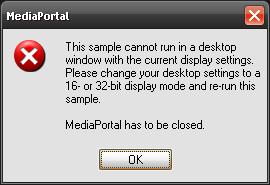
mediaportal_error.JPG

My display was set to 1440 x 900 32 bit color, but I get this same error no matter what resolution and color depth I set it to. I've tried the stable build and the latest SVN snapshot with the same results.

My MediaPortal log has this to say about the event:
Code:
2007-03-27 12:34:26.250000 [Info.][MPMain]: Main: Initializing DirectX
2007-03-27 12:34:26.296875 [Info.][MPMain]: D3D: Exception: This sample cannot run in a desktop
window with the current display settings.
Please change your desktop settings to a
16- or 32-bit display mode and re-run this
sample. MediaPortal    at MediaPortal.D3DApp.ChooseInitialSettings()
   at MediaPortal.D3DApp.CreateGraphicsSample()
Any ideas what's wrong?
 

Paranoid Delusion

Moderation Manager
  • Premium Supporter
  • June 13, 2005
    13,052
    2,978
    Cheshire
    Home Country
    United Kingdom United Kingdom
    That actually sounds like a graphics card driver not communicating correctly with DirectX.

    You may have to reinstall both the driver and DX9, do the driver first and see if that alone fixes things.

    Use driver cleaner pro (free) to clean out the old nvidia driver, pre installing new one.
     

    bwbass

    New Member
    March 27, 2007
    2
    0
    Home Country
    United States of America United States of America
    Thank you! Reinstalling the Nvidia driver did the trick!
     

    damaster

    Portal Pro
    November 23, 2007
    412
    35
    Home Country
    Canada Canada
    I had this problem with ATI Catalyst drivers, and re-installing the Catalayst drivers didn't resolve the problem. It seems that whenever MediaPortal.exe executes before the ATI Catalyst CCC.exe exectuable, this problem arises during DirectX initialization. I resolved this by writing some Perl code (compiled into an executable) that checks the system processes running and only launches MediaPortal.exe after CCC.exe is running. I modified the registry start-up run entry to now run my executable (MediaPortalLauncher.exe) instead of MediaPortal.exe.

    Works like a charm. If there's anyone else out there that's having this same issue with ATI Catalyst, let me know and I'll share my launcher executable.
     

    Jacko

    Portal Member
    January 20, 2008
    32
    0
    Manchester
    Home Country
    United Kingdom United Kingdom
    I had this problem with ATI Catalyst drivers, and re-installing the Catalayst drivers didn't resolve the problem. It seems that whenever MediaPortal.exe executes before the ATI Catalyst CCC.exe exectuable, this problem arises during DirectX initialization. I resolved this by writing some Perl code (compiled into an executable) that checks the system processes running and only launches MediaPortal.exe after CCC.exe is running. I modified the registry start-up run entry to now run my executable (MediaPortalLauncher.exe) instead of MediaPortal.exe.

    Works like a charm. If there's anyone else out there that's having this same issue with ATI Catalyst, let me know and I'll share my launcher executable.

    Can i take you up on your offer please Damaster...im having issues with this as well and i can't resolve it at all. It odd cuz my 64bit vista system running a 2600xt pcie graphics card doesn't have this problem but my 32bit vista system running the same card but agp does...i haven't been able to find a fix yet so i would really appreciate having the script you written.

    Regards
    Jacko
     

    damaster

    Portal Pro
    November 23, 2007
    412
    35
    Home Country
    Canada Canada
    Ok, you asked for it, so here it is. Instructions:
    1. Unrar the contents of the attached archive to your Media Portal installation folder (e.g. C:\Program Files\Team MediaPortal\MediaPortal)
    2. Go to your registry key HKEY_CURRENT_USER\Software\Microsoft\Windows\CurrentVersion\Run. Add a new string value called "MediaPortalLauncher" with value "C:\Program Files\Team MediaPortal\MediaPortal\MediaPortalLauncher.exe boot" (without the double-quotes please). In order for this to work correctly, make sure you haven't configured MediaPortal to launch on Windows start-up from the MediaPortal configuration.
    3. Open up MediaPortalLauncher.config from your Media Portal installation folder. Edit the properties as needed:
    - mpRootDir: This is the root directory where MediaPortal is installed. Don't change the default value here if you didn't change it during installation of MediaPortal.
    - launchMp: This just enables/disables launching of MediaPortal. This is good if you don't want to launch MediaPortal even if MediaPortalLauncher runs.
    - launchOnBoot: If you set up the registry key in step 2 correctly, then MediaPortalLauncher.exe should come up on boot-up. If you wanna temporarily disable MediaPortal launch on boot-up, just set this to false.
    - enableAero: This starts the Vista service "Desktop Window Manager Session Manager" to enable Aero, if the service isn't already started. This eliminates tearing when using EVR. Windows XP users should set this to false.
    - waitForAti: This is your solution to the race condition which leads to the DirectX initialization error. Setting this to true makes MediaPortalLauncher wait for process "CCC.exe" to be running first before launching MediaPortal.exe. For Nvidia users, I would have to make this more configurable to allow specifying any process executable to wait for. For ATI users this should work fine if you have ATI drivers installed which almost always require launching of Catalyst Control Center upon boot-up to activate the ATI drivers and DirectX.

    This has only been tested by me and it's the first time it's getting any public exposure. Send me your bug reports if you encounter any problems.
     

    Jacko

    Portal Member
    January 20, 2008
    32
    0
    Manchester
    Home Country
    United Kingdom United Kingdom
    Thanks Damaster i shall try this when i get home from work :D


    Tbh though i don't think this is my only problem....since installing the card i've had real difficulties trying to get the drivers installed correctly. I've tried the drivers on the supplied disk and have also downloaded two other later versions and still i get a error in device manager. Im using the ati 2600xt agp card as i wanted hdmi out with audio but without breaking the bank but i can't figure out what the problem is. I shall be on the amd/ati website again tonight having a butchers at what i can do to sort this out.

    Damaster - Do you know what directx version i require? I also downloaded v9 but without the correct drivers installed i can't check. I also uninstalled MP and the k-lite codec pack to see if a clean install would help, this i've had had a chance to finish yet.

    Thanks again for the help Damaster.

    Regards
    Jacko
     

    kszabo

    MP Donator
  • Premium Supporter
  • December 6, 2007
    796
    86
    Germany, Bayern
    Home Country
    Hungary Hungary
    Hi damaster!

    I have the same problem. I cannot autostart MP with Windows. But later with running CCC it works.

    I tried your launcher. But the MediaportalLauncher.config file is missing from your rar package! Can you upload it please?
     

    Jacko

    Portal Member
    January 20, 2008
    32
    0
    Manchester
    Home Country
    United Kingdom United Kingdom
    I tried your launcher. But the MediaportalLauncher.config file is missing from your rar package! Can you upload it please?

    Damaster - I've only just got round to trying your launcher and have the same problem; no config file in your .rar file. Would it be ok for you to upload it please?

    Thanks
    Jacko

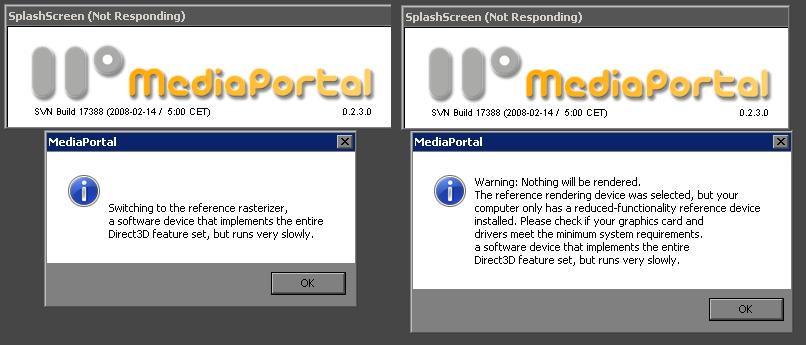
    P.S. I've attached a screen dump of the errors i get when trying to load MP...the right-hand error follows the left once i have clicked on 'ok' Then it will load a blank MP window. If i click to close MP another error comes up saying 'terminal error' and 'closed unexpectedly'
    I've also included the log files and hope these help diagnose the error as im lost as to what to do!

    Regards
     

    Attachments

    • MPerror.jpg
      MPerror.jpg
      47.2 KB

    Users who are viewing this thread

    Top Bottom