
Error locking on to only one channel, every other channel works perfectly. (1 Viewer)

RonD

Test Group
  • Team MediaPortal
  • December 20, 2011
    911
    278
    SillyValley CA
    Home Country
    United States of America United States of America
    mores369

    I'm using over the air (antenna) ATSC not cable QAM and don't have your frustrating tuning problem. There are a few things you can do to look at the tuning frequency "mm" is asking about.

    When you did the HDHR channel scan using HDHR Setup it should have saved tuning info in the following folder. This is for vista you may need to look around a bit. "C:\ProgramData\Silicondust\HDHomeRun" I have a "Digital Antenna.xml" file for ATSC, I guess you will have something similar. You can open this file with a web browser, look for your stations WMTV etc and see what frequency HDHR is using. For my ATSC system one of my channels looks like the following, I think you will have something similar for QAM.

    <Program> <Name>KPIXDT</Name> <Enabled>true</Enabled> <Modulation>8vsb</Modulation> <Frequency>563000000</Frequency> <TransportStreamID>379</TransportStreamID> <ProgramNumber>1</ProgramNumber> <GuideNumber>5.1</GuideNumber> </Program>

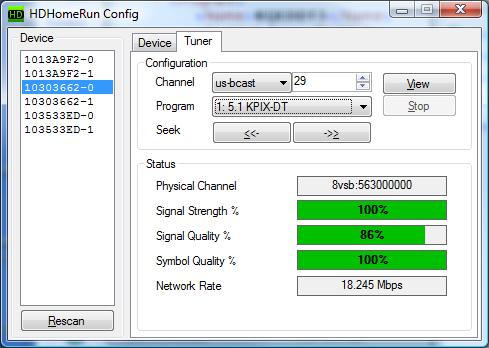
    This shows my KPIXDT uses Frequency = 563000000. When I use "HDHR Config" tool to monitor what happens when HDHR-QuickTV and MePo tune to this channel I see PhysicalChannel = 8vsb:563000000. The "8vsb" is for ATSC, I think you will see QAM. I always see the same frequency for both HDHR and MePo.

    If you try this with your system what frequency does HDHR-QuickTV use? What happens with MePo (bad and good)?
     

    Attachments

    • KPIX.jpg
      KPIX.jpg
      34.6 KB

    mm1352000

    Retired Team Member
  • Premium Supporter
  • September 1, 2008
    21,544
    8,236
    Home Country
    New Zealand New Zealand
    I note that the SiliconDust devs have told me in the past that BDA uses the analog carrier frequency rather than the center frequency, therefore the frequency that we pass is 1.75 MHz below the frequency specified in the SD channel database... as discovered on the previous page of this thread. This should be correct. For tuning cable, the full list of parameters that we pass is:
    - frequency
    - modulation
    - major channel
    - minor channel

    Physical/RF channel would be not set.

    mm
     

    rickn345

    MP Donator
  • Premium Supporter
  • December 2, 2011
    9
    3
    mores369,

    I have the same issue since MP 1.2.3. Fortunately, the HDHR QAM tuners are last on my list of 6 tuners.

    The HDHR ATSC tuners work perfectly.

    The HDHR QAM, not so perfect. Scanned using QAM Std, and the channels populated correctly with freq ( - 1750 Hz).

    Did you notice you can replicate the problem while configuring channels? Setup a none working channel with wrong freq. Select a good channel and preview, now pick the bad channel and preview ( should get error/no signal ) , now go back to the same good channel, you'll get error/no signal. Jump to a different good channel , and preview works........strange

    Notice when running HDHR config at the same time as MP channel config, HDHR config will change tuning parameters to the channel selected when the preview worked and not when the preview fails.

    The good news is recording are not affected, only Live TV. So just record everything you want to watch ;)
     

    mm1352000

    Retired Team Member
  • Premium Supporter
  • September 1, 2008
    21,544
    8,236
    Home Country
    New Zealand New Zealand

    mores369

    MP Donator
  • Premium Supporter
  • July 4, 2012
    30
    4
    45
    Home Country
    United States of America United States of America
    Unfortunately, in my case, recording is affected, as well as live TV. If MP doesn't detect the channel, HDHR doesn't show frequencies for that channel either. Some times it works, some times it doesn't. In a last ditch effort, I removed all the channels, essentially starting over, and tried scanning in STD ALT mode. Things have been stable for a half a week, so it's improving (I think, anyway). I also tried switching to ATSC as mm135200 suggested, and things seem to be okay. Time will tell.

    I love the idea of MP, but the major down side is that there seem to be dozens of options that are basically under the category of "if something's not working, try this instead." Believe, me, I'm no software developer and I probably can't comprehend how complicated this is. I wish I knew how much time I would spend on this little project before I started. Hopefully MP 1.3 and the upcoming 2 might make things easier.

    One other thing I don't understand is this - if MP has trouble using the old channel settings, as in the case of
    "2012-07-04 15:05:06.887818 [(22)]: atsc:using previous channel tuning settings", then finds good settings for the same channel, as in
    "2012-07-04 15:07:07.323706 [(22)]: atsc:using new channel tuning settings", does MP save those new settings somewhere? If I look through my logs from time to time, MP says all the time that it is using new settings. Why doesn't it remember the settings to try next time instead of using the default? Or am I reading that incorrectly?
     

    mm1352000

    Retired Team Member
  • Premium Supporter
  • September 1, 2008
    21,544
    8,236
    Home Country
    New Zealand New Zealand
    Hi mores369

    Unfortunately, in my case, recording is affected, as well as live TV.
    Yes, I would expect that - I'm surprised it doesn't affect rickn345.

    I also tried switching to ATSC as mm135200 suggested, and things seem to be okay. Time will tell.
    I suggested this because somebody reported only a week or so ago (link) that the generic network provider didn't seem to work at all for their HDHomeRun.

    I love the idea of MP, but the major down side is that there seem to be dozens of options that are basically under the category of "if something's not working, try this instead."
    I hear you. The difficulty for tuner related settings is that tuner drivers can behave so differently.

    One other thing I don't understand is this - if MP has trouble using the old channel settings, as in the case of
    "2012-07-04 15:05:06.887818 [(22)]: atsc:using previous channel tuning settings", then finds good settings for the same channel, as in
    "2012-07-04 15:07:07.323706 [(22)]: atsc:using new channel tuning settings", does MP save those new settings somewhere? If I look through my logs from time to time, MP says all the time that it is using new settings. Why doesn't it remember the settings to try next time instead of using the default? Or am I reading that incorrectly?
    I think you are reading it incorrectly (although the log message isn't exactly helpful so I don't blame you ;)). What the log is trying to say when you see "using new channel tuning settings" is that it will actually send a tune request to the hardware. When it says "using previous channel tuning settings" it is meaning that it thinks the hardware is already configured with the correct tuning settings so it doesn't need to reconfigure - this can sometimes save a second or more (tuner dependent) in tuning time.

    mm
     

    rickn345

    MP Donator
  • Premium Supporter
  • December 2, 2011
    9
    3
    Considering MP is supporting an incredible number of hardware devices which no other Win program matches, I'm very impressed with the developers.

    I switched to "ATSC" instead of "generic" on the HDHR Dual used for QAM cable. Re scanned the channels and problem SOLVED. thanks mm1352000!:)

    The HDHR Dual used for ATSC, I continue using "generic" without any problems.

    All the tuners are set to "stop"

    90% of the time the two colossus cards manage the LiveTV. ( technically not tuners )

    Hang in there mores369, MP will only get better with your support.
     

    mores369

    MP Donator
  • Premium Supporter
  • July 4, 2012
    30
    4
    45
    Home Country
    United States of America United States of America
    I also switched to ATSC and everything seems to be working great for a week now. Thanks again for everyone's help!
     

    Users who are viewing this thread

    Top Bottom