
Error - This sample cannot run in a desktop... (1 Viewer)

bwblade

New Member
January 8, 2009
1
0
Home Country
United Kingdom United Kingdom
Hi all,

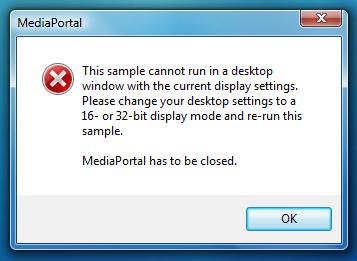
I am getting this error when launching Media Portal, i have the display set to 32bit and my pc spec is below.

Regards

MediaPortal Version: 1
Windows Version: Vista 64x
CPU Type: Quad Core 2.4 Ghz
HDD: 500Sata
Memory: 4Gb
Video Card: Gforce 8600gt
1. TV Card: Peak DVB-T Digital TV PCI Card
 

Attachments

  • Display Mode.jpg
    Display Mode.jpg
    18.6 KB

minimax

MP Donator
  • Premium Supporter
  • August 10, 2007
    19
    0
    Brno
    Home Country
    Czech Republic Czech Republic
    Hi, I have exactly the same problem. Also on Vista x64. MP is set to start with windows and I dont know why, it's starting during Windows' login-in splash screen. So I think Windows is not yet fully started and MP has no connection to display adapter. Is there any solution make startup programs load after that stupid windows splash screen?

    A few lines from log, nothing interesting:
    2009-01-15 21:57:53.959808 [Info.][MPMain]: CustomInputDefault - C:\Program Files (x86)\Team MediaPortal\MediaPortal\InputDeviceMappings\defaults
    2009-01-15 21:57:54.011808 [Info.][MPMain]: BurnerSupport - C:\Program Files (x86)\Team MediaPortal\MediaPortal\Burner
    2009-01-15 21:57:54.025808 [Info.][MPMain]: Main: Assembly creation time: 25.12.2008 15:55:57 (UTC)
    2009-01-15 21:57:54.031808 [Warn.][MPMain]: Main: MediaPortal is already running
    2009-01-15 21:58:03.044808 [Info.][MPMain]: Main: Windows Media Player version 11.0.6001.7000 installed
    2009-01-15 21:58:03.148808 [Info.][MPMain]: Main: Checking for running MediaPortal instance
    2009-01-15 21:58:03.198808 [Info.][MPMain]: Main: Deleting old log\capture.log
    2009-01-15 21:58:03.252808 [Info.][MPMain]: Main: Checking skin version
    2009-01-15 21:58:03.517808 [Info.][MPMain]: Load key mapping from C:\ProgramData\Team MediaPortal\MediaPortal\keymap.xml
    2009-01-15 21:58:03.653808 [Info.][MPMain]: Main: Init playlist player
    2009-01-15 21:58:03.654808 [Info.][MPMain]: Main: Init players
    2009-01-15 21:58:03.681808 [Warn.][MPMain]: Thumbs: MediaPortal is using highest quality thumbnail mode
    2009-01-15 21:58:03.938808 [Info.][MPMain]: D3D: Exception: This sample cannot run in a desktop
    window with the current display settings.
    Please change your desktop settings to a
    16- or 32-bit display mode and re-run this
    sample. MediaPortal v MediaPortal.D3DApp.ChooseInitialSettings()
    v MediaPortal.D3DApp.CreateGraphicsSample()

    2009-01-15 21:58:07.262808 [Info.][FilterChecker]: FilterChecker: Found TsReader.ax from 23.11.2008 located at C:\Program Files (x86)\Team MediaPortal\MediaPortal\TsReader.ax
    2009-01-15 21:58:08.531808 [Info.][FilterChecker]: FilterChecker: Found quartz.dll from 10.1.2009 located at C:\Windows\system32\quartz.dll
    2009-01-15 21:58:08.583808 [Info.][FilterChecker]: FilterChecker: Version of installed quartz.dll: 6.6.6000.16386
     

    minimax

    MP Donator
  • Premium Supporter
  • August 10, 2007
    19
    0
    Brno
    Home Country
    Czech Republic Czech Republic
    It was the firs I tried but Welcome spash screen was displaying longer, so no effect... I set 15 sec delay so it is enough, but it iritates me every time i start MP manually. A don't understand why windows starts startup programs (not services) while it is not fully in initialized... :mad:
     

    seco

    Retired Team Member
  • Premium Supporter
  • August 7, 2007
    1,575
    1,239
    Home Country
    Finland Finland
    I got the same problem when I enabled Aero: Windows startup and "Preparing desktop" takes now longer and MP tries to start but fails to that message if "Preparing desktop" is not finished. I had to set my delay to 25 seconds so that desktop is visible and MP can start.
     

    minimax

    MP Donator
  • Premium Supporter
  • August 10, 2007
    19
    0
    Brno
    Home Country
    Czech Republic Czech Republic
    Ok, but it is not THE SOLUTION... there must be a way to start MP and all other applications after desktop is prepared... I dont understand why vista starts up programs this way. It's nonsense. Why load program that can't interact with desktop?
     

    Messiahs

    Portal Pro
    December 11, 2008
    222
    106
    Home Country
    Germany Germany
    - Disable CCC.exe in autostart
    - Use a aeroDesign-background
    - use startup delay (MP Config/General/Startup Delay)
     

    mlburgoon

    Portal Pro
    November 16, 2006
    448
    48
    Home Country
    United States of America United States of America
    yep, I get the same thing. just "upgraded" to vista. I had a copy laying around and decided to give it a try. I have been trying to tweak the number of services that start when vista starts to see if I can improve the performance that way. I currently have a 15 second startup delay and don't want to go much longer than that. If I find something, I will post it for all to know.
     

    Users who are viewing this thread

    Top Bottom