
Error when recording with Restart after Standby option enabled (1 Viewer)

BigBuddha

Portal Pro
August 28, 2005
112
0
62
TV-Server Version:
MediaPortal Version: 0.2.3.0
MediaPortal Skin: Blue Two Wide
Windows Version: XP PRO SP2
CPU Type: Intel dual Core E6600
HDD: 1 x 40 GB Seagate SATA 10,000 RPM 2 X Seagate SATA 320 GB 7,200 RPM
Memory: 4GB
Motherboard: Gigabyte GA-965G-DS3
Motherboard Chipset: Intel G965
Motherboard Bios:
Video Card: Nvidia GTX 8800
Video Card Driver:
Sound Card:
Sound Card AC3: no AC3
Sound Card Driver:
1. TV Card: Dvico DVB-T Lite
1. TV Card Type: DVB-T
1. TV Card Driver: 3.62
2. TV Card:
2. TV Card Type:
2. TV Card Driver:
3. TV Card:
3. TV Card Type:
3. TV Card Driver:
4. TV Card:
4. TV Card Type:
4. TV Card Driver:
MPEG2 Video Codec: Nivida Latest Version
MPEG2 Audio Codec: Nvidia Latest Version
Satelite/CableTV Provider:
HTPC Case:
Cooling:
Power Supply:
Remote: Microsoft
TV: Hitachi
TV - HTPC Connection: D-Sub


I am getting an error when I try to record something ( if waking the computer from standby for the recording ) with the new "Restart after Standby" setting enabled. The error seems to occur when MP is restarting

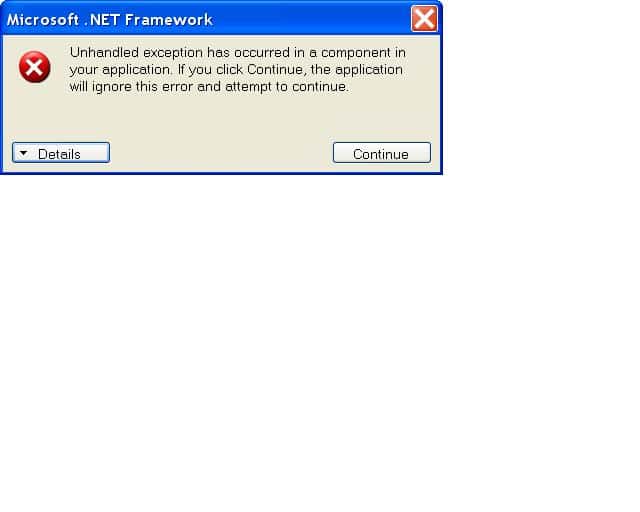
I have attached a screen grab of the error message as well as the text details of the error. I have tested thoroughly and the error does not happen with this setting disabled.

I need to use this setting otherwise I get micro stutters after standby.

Thanks,

BB
 

Attachments

  • MP_ERROR.JPG
    MP_ERROR.JPG
    23.2 KB
  • MP_ERROR.TXT
    30.6 KB

rtv

Retired Team Member
  • Premium Supporter
  • April 7, 2005
    3,622
    301
    Osnabruck
    Home Country
    Germany Germany
    Could you please set MP's log level to debug and produce a mediaportal.log containing exactly these steps?
    - schedule recording
    - standby
    - wakeup
    - crash
     

    BigBuddha

    Portal Pro
    August 28, 2005
    112
    0
    62
    Could you please set MP's log level to debug and produce a mediaportal.log containing exactly these steps?
    - schedule recording
    - standby
    - wakeup
    - crash

    The Mediapotal.log only has 3kb of data in it at the time of the crash so i have included the mediaportal.bak as well.
     

    Paranoid Delusion

    Moderation Manager
  • Premium Supporter
  • June 13, 2005
    13,052
    2,978
    Cheshire
    Home Country
    United Kingdom United Kingdom
    Hi BigBuddha

    Will need all logs, use Start\mediaportal\MPTestool after reproducing error, just use to collect all logs after testing.

    There is nothing in the MP log that helps, it just stops.

    Thanks
     

    nfox

    Portal Pro
    August 22, 2006
    163
    24
    London
    Home Country
    United Kingdom United Kingdom
    I'm not sure if this will be of any help, but I have been having the same issue (temporarily solved by turning off the option to restart MP on resume from standby), and when I click on the "Details" button in the error popup (as seen in post #1), this is what it says:

    See the end of this message for details on invoking
    just-in-time (JIT) debugging instead of this dialog box.

    ************** Exception Text **************
    System.ComponentModel.Win32Exception: The operation completed successfully
    at System.Windows.Forms.Form.UpdateLayered()
    at System.Windows.Forms.Form.OnHandleCreated(EventArgs e)
    at System.Windows.Forms.Control.WmCreate(Message& m)
    at System.Windows.Forms.Control.WndProc(Message& m)
    at System.Windows.Forms.ScrollableControl.WndProc(Message& m)
    at System.Windows.Forms.ContainerControl.WndProc(Message& m)
    at System.Windows.Forms.Form.WmCreate(Message& m)
    at System.Windows.Forms.Form.WndProc(Message& m)
    at System.Windows.Forms.Control.ControlNativeWindow.OnMessage(Message& m)
    at System.Windows.Forms.Control.ControlNativeWindow.WndProc(Message& m)
    at System.Windows.Forms.NativeWindow.Callback(IntPtr hWnd, Int32 msg, IntPtr wparam, IntPtr lparam)


    ************** Loaded Assemblies **************
    mscorlib
    Assembly Version: 2.0.0.0
    Win32 Version: 2.0.50727.1433 (REDBITS.050727-1400)
    CodeBase: file:///C:/WINDOWS/Microsoft.NET/Framework/v2.0.50727/mscorlib.dll
    ----------------------------------------
    MediaPortal
    Assembly Version: 0.2.3.17392
    Win32 Version: 0.2.2.9993
    CodeBase: file:///C:/Program%20Files/Team%20MediaPortal/MediaPortal/mediaportal.exe
    ----------------------------------------
    System.Windows.Forms
    Assembly Version: 2.0.0.0
    Win32 Version: 2.0.50727.1433 (REDBITS.050727-1400)
    CodeBase: file:///C:/WINDOWS/assembly/GAC_MSIL/System.Windows.Forms/2.0.0.0__b77a5c561934e089/System.Windows.Forms.dll
    ----------------------------------------
    System
    Assembly Version: 2.0.0.0
    Win32 Version: 2.0.50727.1433 (REDBITS.050727-1400)
    CodeBase: file:///C:/WINDOWS/assembly/GAC_MSIL/System/2.0.0.0__b77a5c561934e089/System.dll
    ----------------------------------------
    System.Drawing
    Assembly Version: 2.0.0.0
    Win32 Version: 2.0.50727.1433 (REDBITS.050727-1400)
    CodeBase: file:///C:/WINDOWS/assembly/GAC_MSIL/System.Drawing/2.0.0.0__b03f5f7f11d50a3a/System.Drawing.dll
    ----------------------------------------
    Microsoft.DirectX.Direct3D
    Assembly Version: 1.0.2902.0
    Win32 Version: 9.05.132.0000
    CodeBase: file:///C:/Program%20Files/Team%20MediaPortal/MediaPortal/Microsoft.DirectX.Direct3D.DLL
    ----------------------------------------
    Core
    Assembly Version: 0.2.3.17392
    Win32 Version: 0.2.2.9993
    CodeBase: file:///C:/Program%20Files/Team%20MediaPortal/MediaPortal/Core.DLL
    ----------------------------------------
    Utils
    Assembly Version: 2.2.4.17392
    Win32 Version: 0.2.2.9993
    CodeBase: file:///C:/Program%20Files/Team%20MediaPortal/MediaPortal/Utils.DLL
    ----------------------------------------
    System.ServiceProcess
    Assembly Version: 2.0.0.0
    Win32 Version: 2.0.50727.1433 (REDBITS.050727-1400)
    CodeBase: file:///C:/WINDOWS/assembly/GAC_MSIL/System.ServiceProcess/2.0.0.0__b03f5f7f11d50a3a/System.ServiceProcess.dll
    ----------------------------------------
    System.Configuration
    Assembly Version: 2.0.0.0
    Win32 Version: 2.0.50727.1433 (REDBITS.050727-1400)
    CodeBase: file:///C:/WINDOWS/assembly/GAC_MSIL/System.Configuration/2.0.0.0__b03f5f7f11d50a3a/System.Configuration.dll
    ----------------------------------------
    RemotePlugins
    Assembly Version: 0.2.3.17392
    Win32 Version: 0.2.2.9993
    CodeBase: file:///C:/Program%20Files/Team%20MediaPortal/MediaPortal/RemotePlugins.DLL
    ----------------------------------------
    System.Xml
    Assembly Version: 2.0.0.0
    Win32 Version: 2.0.50727.1433 (REDBITS.050727-1400)
    CodeBase: file:///C:/WINDOWS/assembly/GAC_MSIL/System.Xml/2.0.0.0__b77a5c561934e089/System.Xml.dll
    ----------------------------------------
    MediaPortal.Support
    Assembly Version: 0.2.3.17392
    Win32 Version: 0.2.2.17392
    CodeBase: file:///C:/Program%20Files/Team%20MediaPortal/MediaPortal/MediaPortal.Support.DLL
    ----------------------------------------

    ************** JIT Debugging **************
    To enable just-in-time (JIT) debugging, the .config file for this
    application or computer (machine.config) must have the
    jitDebugging value set in the system.windows.forms section.
    The application must also be compiled with debugging
    enabled.

    For example:

    <configuration>
    <system.windows.forms jitDebugging="true" />
    </configuration>

    When JIT debugging is enabled, any unhandled exception
    will be sent to the JIT debugger registered on the computer
    rather than be handled by this dialog box.


    It means nothing to me, and may be of no interest, but hopefully it will be of some help.

    Neil
     

    Users who are viewing this thread

    Top Bottom