Eurosport HD and History HD problem (1 Viewer)

limpwhizkid

Retired Team Member
  • Premium Supporter
  • February 22, 2008
    573
    77
    on your IPC$
    Home Country
    Netherlands Netherlands
    Hi there,

    It seems i have exact the same problem here. Not only with eurosport and history HD, but the new Nederland 1, 2 and 3 HD on ZIggo also give me only the left top corner....

    Anyone who as fixed this???

    Gr.

    Pieter
    hello Pieter,

    maybe we can work together a bit to figure it out ?

    What kind of codecs do you use for example ?

    It seems that tv part of mediaportal codec setup is ignored, and only the video codec setup is used in my opinion .. can you confirm that ?

    Do you have multiseat setup ?
     

    limpwhizkid

    Retired Team Member
  • Premium Supporter
  • February 22, 2008
    573
    77
    on your IPC$
    Home Country
    Netherlands Netherlands
    Well.. found this list:


    Codec
    Eurosport HD 11.1 mbps h.264
    HD09 (Nederland 1 HD test) 11.3 mbps h.264
    History Channel HD 12.3 mbps h.264
    Sport 1 HD 14.4 mbps h.264
    Brava HD Promo 9.3 mbps h.264
    NGC HD 13.9 mbps h.264
    HD NL 8.75 mbps h.264
    Discovery HD 20.6 mbps MPEG2
    Film1 HD 13.8 mbps h.264

    the only channel working for me is the MPEG2 channel .. so there must be something wrong with Coreavc I think..

    is it the same for you ? only discovery is working ?
     

    limpwhizkid

    Retired Team Member
  • Premium Supporter
  • February 22, 2008
    573
    77
    on your IPC$
    Home Country
    Netherlands Netherlands
    Woohoo... got it working...

    only Coreavc 1.9.5 (FIVE) is working on those channels..

    everything fine now!! so not a MP bug.. !
     

    limpwhizkid

    Retired Team Member
  • Premium Supporter
  • February 22, 2008
    573
    77
    on your IPC$
    Home Country
    Netherlands Netherlands
    hmmm same configuration with coreavc 1.9.5 on a different computer is not working..
    same problem .. only difference is its vista servicepack 2.. and on the working machine its servicepack 1..
     

    limpwhizkid

    Retired Team Member
  • Premium Supporter
  • February 22, 2008
    573
    77
    on your IPC$
    Home Country
    Netherlands Netherlands
    GOT the solution ..

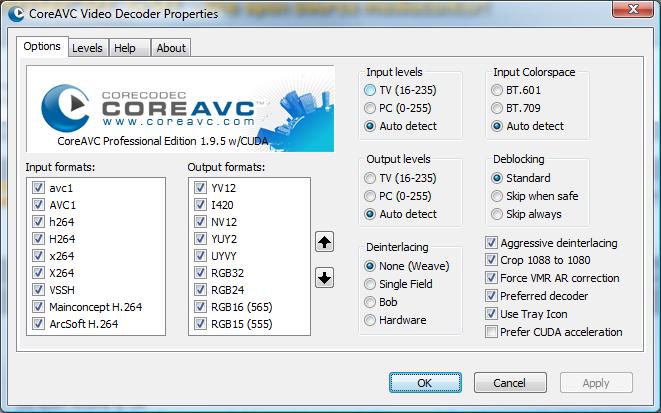
    you have to make some changes to the coreavc codec settings..

    If you set them as I have it should work .. (see attachment)
    got it working on 3 machines now.. and watching Netherlands 3 in HD.. History channel in HD etc.. no problem anymore..
    (only there is no EPG) but that not a biggie.. ;) will check that out later..
     

    Attachments

    • coreavc settings.jpg
      coreavc settings.jpg
      57.3 KB

    cornetje

    Portal Member
    February 14, 2009
    7
    1
    It works here for me!

    Thnx for your information.
    :D

    It works for me now. Nederland 1 HD works, still trying to configure MediaPoartal TV server for Ziggo Nederland 2 and 3 on HD, but that is anothe issue :oops:

    I only question the quality of HD. It seems that the image is not as clear as Discovery HD, but i'll try to modify some settings in CoreAV.... I see some flickering while tooking at the Tour....

    anyway, switching tot History Channel and so on works fine now.

    Thanks again!

    Pieter
     

    limpwhizkid

    Retired Team Member
  • Premium Supporter
  • February 22, 2008
    573
    77
    on your IPC$
    Home Country
    Netherlands Netherlands
    Thnx for your information.
    :D

    It works for me now. Nederland 1 HD works, still trying to configure MediaPoartal TV server for Ziggo Nederland 2 and 3 on HD, but that is anothe issue :oops:

    I only question the quality of HD. It seems that the image is not as clear as Discovery HD, but i'll try to modify some settings in CoreAV.... I see some flickering while tooking at the Tour....

    anyway, switching tot History Channel and so on works fine now.

    Thanks again!

    Pieter

    can fix that for you 2... ;)

    Downloaded the latest channel file , and choose your location ..
    https://forum.team-mediaportal.com/attachments/epg-grabbers-tuningdetails-296/42932d1246643760-updated-ziggo-tuning-parameters-tuningparameters_the-netherlands-ziggo_0307.zip

    overwrite it on this location : Program Files/Team Mediaportal/MediaPortal TV Server/TuningParameters/

    And do a new scan .. you should have them all ;)
     

    limpwhizkid

    Retired Team Member
  • Premium Supporter
  • February 22, 2008
    573
    77
    on your IPC$
    Home Country
    Netherlands Netherlands
    GOT the solution ..

    you have to make some changes to the coreavc codec settings..
    With Deinterlacing set to "none", 1080i channels will look horrible?

    could be... i just messed around till I got it working..

    still messing around now to get it better..

    The option that made it work seems to be the Force VMR Ar correction, so you can set the rest to whatever you want or looks the best for you ;)
     

    Users who are viewing this thread

    Top Bottom