- October 28, 2007
- 30
- 0
Just upgraded to RC1 from 2.3
Everything is ok so far,
I never bothered with transfering any of the settings just removed 2.3 and did a clean install of 1.
Only thing I did forget, All my music is saved as wav files, on the hard drive in the folder structure
Artist/Album/Filename(track)
I also have the album art for each album saved as a jpeg in the album folder,
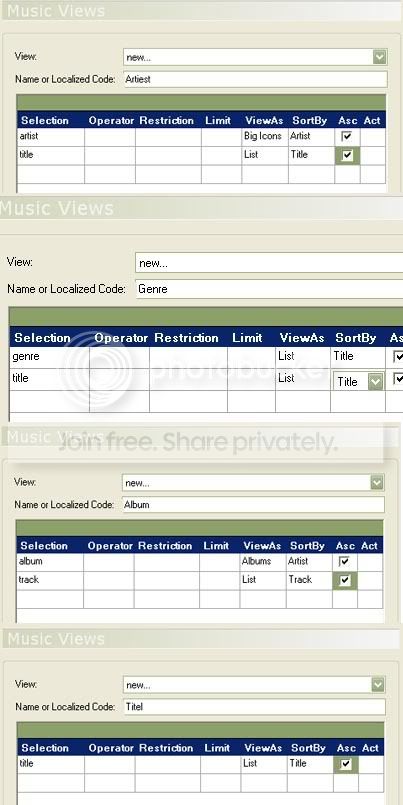
Now, when I go into 'my music' I want all the artists to show in list view,
Then, when I click on a artist I want the albums to come up in film strip view.
I can do this manually by selecting the list view in config and then click into each artist on the list and chose filmstrip.
This is how I did it before but it took me hours . Now I have a few thousand lbums so just wondered if it is possible to do a mass change on lower level folders?
Cheers!
TV-Server Version:
MediaPortal Version: 2.3RC3
MediaPortal Skin: X-Face
Windows Version: XP Pro Sp2
CPU Type: AMD 4600+ Dual Core 2.4GHZ
HDD: 250GB Sata 300 / 500GB Sata 300
Memory: 2GB (2x1GB) PC4000
Motherboard: Abit AN8 32x
Video Card: 2 x BFG 7600GT OC 256MB
Video Card Driver: Nvidia
Sound Card: Abit Optical Out
Sound Card AC3:
Sound Card Driver:
1. TV Card: Black Gold GDI3520 Dual-Tuner
1. TV Card Type: DVB-T / Analog
1. TV Card Driver:
2. TV Card: Black Gold GDI3520 Dual-Tuner (Quad Configeration)
2. TV Card Type: DVB-T / Analog
2. TV Card Driver:
3. TV Card:
3. TV Card Type:
3. TV Card Driver:
4. TV Card:
4. TV Card Type:
4. TV Card Driver:
MPEG2 Video Codec:
MPEG2 Audio Codec:
h.264 Video Codec:
Satelite/CableTV Provider:
HTPC Case: Thermaltake Bach
Cooling: Fans
Power Supply: Thermaltake Toughpower
Remote: iMon
TV: Panasonic TH37PW5B 37" Plasma Display
TV - HTPC Connection: VGA / Component
Everything is ok so far,
I never bothered with transfering any of the settings just removed 2.3 and did a clean install of 1.
Only thing I did forget, All my music is saved as wav files, on the hard drive in the folder structure
Artist/Album/Filename(track)
I also have the album art for each album saved as a jpeg in the album folder,
Now, when I go into 'my music' I want all the artists to show in list view,
Then, when I click on a artist I want the albums to come up in film strip view.
I can do this manually by selecting the list view in config and then click into each artist on the list and chose filmstrip.
This is how I did it before but it took me hours . Now I have a few thousand lbums so just wondered if it is possible to do a mass change on lower level folders?
Cheers!
TV-Server Version:
MediaPortal Version: 2.3RC3
MediaPortal Skin: X-Face
Windows Version: XP Pro Sp2
CPU Type: AMD 4600+ Dual Core 2.4GHZ
HDD: 250GB Sata 300 / 500GB Sata 300
Memory: 2GB (2x1GB) PC4000
Motherboard: Abit AN8 32x
Video Card: 2 x BFG 7600GT OC 256MB
Video Card Driver: Nvidia
Sound Card: Abit Optical Out
Sound Card AC3:
Sound Card Driver:
1. TV Card: Black Gold GDI3520 Dual-Tuner
1. TV Card Type: DVB-T / Analog
1. TV Card Driver:
2. TV Card: Black Gold GDI3520 Dual-Tuner (Quad Configeration)
2. TV Card Type: DVB-T / Analog
2. TV Card Driver:
3. TV Card:
3. TV Card Type:
3. TV Card Driver:
4. TV Card:
4. TV Card Type:
4. TV Card Driver:
MPEG2 Video Codec:
MPEG2 Audio Codec:
h.264 Video Codec:
Satelite/CableTV Provider:
HTPC Case: Thermaltake Bach
Cooling: Fans
Power Supply: Thermaltake Toughpower
Remote: iMon
TV: Panasonic TH37PW5B 37" Plasma Display
TV - HTPC Connection: VGA / Component

 Netherlands