
firedtv-c (1 Viewer)

Lotsofjazz

MP Donator
  • Premium Supporter
  • January 7, 2008
    462
    42
    Home Country
    Netherlands Netherlands
    Thx i,am gonna try it again and hopely i finaly get it work
    But please can you explain me how i must write this RTL 8 TV (1) 6004 * * or this what is standing below 13 626.00 into this 170000,64QAM,6875000 i think that i must use the settings below 13 626.00 but which one of the four the 500, 2222, 5555 or the 8888 is for Utrecht
    And i think the easiest way for doing this I advise you to read some wiki's here about configuring TV server, because you must delete the current SQL database first to prevent double entries and such. Note that if you use Vista you must open the SQL managing software as Administrator, otherwise it will not let you delete the database... How this has to be done, see the Wiki's on the mediaportal website, there are several types of SQL managing software you an use so , a bit difficult to explain here how to do that. is delete evrything install erything again and put mine new dvbc file in the right map and then configure TV server configuration

    Read this.. no, LEARN this:

    TV-Server - MediaPortal Manual Documentation

    especialy take a close look at chapter 2. it will learn you how to work with the SQL server, because i really think your tv database is messed up (happens when you do multiple scans quickly after each other)

    for building the dvbc file,

    After some surfing and reading the website of digitalekabeltelevisie.nl I am pretty sure you must take the list under 5555 "Ziggo digitale televisie" which is is still the same as the list you posted(please check carefully, maybe one or two are different, I have just looked at it quickly). So I think your dvbc file is correct for the most part, so it is strange you see only one channel.. Which again brings me to the conclusion your database is messed up.

    Could you please also check with Firedtv Support Tool(start>firedtv>Tools>firedtv support tool) the BER and signal strength? BER should be 0 and signal strength above 75% If not, I think your COAX from the 'meterkast' to the outlet near your TV is bad and/or the coax plugs in the 'meterkast' are of poor quality.

    One last stupid question, you do pay your subscription for your ziggo smart cards right? As All channels are scrambled, and some channels remain scrambled becasue they are in special packages (like the HD package with History Channel HD NGC HD and Discovery HD)

    Lots
     

    xallias

    Portal Member
    November 7, 2008
    36
    0
    Home Country
    Netherlands Netherlands
    Hello sorry for the delayed response, but I was a little tired of all that searching.
    I also have my computer re-installed hoping that it would go.
    This afternoon I put an antenna amplifier between them and this does not help also.
    I also installed the new media portal, and this does not helped also.
    I installed mediaportal and the server using the wiki
    My cards are valid and I pay just my abbonement.
    Below are my Everywhere Digital Support Report.
    What is strange is that sometimes one card is 100% and then the other while I did not change.
    But it remains the same as I scan in The Netherlands Casema he believes all channels on a cam but only on the channel station is green and the other cam course gives nothing.
    I do have in the configuration of cams cam enabled the option checked.

    I hope some one can help me

    ------------------------------------------------------------------------------
    Digital Everywhere Support Report: v1.1 (2279-0)
    -------------------------------------------------------------------------------
    Generated on (Y/M/d): 2008.12.14

    FireDTV / FloppyDTV devices:
    -------------------------------------------------------------------------------
    devices found: 2

    Status for device 1
    Model : FloppyDTV C/CI
    GUID : 0x0012872602002647
    HW Ver.: 00.00.00
    FW Ver.: 0.0.0 Build 0
    Driver : 4.8.1

    Frontend Status:
    Frequency.: 205488 kHz, Sig.Str.: 0%, BER: 65526
    Locked : NO

    CAM Module:

    Status for device 2
    Model : FloppyDTV C/CI
    GUID : 0x0012872602002306
    HW Ver.: 01.26.02
    FW Ver.: 2.4.0 Build 51440
    Driver : 4.8.1

    Frontend Status:
    Frequency.: 388000 kHz, Sig.Str.: 100%, BER: 0
    Locked : YES

    CAM Module: AlphaCrypt

    Windows System Information:
    -------------------------------------------------------------------------------
    OS Path: C:\Windows

    OS Version:
    Microsoft Windows Vista, Service Pack 1 (Build: 6001)

    OHCI Controller:
    Manufacturer: Texas Instruments
    Description: Texas Instruments OHCI Compliant IEEE 1394 Host Controller

    MCE Plugin:
    -------------------------------------------------------------------------------
    No Plugin Version found!
    No Service found!
    Program files path: 'C:\Program Files'


    FireDTV Transponder List:
    -------------------------------------------------------------------------------
    Transponder List found:
    Cable

    FireDTV Tools:
    -------------------------------------------------------------------------------
    No running FireDTV tools found
     

    henk99

    Portal Pro
    October 7, 2008
    167
    3
    Home Country
    Netherlands Netherlands
    Hi,

    One thing i see is that card #1 has no cam detected. Maybe, there is something wrong with that card? I have had a problem where my firedtv didn't see my alphacrypt. It was tested at the shop and turned out to be an error in the card. They gave me a new firedtv and all worked well after that.

    Maybe just test with one card first? ( the one that has detected the alphacrypt...)
     

    Lotsofjazz

    MP Donator
  • Premium Supporter
  • January 7, 2008
    462
    42
    Home Country
    Netherlands Netherlands
    Yep, with the first card also HW and FW not detected as everything is on zero.. So the first FloppyDTV is not working, or not connected properly.

    Remove that first card and try again.

    You know you MUST have a second smartcard and alphacrypt, right? You can get a second smartcard with reduced price with ziggo. It is impossible to operate both cards on one set of smartcard and CAM.

    Lots
     

    xallias

    Portal Member
    November 7, 2008
    36
    0
    Home Country
    Netherlands Netherlands
    Hello thanks for responding but i have 2 alphacrypts and two ziggo cards but the strange thing is that firedtv and mediaportal find both cards but for some strange reason the firedtv tools give me each time a different result. i haven,t change nothing with the last report but now the report gives me this

    -------------------------------------------------------------------------------
    Digital Everywhere Support Report: v1.1 (2279-0)
    -------------------------------------------------------------------------------
    Generated on (Y/M/d): 2008.12.15

    FireDTV / FloppyDTV devices:
    -------------------------------------------------------------------------------
    devices found: 2

    Status for device 1
    Model : FloppyDTV C/CI
    GUID : 0x0012872602002647
    HW Ver.: 01.26.02
    FW Ver.: 2.4.0 Build 51440
    Driver : 4.8.1

    Frontend Status:
    Frequency.: 268496 kHz, Sig.Str.: 100%, BER: 0
    Locked : YES

    CAM Module: AlphaCrypt

    Status for device 2
    Model : FloppyDTV C/CI
    GUID : 0x0012872602002306
    HW Ver.: 01.26.02
    FW Ver.: 2.4.0 Build 51440
    Driver : 4.8.1

    Frontend Status:
    Frequency.: 170000 kHz, Sig.Str.: 0%, BER: 16160
    Locked : NO

    CAM Module: AlphaCrypt

    Windows System Information:
    -------------------------------------------------------------------------------
    OS Path: C:\Windows

    OS Version:
    Microsoft Windows Vista, Service Pack 1 (Build: 6001)

    OHCI Controller:
    Manufacturer: Texas Instruments
    Description: Texas Instruments OHCI Compliant IEEE 1394 Host Controller

    MCE Plugin:
    -------------------------------------------------------------------------------
    No Plugin Version found!
    No Service found!
    Program files path: 'C:\Program Files'


    FireDTV Transponder List:
    -------------------------------------------------------------------------------
    Transponder List found:
    Cable

    FireDTV Tools:
    -------------------------------------------------------------------------------
    No running FireDTV tools found

    So you can see now that mine first cam is 100 % and mine second cam is 0 %
    I hope you understand this and now the answer.

    With the best regards

    5 minutes later i have a new personel record mine new list

    ------------------------------------------------------------------------------
    Digital Everywhere Support Report: v1.1 (2279-0)
    -------------------------------------------------------------------------------
    Generated on (Y/M/d): 2008.12.15

    FireDTV / FloppyDTV devices:
    -------------------------------------------------------------------------------
    devices found: 2

    Status for device 1
    Model : FloppyDTV C/CI
    GUID : 0x0012872602002647
    HW Ver.: 01.26.02
    FW Ver.: 2.4.0 Build 51440
    Driver : 4.8.1

    Frontend Status:
    Frequency.: 268496 kHz, Sig.Str.: 100%, BER: 0
    Locked : YES

    CAM Module: AlphaCrypt

    Status for device 2
    Model : FloppyDTV C/CI
    GUID : 0x0012872602002306
    HW Ver.: 01.26.02
    FW Ver.: 2.4.0 Build 51440
    Driver : 4.8.1

    Frontend Status:
    Frequency.: 170000 kHz, Sig.Str.: 100%, BER: 0
    Locked : YES

    CAM Module: AlphaCrypt

    Windows System Information:
    -------------------------------------------------------------------------------
    OS Path: C:\Windows

    OS Version:
    Microsoft Windows Vista, Service Pack 1 (Build: 6001)

    OHCI Controller:
    Manufacturer: Texas Instruments
    Description: Texas Instruments OHCI Compliant IEEE 1394 Host Controller

    MCE Plugin:
    -------------------------------------------------------------------------------
    No Plugin Version found!
    No Service found!
    Program files path: 'C:\Program Files'


    FireDTV Transponder List:
    -------------------------------------------------------------------------------
    Transponder List found:
    Cable

    FireDTV Tools:
    -------------------------------------------------------------------------------
    No running FireDTV tools found

    both cams are now 100 %
    The onley thing i did was change the card.
    now find out why and find out why all mine channels are black.
    i didt four new scans with cams enabled and with alphacrypt 2.
    but it is still the shame 163 channels only zenderoverzicht is green and the rest is black.
    But i don`t now if i first muss remove the channellist or not and if it is yes how do i do that.

    and still thanks to you guys
     

    Lotsofjazz

    MP Donator
  • Premium Supporter
  • January 7, 2008
    462
    42
    Home Country
    Netherlands Netherlands
    Did you also try to use only one card?

    It seems you have a antenna signal problem, it could be too weak to support two cards the same time.

    With one card, if you scan the channels in mediaportal, are the indicators (green bars) at or near 100% ?

    Now it seems that one card sucks up all antenna signal power.

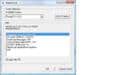
    Also check the settings of the CI module as follows

    Start>Firedtv>tools>CI Common Interface>select line 'Module Options'click OK

    Set it as shown in the attached screenshot, bij clicking on a line(select) and then click OK, repeat as many times as necessary to get the correct setting. When everything correct, select Quit and OK as many times as necessary to close the program. I have also Ziggo, and with these settings it seems to work best in my system

    I would try to get one floppyDTV card working first (Device nr 2 seems to work correctly) and then add the second card and set everything the same for that one.

    You allready used an antenna ampifier, right? Is it one with two TV antenna exits? Place it as close as possible to your computer keeping the COAX cables from the amp to the floppyDT'V's as short as possible. Use one exit for each FloppyDTV, so do not use a splitter behind one exit. Also, if you haven't done allready, replace all plastick covered coax plugs, with all metal shielded plugs, also check the plug in the meterkast(utility cabinet).. these plastick plugs are notorius as entrance for signal distortion.. its only 10 euro's max to get this right.

    You must get it working OK, It works with me so why not with you.

    Don't give up!

    Lots
     

    Attachments

    • CIscreenshot.jpg
      CIscreenshot.jpg
      28.8 KB

    xallias

    Portal Member
    November 7, 2008
    36
    0
    Home Country
    Netherlands Netherlands
    Did you also try to use only one card?

    It seems you have a antenna signal problem, it could be too weak to support two cards the same time.

    With one card, if you scan the channels in mediaportal, are the indicators (green bars) at or near 100% ?

    Now it seems that one card sucks up all antenna signal power.

    Also check the settings of the CI module as follows

    Start>Firedtv>tools>CI Common Interface>select line 'Module Options'click OK

    Set it as shown in the attached screenshot, bij clicking on a line(select) and then click OK, repeat as many times as necessary to get the correct setting. When everything correct, select Quit and OK as many times as necessary to close the program. I have also Ziggo, and with these settings it seems to work best in my system

    I would try to get one floppyDTV card working first (Device nr 2 seems to work correctly) and then add the second card and set everything the same for that one.

    You allready used an antenna ampifier, right? Is it one with two TV antenna exits? Place it as close as possible to your computer keeping the COAX cables from the amp to the floppyDT'V's as short as possible. Use one exit for each FloppyDTV, so do not use a splitter behind one exit. Also, if you haven't done allready, replace all plastick covered coax plugs, with all metal shielded plugs, also check the plug in the meterkast(utility cabinet).. these plastick plugs are notorius as entrance for signal distortion.. its only 10 euro's max to get this right.

    You must get it working OK, It works with me so why not with you.

    Don't give up!

    Lots
    Thanks again for responding

    I also believe it is an antenne problem because now floppy1 is 100% and floppy2 is 0%
    But yesterday when i have both 100% the signal in mediaportal was also 100% each.
    Only i have mine two cards near each other so there is not much space between them iàm gonna chance that one of this days.
    And i looked in the module and change it the way you said.
    Mine anplifer has 6 tv outs i use 2 of them mine cables are at least 1,5 meter.
    And iàm gonna look for the plastic covers.

    So i won`t give up {but some times i want to throw mine htpc out of the window}:):)

    Latest news i refresht mine tools and it is unbelieveble they are both 100% in the tools but in mediaportal only cam2 has a signal i think i need a cam whisperer

    with the best regards
     

    Lotsofjazz

    MP Donator
  • Premium Supporter
  • January 7, 2008
    462
    42
    Home Country
    Netherlands Netherlands
    1.5 meter for the coax between the amp and floppydtv cards is OK.

    putting the cards a bit apart might be a good idea as well, as those HF modules might influencing eachother. None the less I think you still should try to get it working with one card first, because then you know for sure it is not mediaportal or the rest of your system, and then add the second card, copying the same settings from the first one.

    One little odd thing you might try is the following. Since you use an Antenna amplifier, it might be that the signal is TOO STRONG!! I have a little knob on my amplifier where I can adjust the antenna output, if your amplifier also has a knob, try to set it just in the middle in stead of turning it fully open. If the signal is so strong it could blow away the signal of the second card or they just distort eachother too much.

    Hmm, we are getting there..

    Lots
     

    xallias

    Portal Member
    November 7, 2008
    36
    0
    Home Country
    Netherlands Netherlands
    thanks again
    I have removed one firedtv from mine comp.
    After this i cleared the list and i scanned al the channela again with al the 3 options under tv-servers /comp/edit, and with every of this options he found 163 channels but only one 1 channel {zenderoverzicht} is green.
    After this i have turn the amplifer to the half and set the firedtv under tv-servers /comp/edit on cam enabled,grab epg and Allow this card to preload, and clear mine channellist and scan again, with the shame results as before.
    I took some pics of mine module and load them on this page, i hope you can do something with
     

    Users who are viewing this thread

    Top Bottom