
[Approved] Fix for Mantis 2866: Visiblechange animations not processing reverse animations (1 Viewer)

robyf

Retired Team Member
  • Premium Supporter
  • June 20, 2005
    1,076
    278
    54
    Bolzano
    Home Country
    Italy Italy
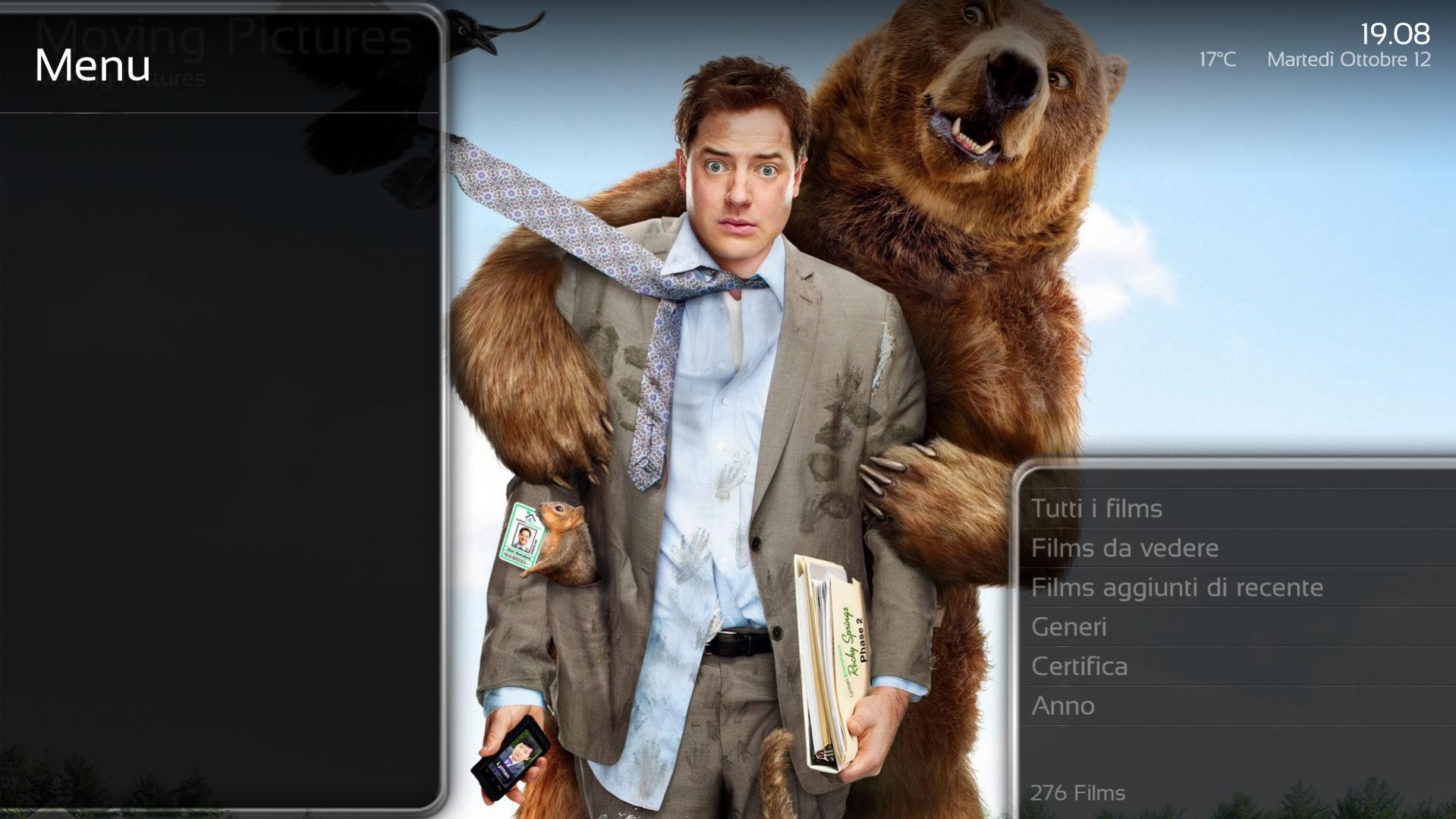
    I confirm that with new SVN strange animations disappear. I only found one problem with black glass nova skin: everytime when I enter a plugin (moving pictures, tvseries) the menu on the left is visible although it should be hidden, expecially noticeable in moving pictures where there should only be the menu with "recently added movies" and so on.

    Infact the menu is visible but not usable. If I remember well the problem was not there with SVN26514 but I will test it later and confirm.

    Will also try with other skins...
     

    Attachments

    • 19-08-38.jpg
      19-08-38.jpg
      192.9 KB

    mironicus

    Portal Pro
    March 9, 2008
    688
    44
    AW: Fix for Mantis 2866: Visiblechange animations not processing reverse animations

    I can confirm that. In Black Glass the left buttons in My Home which are normally hidden are now always visible (Shutdown/Restart/Exit). Also the hidden menu in "My Videos" is always visible now.
     

    SilentException

    Retired Team Member
  • Premium Supporter
  • October 27, 2008
    2,617
    1,130
    Rijeka, Croatia
    Home Country
    Croatia Croatia
    As it has been said:

    Skins so far have used various workarounds for not working animations. Since now all animations are fixed, thanks to Migue, some changes are needed to make it all compatible.

    Think of it like having IE and FireFox/Opera/Chrome. Sites had to use workarounds to be compatible with IE. But we don't wanna MediaPortal to be IE, don't we? :)
     

    mironicus

    Portal Pro
    March 9, 2008
    688
    44
    AW: Fix for Mantis 2866: Visiblechange animations not processing reverse animations

    So what do you have to change in the skin files to fix this?

    Could someone look at the attached file (myhome.xml) as example so I can see what has to be changed? I already edited some files in Black Glass myself to make it compatible with the 1.20 skin changes recently, but this seems to be more difficult. I would be glad if someone could look at this.
     

    Attachments

    • myHome.xml
      8.8 KB

    Migue

    Retired Team Member
  • Premium Supporter
  • January 27, 2006
    381
    305
    Florida
    Look for the <!-- LEFT BUTTONS --> comment. Look for the dummy image control (the one that has 1 width and 1 height and the visible condition). copy that visible tag to the actiongroup control above it. Remove the image dummy control as it is not necessary anymore.
     

    mironicus

    Portal Pro
    March 9, 2008
    688
    44
    AW: Fix for Mantis 2866: Visiblechange animations not processing reverse animations

    Cool! That worked! Thank you! :)

    Edit: About 140 files have to be changed... :D
     

    SilentException

    Retired Team Member
  • Premium Supporter
  • October 27, 2008
    2,617
    1,130
    Rijeka, Croatia
    Home Country
    Croatia Croatia
    mironicus, not related to the patch but if you already did some changes for 1.2 for Black Glass, you should contact Tgx and help him out a bit :)
     

    tourettes

    Retired Team Member
  • Premium Supporter
  • January 7, 2005
    17,301
    4,800
    Re: AW: Fix for Mantis 2866: Visiblechange animations not processing reverse animatio

    Edit: About 140 files have to be changed... :D

    Something that MP2 would have saved you since it allows really flexible templates to be used :)
     

    Tgx

    Retired Team Member
  • Premium Supporter
  • January 22, 2008
    1,560
    1,115
    Home Country
    Italy Italy
    Look for the <!-- LEFT BUTTONS --> comment. Look for the dummy image control (the one that has 1 width and 1 height and the visible condition). copy that visible tag to the actiongroup control above it. Remove the image dummy control as it is not necessary anymore.
    Hi!

    I've just compiled the latest svn and tested the Black Glass skin on it. This issue shows up in every screen that has an actiongroup control inside (almost every file! :( ). This is because i inserted a dummy image to obtain the sliding in/out animations of the left menu and that was working for MP 1.1.0. Now that the animations management code of Mediaportal is ok, the dummy image is not needed anymore and causes the issue. I've started patching the skin and today i'm going to slowly upload the fixed files on Google Code Black Glass Svn in a new folder for Mediaportal 1.2.0 only (look for the "Black Glass for Mediaportal 1.2.0" folder).

    Thanks

    Tgx
     

    mironicus

    Portal Pro
    March 9, 2008
    688
    44
    AW: Fix for Mantis 2866: Visiblechange animations not processing reverse animations

    Tgx

    1.20 requires also some other changes to be made. Look here. The position of the TV Guide has to be added/changed.

    And:

    The two keyboard xml skin files (stdKeyboard.xml and smsKeyboard.xml) must appear in the skin xml file directory. The default values in these skin xml files may be modified to the skin designers liking. The keyboard skin is defined only once for the whole skin implementation. It is not possible to have multiple keyboard designs for a single skin (although the std and sms keyboards may look different).

    You can copy those two new files from the Blue3Wide into the Black Glass main directory. It works - but the font size is a little bit to small I think.
     

    Users who are viewing this thread

    Top Bottom