folder.jpg shares vs database (1 Viewer)

PC_Pal68

Portal Member
October 2, 2006
32
0
Home Country
Canada Canada
rtv,

Tx for your help.

The rescan was done via config application and not within MP.

Also, the other options for displaying images (.thb and embeded in mp3) does not apply for what I am trying to do. I am trying to display images for artists. The artist folders olnly have sub directories in them and the folder.jpg.

Could it be possible that folder.jpg isn't taking into acount by the db just for that reason: no files are in the folder (except folder.jeg and subdirectories)?

Tx again for your help... I really would like to get this done.
 

rtv

Retired Team Member
  • Premium Supporter
  • April 7, 2005
    3,622
    301
    Osnabruck
    Home Country
    Germany Germany
    Yes you're correct.
    While scanning shares MP does only look for cover art for each music file (and it's path) which is about to be added...
     

    PC_Pal68

    Portal Member
    October 2, 2006
    32
    0
    Home Country
    Canada Canada
    rtv,

    Tx for the info.


    So what you are saying is that MP right now, cannot add images if their isn't any media file in that folder?

    Is that something that can be change/corrected ?

    I would prefer adding an image that represent an artist/band instead of using a random album cover.

    Do you see a work around this (like adding a fake file). If not I might have to use Share view since I really would like use this setup.


    Regards.
     

    rtv

    Retired Team Member
  • Premium Supporter
  • April 7, 2005
    3,622
    301
    Osnabruck
    Home Country
    Germany Germany
    So what you are saying is that MP right now, cannot add images if their isn't any media file in that folder?

    Is that something that can be change/corrected ?
    Yes.
    Unfortunately no (Even if - you already see cover handling is quite complex, such a specialized hack wouldn't be appreciated).

    I would prefer adding an image that represent an artist/band instead of using a random album cover.

    if you do not want to use a collection of album pics to identify artists you have to populate the \thumbs\artist dir by yourself or use the audioscrobbler artist art grabber.
     

    PC_Pal68

    Portal Member
    October 2, 2006
    32
    0
    Home Country
    Canada Canada
    rtv,

    Thank you for clearing that out.

    Now, I don't mind populating the Thumbs/Artists (in My Docs) manually. I'm already puting these files by hand in the Artist folder(folder.jpg) of mu mp3 collection.

    I don't know however, in the Thumbs\Artist, how to link the image file to the correct Artist folder in the mp3 collection. I guess I can't just put all the folder.mp3 in the same Thumbs\Artiste folder. How do i need to rename them to correctly link them to the right folder

    Regards.
     

    coopers

    Portal Pro
    November 8, 2005
    180
    3
    Adelaide
    Home Country
    So after reading this thread, am I correct in stating that there is no way to get Mediaportal to use your folder.jpg artist files for the artist art?
     

    PC_Pal68

    Portal Member
    October 2, 2006
    32
    0
    Home Country
    Canada Canada
    I'm not sure if their is no way; but there is not easy or simple way that's for sure. I'm trying to evaluate all the options to tag an image to an artist folder. It might not be with the simple folder.jgp approch. It could mean that I have to enter manually each image to the db or someother method. I understand that it will not be something that everybody wants to do since it might be time consuming. But to me, it's something that would make the music section of MP so much more interesting and "fum to look at".

    If I can come up with a simple or auto method, I will report back.
     

    rtv

    Retired Team Member
  • Premium Supporter
  • April 7, 2005
    3,622
    301
    Osnabruck
    Home Country
    Germany Germany
    I'm not sure if their is no way; but there is not easy or simple way that's for sure. I'm trying to evaluate all the options to tag an image to an artist folder. It might not be with the simple folder.jgp approch. It could mean that I have to enter manually each image to the db or someother method. I understand that it will not be something that everybody wants to do since it might be time consuming. But to me, it's something that would make the music section of MP so much more interesting and "fum to look at".

    If I can come up with a simple or auto method, I will report back.

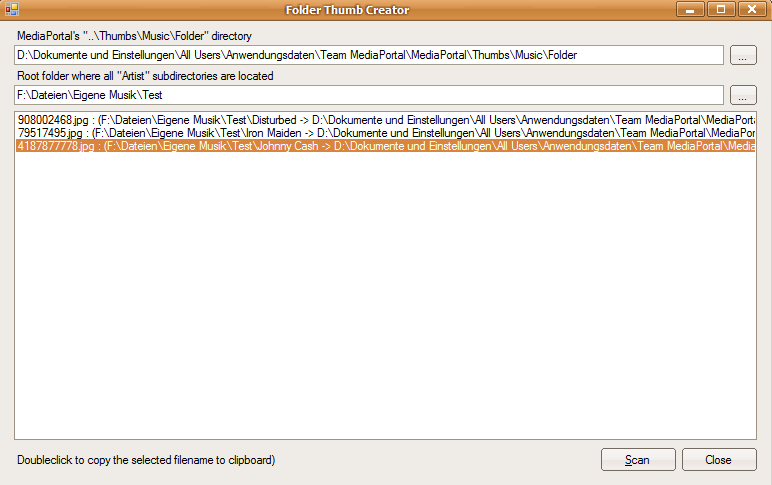
    Since I really appreciate people who invest time to setup their music correct I decided to code a little tool which will save you lots of time. Please consider it just as a quick take it or leave it (at least for now).

    It cannot do any harm as it doesn't write anything on its own though.

    1. Check and maybe correct the path to your folder thumbs
    2. Enter the root directory which contains the directories of each artist.
    3. Press "Scan".
    4. Check the results.
    5. Copy the folder.jpg you want to the thumbs\folder dir
    6. doubleclick the entry in this tool to copy the Filename to your clipboard.
    7. Use F2 on the folder.jpg to rename it by pasting the content of the clipboard buffer.

    Repeat 5-7 until all Artists have a thumb.

    This tool uses the exact same methods as MP to generate the unique filename for rapid lookups while browsing folders. So you should be able to "cover" every folder regardless whether there are music files in it or not.

    Enjoy ;)
     

    Attachments

    • ArtistThumbCreator.png
      ArtistThumbCreator.png
      23.8 KB

    PC_Pal68

    Portal Member
    October 2, 2006
    32
    0
    Home Country
    Canada Canada
    rtv,

    Just 2 words: 1) Wow and 2) Thanks

    I will give it a try in the next 24 hours. I really appreciate you taking the time for something that seams so "personal" (at least for now).

    I will report as soon as I have done it.

    Thanks again


    Regards.
     

    Users who are viewing this thread

    Top Bottom