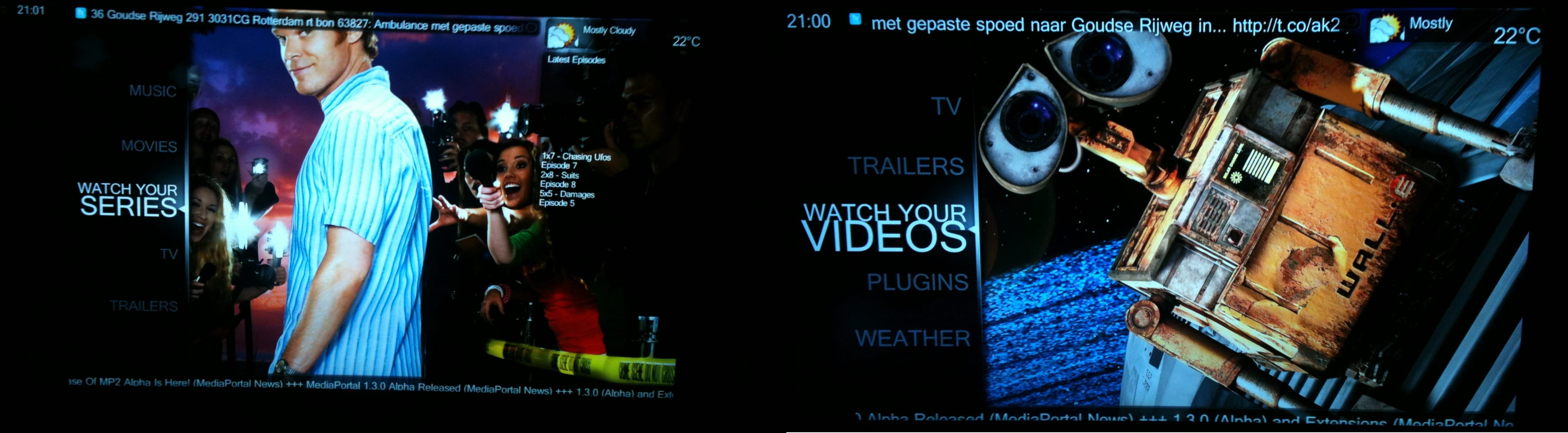
Fonts oversized only on boot, fine after closing and restarting (1 Viewer)

kazooless

Portal Member
November 22, 2010
40
7
Home Country
United States of America United States of America
I am using Win7 32-bit on a 1080p projector. I have the display settings to 150% so that the icons and text are not so small. MP is configured to start on Windows login.

When I boot the PC, MP starts up with really large fonts. It just looks weird. However, all I have to do is exit MP and restart it. Then the screen looks just like it should. It is a minor annoyance, but does anyone have any ideas?

Thanks,

Kazooless
 

2.0

MP Donator
  • Premium Supporter
  • January 18, 2012
    106
    19
    New York
    Home Country
    United States of America United States of America
    I had similar problems with Windows zoom. Not only does it mess up your font size, it reduces your output resolution to 1280x720. There seems to be no way to fix this other than just disabling the zoom. I know it's annoying to squint at tiny text and icons from ten feet away, but it's the only way to make MP display properly.

    My suggestion is to put Windows zoom back down to 100% and get some binoculars. o_O
     

    kazooless

    Portal Member
    November 22, 2010
    40
    7
    Home Country
    United States of America United States of America
    2.0: Thanks for the reply. I checked the projector menu status and it is definitely playing 1080p, not 720p. The zoom in Win7 only increases the icons and fonts but it doesn't change the resolution. Also, I think the key here is that it looks perfect when I manually launch it. The fact that with the same resolution and zoom I get both the bad screen and the good should mean that the zoom isn't to blame. Maybe the zoom doesn't go into play before the auto start of MP happens though. Not sure. I was hoping that maybe someone else already dealt with this and figured out a fix.

    Thanks again.
     

    2.0

    MP Donator
  • Premium Supporter
  • January 18, 2012
    106
    19
    New York
    Home Country
    United States of America United States of America
    Check your resolution again. Though Windows reports itself as 1080, MediaPortal will scale itself down to 720. I'm not the only one who confirmed this to be true.

    https://forum.team-mediaportal.com/threads/mp-stuck-at-720p-i-want-1080p.105182/
    https://forum.team-mediaportal.com/threads/problem-with-resolution-of-monitor.105769/

    Play a 1080p video in MP and press Shift+1 to bring up the Directshow information. That will tell you exactly what is being displayed. Also, in MP Configuration, go to Startup Settings and take a look at the monitor MP is set to start up on. I'm willing to bet that says 1280x720.
     

    kazooless

    Portal Member
    November 22, 2010
    40
    7
    Home Country
    United States of America United States of America
    2.0, thanks for the threads. Turns out that the MP interface is indeed on 720p when I like it. The first boot must be before the login notices the font enlargement, because then it is 1080p. When I go down to no enlarged fonts or 125% fonts, then it is always 1080p.

    However, one thing that you're not correct on, is the resolution of a 1080p video. When I play 1080p video, it is in 1080p resolution. So, even though MP's interface is 720p, it plays the video in the correct resolution.

    Now, what I don't understand is why is the MP 1080p screen so horrible? The fonts are way too big and overlap each other. 720p looks beautiful. I am using the default wide skin. Maybe I should change to a different skin, but I put the zoom back to 150% because the videos play just fine, and MP looks great when it uses 720p and horrible with 1080p. Thoughts?
     

    kazooless

    Portal Member
    November 22, 2010
    40
    7
    Home Country
    United States of America United States of America
    I switched to Avalon skin and it is better looking at 1080p. So, maybe the default skin just doesn't scale well to 720p.

    Thanks again.
     

    sincze

    Portal Pro
    September 18, 2011
    76
    1
    101
    I have the same issue.
    After a fresh start.... strange big Font..
    Stop mediaportal and restart... Looking brilliant.

    Problem seem to be there since i put font size to 150% for better readability at a greater distance ;-)

    I'll check the links:
    https://forum.team-mediaportal.com/threads/mp-stuck-at-720p-i-want-1080p.105182/
    https://forum.team-mediaportal.com/threads/problem-with-resolution-of-monitor.105769/

    To see if the answer is in those links.
    In Media Portal configuration I do see:
    Start Screen: UPNP Generic Monitor 1280x720 on INTEL HD 3000.

    WIndows indicates 1080x720.
    Should I change something?
     

    Attachments

    • Mediaportal Behaviour.jpg
      Mediaportal Behaviour.jpg
      1,000.2 KB

    Users who are viewing this thread

    Top Bottom