
Hardware acceleration with ATi x1250 (1 Viewer)

kszabo

MP Donator
  • Premium Supporter
  • December 6, 2007
    796
    86
    Germany, Bayern
    Home Country
    Hungary Hungary
    Nope.

    Btw: I can only achieve ~50fps (PAL) when using DXVA. Else I only get ~25 FPS (PAL - deinterlaced?) no matter what I try. How about you (or other reading this thread)?

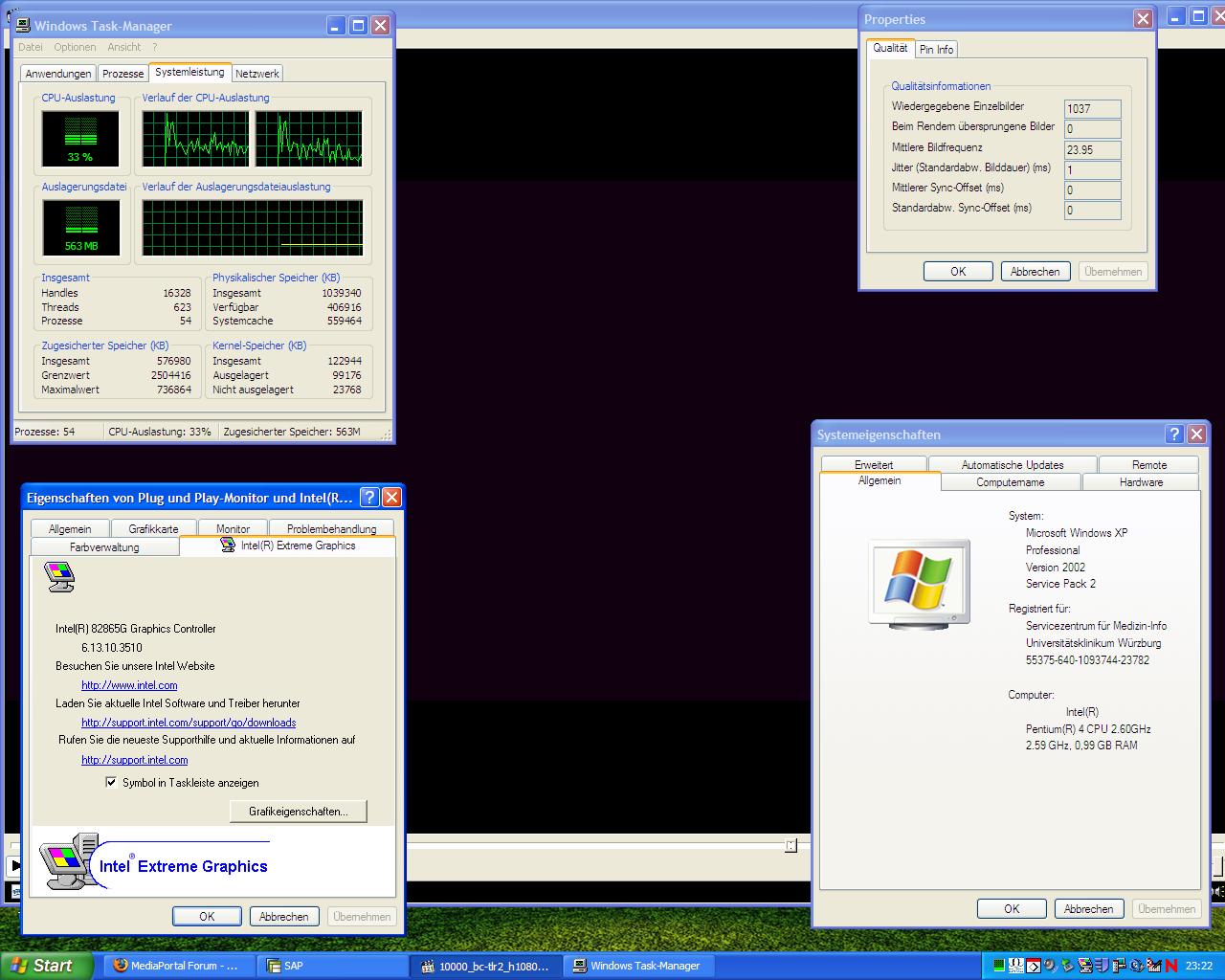
    I tested 1080p and 720p progressive material (trailers) and played with media player calssic with CoreAVC, VRM9. It payed with nearly exactly 24fps (original cinema fps), no dropped frame, jitter 1, no sync offset, with CPU (P4 2,6 GHz) about 50%! Just check out the screenshot! (video is not captured because of rendering, it ran, believe me).

    Core AVC rocks! One can live without DXVA (if you play progressive) and with the X1250!
     

    Attachments

    • screen.JPG
      screen.JPG
      181.5 KB

    uncertainty

    Portal Pro
    September 29, 2007
    140
    2
    NYC
    Home Country
    United States of America United States of America
    My results with the 690g (asus motherboard) I had using an amd x2 4800+ were that any flavor of media played fine (1080i output) except for high bitrate bluray and hd-dvd. The 690g (1250x) just did not have the processing power to play those type of media without dropping frames. I picked up a 8500gt cheap and now can play any type of media I throw at it.
     

    kszabo

    MP Donator
  • Premium Supporter
  • December 6, 2007
    796
    86
    Germany, Bayern
    Home Country
    Hungary Hungary
    Nope.

    Btw: I can only achieve ~50fps (PAL) when using DXVA. Else I only get ~25 FPS (PAL - deinterlaced?) no matter what I try. How about you (or other reading this thread)?

    I tried the ATi encoder for mpg2 (TV and DVD), it works great now with my newly installed Vista wit DXVA and nice deinterlacing. Black level problem can be corrected in Avivo. :D

    h.264 I tried only quickly with the ATi encoder. 1080p played smooth without stutter, but horizontally flipped! Strange! I will sort it out and report, do a comparison with CoreAVC (haven´t got it registered under Vista yet), check CPU usage and framerates/dropped frames and 1080i etc.
     

    damaster

    Portal Pro
    November 23, 2007
    412
    35
    Home Country
    Canada Canada
    How do you enable DXVA on Vista with the X1250? My biggest issue has been getting smooth 720p and 1080p playback with EVR in MediaPortal. I often have lip-sync issues and stuttering with EVR.
     

    kszabo

    MP Donator
  • Premium Supporter
  • December 6, 2007
    796
    86
    Germany, Bayern
    Home Country
    Hungary Hungary
    I use VRM9 not EVR even under Vista. I don´t use DXVA for h.264 files because it is not possible with the x1250. It does not have any hardware acceleration for h.264! I simply use CoreAVC for h.264, everything done by CPU.

    EDIT: I´ve tried the new CoreAVC 1.6.5 today. It has several new options. I could set "deinterlacing" to "hardware". It played even 1080i fluid! That´s not all! The picture was nicely deinterlaced with acceptable CPU usage! (I see the difference, before I could puke because of the ugly interlace artefacts). Maybe it could make use of the x1250 DXVA? I tested only with MediaPlayerClassic on a test-HD recording from satellite (1080i .ts file). Test with MP follows!

    I did some new tests with my x1250 and h.264 HD 1080i (Vista 32bit Home Premium, Catalyst 7.12, CoreAVC 1.6.5 as h.264 codec, AMD X2 BE2400 with 2x2,3 GHz).

    - the most challenging is 1080i. The deinterlacing is CPU/GPU consuming. With this resloution every CPU cycle to spare is important. With 1080p or 720p there is no problem for my 2x2,3 GHz AMD X2

    - with MediaPlayerClassic I can play recorded 1080i .ts files (from AstraHD, Pro7HD, Sat1HD) with CoreAVC, deinterlacing option set to "hardware" without problems with good deinterlaced picture

    - in MP I can play recorded 1080i .ts files or live TV from DVB-Satellite S2 only with deinterlacing set to "none" ot "blend". With "bob" the video plays slow than realtime getting "slow motion" effect with desynchronisation of sound. With setting "hardware" I get sound but no picture using VRM9 as renderer. With EVR I get picture also but get some freezes sometimes

    - changing channel between HD channels does not work. I have to stop each channel manually.

    I am happy now that it is possible to play every HD material (1080p/i, 720p/i) with a 2x2,3 GHz CPU with a small cheap onboard GPU like x1250. The deinterlacing quality of "blend" is an acceptable compromise for me.
     

    kszabo

    MP Donator
  • Premium Supporter
  • December 6, 2007
    796
    86
    Germany, Bayern
    Home Country
    Hungary Hungary
    Nope.

    Btw: I can only achieve ~50fps (PAL) when using DXVA. Else I only get ~25 FPS (PAL - deinterlaced?) no matter what I try. How about you (or other reading this thread)?

    I think it is normal. In Europe PAL is either 50i or 25p. As HDTV 1080/720i means 50 Hz, 1080/720p means 25 Hz (Hz=frames per second). It is possible to use 1080/720p with 50 Hz also but it would mean terrible datarate, and is not used AFAIK.

    Movie film use 24 fps, so in Europe it will be played 4% quicker (with 25fps), and in ex-NTSC countries with 3:2 Telecine pull-down (with noticable stutter eventually). 25 fps is flickering to the eyes, 30 fps have the pulldown stutter. Who suffers more NTSC or PAL people? The movie industry should use 30 fps and in Europe we should switch from 25 to 30 (just ask a eye-doctor)

    I live in Europe (ex-PAL 25/50 fps) and use my Panasonic Plasma with x1250 with 60 Hz. I watch HDTV from Astra (they use 1080i 50fps) with CoreAVC. The x1250 has to make the 50Hz->60 Hz pulldown. It makes it quite good, I don´t see any big problem.
     

    Users who are viewing this thread

    Top Bottom