
Hauppauge HD-DVR, why my tv output looks like this? (1 Viewer)

HiSoC8Y

Portal Member
December 22, 2010
15
0
MediaPortal Version: 1.1.2.0
MediaPortal Skin:
Windows Version:
CPU Type:
HDD:
Memory:
Motherboard:
Video Card:
Video Card Driver:
Sound Card:
Sound Card AC3:
Sound Card Driver:
1. TV Card:
1. TV Card Type:
1. TV Card Driver:
2. TV Card:
2. TV Card Type:
2. TV Card Driver:
3. TV Card:
3. TV Card Type:
3. TV Card Driver:
4. TV Card:
4. TV Card Type:
4. TV Card Driver:
MPEG2 Video Codec:
MPEG2 Audio Codec:
h.264 Video Codec:
Satelite/CableTV Provider:
HTPC Case:
Cooling:
Power Supply:
Remote:
TV:
TV - HTPC Connection:


Hello

I'm testing mediaportal on my laptop, with the Hauppauge HD-DVR 1212.

attached is the output of the tv, why is the output showing like this?

your help please.
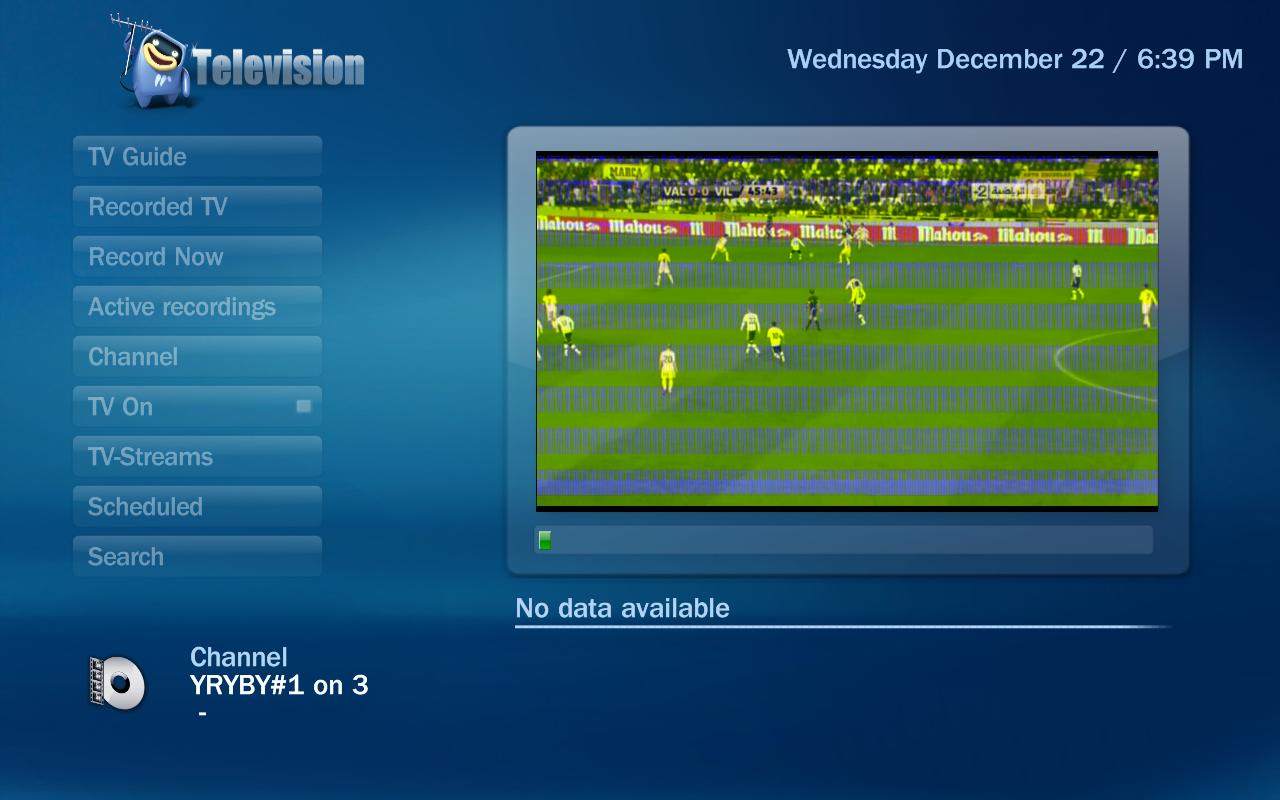
 

Attachments

  • tv-quality-mediaportal.JPG
    tv-quality-mediaportal.JPG
    84.4 KB

geoffstewart

MP Donator
  • Premium Supporter
  • October 12, 2008
    346
    112
    Ottawa
    Home Country
    Canada Canada
    You said you have the passthrough setup... Do you get the same picture when you disconnect the passthrough component cables from the hd-pvr?

    Also, do you get the same picture in Arcsoft Theatre Extreme (or whatever it's called) ? The record utility allows you to specify the inputs and quality of recording.

    g
     

    geoffstewart

    MP Donator
  • Premium Supporter
  • October 12, 2008
    346
    112
    Ottawa
    Home Country
    Canada Canada
    I was referring to what tool to use in the Arcsoft utility when I said "record utility".

    So, if Arcsoft can view it, then it's not cable-related.

    You didn't fill in any system specs (please do that so it's easier to help), so what codecs are you using in MediaPortal?
     

    HiSoC8Y

    Portal Member
    December 22, 2010
    15
    0
    there are 4 video codes or 5 installed with the default mediaplayer. im trying those.

    in the TV configuration, under tv, when i test viewing the channel, it works perfectly.
     

    geoffstewart

    MP Donator
  • Premium Supporter
  • October 12, 2008
    346
    112
    Ottawa
    Home Country
    Canada Canada
    not sure that the tv configuration test has much merit... don't know... never tried it.

    let's try this... instead of turning TV on, select record now to record 10 minutes of any given channel.

    Then try to playback the recording in MP and see if the results are the same.

    MP doesn't install video codecs, I don't believe. Playback of HD-PVR recordings requires hardware acceleration...
    Start by trying the Microsoft video and audio codecs.
    If that doesn't work, try installing a codec pack called SAF (available in the forums under codecs)... I have better luck with 4 on windows7 but lots of people use saf5 (which is still in beta) with good results.

    It would help to know your system specs.
    g
     

    ChrisOfCatford

    MP Donator
  • Premium Supporter
  • August 2, 2006
    210
    6
    London UK
    Home Country
    United Kingdom United Kingdom
    Hi,

    I would be interested to know what graphics card you are using?

    I had a below spec onboard graphics card which gave me a green distorted picture in MP. This was on a mini ITX system using onboard graphics. Not DX9 compatible/capable.

    Just a thought.

    Chris
     

    HiSoC8Y

    Portal Member
    December 22, 2010
    15
    0
    the graphics card I have is also an onboard, "Mobile Intel 4 Series Express Chipset".

    I'm using a laptop, for the purpose of testing only. This is not my final setup, the final setup will be eventually a high end server.
     

    ChrisOfCatford

    MP Donator
  • Premium Supporter
  • August 2, 2006
    210
    6
    London UK
    Home Country
    United Kingdom United Kingdom
    If this is the one that I am thinking of, it is DX10 so should be OK I suppose.

    If it is this that is causing your problem, you may not be able fix it because you can't replace onboard graphics on a laptop. A driver update helped me a little.

    In the end I fixed the issue in my mini ITX system by adding a PCI card which can *Just* handle MP.

    I hope you can solve your problem.

    Chris
     

    Users who are viewing this thread

    Top Bottom