
Hauppauge remote only works in WinTV (1 Viewer)

susd

Portal Member
February 4, 2015
32
0
72
Home Country
United States of America United States of America
Like the title says the remote seems to work with WinTV but not with MP.
In the MP configuration under the Hauppauge tab the check box to "Use Hauppauge Remote" is grayed out.
In the status box is "The Happauge IR components have not been found." "Install the latest Hauppauge IR drivers and use XPSP2"

I have clicked on the link and installed the downloaded software from that link. file name wintv7_cd_3.9g.exe.

where or what should I check next?

thanks for you assistance.
SUSD
 

mm1352000

Retired Team Member
  • Premium Supporter
  • September 1, 2008
    21,544
    8,236
    Home Country
    New Zealand New Zealand
    Hauppauge bundles various remote controls with its products.
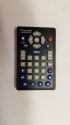
    Can you please post/attach or link to a photo of the remote control you have.
     

    susd

    Portal Member
    February 4, 2015
    32
    0
    72
    Home Country
    United States of America United States of America
    Thanks MM.
    Here is a jpg of the remote. on the back label it says PT# R-005

    SUSD
     

    Attachments

    • 20150331_191435.jpg
      20150331_191435.jpg
      1.4 MB

    mm1352000

    Retired Team Member
  • Premium Supporter
  • September 1, 2008
    21,544
    8,236
    Home Country
    New Zealand New Zealand
    Right, okay. So it looks like a variant of this one:
    http://www.hauppauge.com/site/press/presspictures/remote_creditcard-black_front.png

    Your remote came with your Colossus, right?
    ...and the remote receiver is a cable with a "blob" on the end that plugs into the back of the Colossus, right?

    As far as I know that is *not* a MCE-compatible remote. Therefore, to make it work I *think* you would need:
    1. To install Hauppauge's IR32 application/driver.
    2. To enable the Hauppauge remote in MediaPortal configuration.
    I'd like to emphasize that I am guessing these things. I have a couple of Hauppauge products, but they came with remote controls which are very different to the one you have.

    You asked what you should check next. Answering this question is tricky because there are some conflicting facts/assumptions:
    1. The remote works in WinTV. If my guess is right, we might assume that this means Hauppauge's IR32 application/driver is installed.
    2. MediaPortal configuration is telling you that Hauppauge's IR32 application/driver is *not* installed.
    I think there are 2 possibilities to resolve this conflict:
    1. I'm wrong. The remote is actually a MCE-compatible remote, and Hauppauge's IR32 application/driver is *not* required.
    2. Hauppauge's IR32 application/driver *is* installed, but MP configuration is not able to detect it.
    I think both possibilities are possible and equally probable.

    If the first possibility is correct then the remote should start working if/when you enable either the HID or media remote options. You should test if enabling either of those options makes the remote start working. Note: if using MP 1.11 PR or newer, make sure you do *not* enable HID and media at the same time.

    If the second possibility is correct then the only way forward is to get MediaPortal configuration to detect that IR32 *is* actually installed.
    What do I mean when I say "IR32"? I mean this:
    http://www.hauppauge.com/site/support/support_colossus.html
    "IR Blaster" tab, "IR Remote control application":
    http://hauppauge.lightpath.net/software/remote_control/ir32_28015.exe

    If IR32 is already installed and running there should be a small remote control icon in the system tray:
    upload_2015-4-1_16-19-26.png

    (First icon above.)

    Note: if that icon is *not* there then the second possibility is most likely to be wrong, and the first possibility is most likely to be right (ie. the remote is probably MCE-compatible).

    In my experience, MediaPortal configuration sometimes doesn't detect when IR32 is installed. Uninstalling and reinstalling IR32 then restarting the PC usually resolves the problem. You can uninstall IR32 by using Windows add/remove software in control panel.

    Make sense? :)
     

    susd

    Portal Member
    February 4, 2015
    32
    0
    72
    Home Country
    United States of America United States of America
    Right, okay. So it looks like a variant of this one:
    http://www.hauppauge.com/site/press/presspictures/remote_creditcard-black_front.png

    Yep looks like that one

    Your remote came with your Colossus, right?
    ...and the remote receiver is a cable with a "blob" on the end that plugs into the back of the Colossus, right?

    Your two for two so-far. There is actually one plug and two "bulbs" One for the set top box and one to receive the IR signal from the remote.

    As far as I know that is *not* a MCE-compatible remote. Therefore, to make it work I *think* you would need:
    1. To install Hauppauge's IR32 application/driver.
    2. To enable the Hauppauge remote in MediaPortal configuration.
    I'd like to emphasize that I am guessing these things. I have a couple of Hauppauge products, but they came with remote controls which are very different to the one you have.

    You asked what you should check next. Answering this question is tricky because there are some conflicting facts/assumptions:
    1. The remote works in WinTV. If my guess is right, we might assume that this means Hauppauge's IR32 application/driver is installed.
    2. MediaPortal configuration is telling you that Hauppauge's IR32 application/driver is *not* installed.
    Yes the IR32 is installed and MP is saying it not installed
    I think there are 2 possibilities to resolve this conflict:
    1. I'm wrong. The remote is actually a MCE-compatible remote, and Hauppauge's IR32 application/driver is *not* required.
    2. Hauppauge's IR32 application/driver *is* installed, but MP configuration is not able to detect it.
    I think both possibilities are possible and equally probable.

    If the first possibility is correct then the remote should start working if/when you enable either the HID or media remote options. You should test if enabling either of those options makes the remote start working. Note: if using MP 1.11 PR or newer, make sure you do *not* enable HID and media at the same time.

    If the second possibility is correct then the only way forward is to get MediaPortal configuration to detect that IR32 *is* actually installed.
    What do I mean when I say "IR32"? I mean this:
    http://www.hauppauge.com/site/support/support_colossus.html
    "IR Blaster" tab, "IR Remote control application":
    http://hauppauge.lightpath.net/software/remote_control/ir32_28015.exe

    If IR32 is already installed and running there should be a small remote control icon in the system tray:
    View attachment 163457

    (First icon above.)
    I do have that icon.

    Note: if that icon is *not* there then the second possibility is most likely to be wrong, and the first possibility is most likely to be right (ie. the remote is probably MCE-compatible).

    In my experience, MediaPortal configuration sometimes doesn't detect when IR32 is installed. Uninstalling and reinstalling IR32 then restarting the PC usually resolves the problem. You can uninstall IR32 by using Windows add/remove software in control panel.

    Make sense? :)

    Sounds good. I'm going to try what you have suggested tomorrow (kind of late now to start testing) and I'll let you know what I have found out.


    thanks
     

    mm1352000

    Retired Team Member
  • Premium Supporter
  • September 1, 2008
    21,544
    8,236
    Home Country
    New Zealand New Zealand
    It could be, that the IR32 has to be installed but the autostart of it should be deactivated. So I did at the configuration of my dad's htpc.
    Yes, MediaPortal can't receive from the remote if IR32 is running. However, if the Hauppauge remote configuration is enabled, MediaPortal should automatically stop and start IR32 as required.
     

    susd

    Portal Member
    February 4, 2015
    32
    0
    72
    Home Country
    United States of America United States of America
    I have uninstalled all the WinTV programs from my computer. rebooted it and just installed the irblast_28025.exe that was emailed me from Hauppauge and I could not configure the remote. I uninstalled that and installed wintv7_cd_3.9g.exe program that was downloaded from the link in MP configuration under remote. I disabled the IR program in startup and still could not activate the blaster in MP config. I did notice that the lettering on the Hauppauge tab in remote referenced XPS2. I'm running windows 8 on my MP computer. Is that what I problem might be?

    next step is to turn on HID
     

    mm1352000

    Retired Team Member
  • Premium Supporter
  • September 1, 2008
    21,544
    8,236
    Home Country
    New Zealand New Zealand
    I have uninstalled all the WinTV programs from my computer.
    That was a bit extreme. Only reinstallation of IR32 was suggested.

    rebooted it and just installed the irblast_28025.exe that was emailed me from Hauppauge and I could not configure the remote.
    Nope, that won't work.

    IRBlast is for the blaster.
    IR32 is for the receiver.

    If you want to control your set top box with IR then you need IRBlast.
    If you want your remote control to work then you need IR32.

    I uninstalled that and installed wintv7_cd_3.9g.exe program that was downloaded from the link in MP configuration under remote.
    Could you please try following the instructions that I gave you, which were to simply uninstall and reinstall IR32. The stuff that you're doing now is not helping.

    I disabled the IR program in startup and still could not activate the blaster in MP config.
    Nope, disabling IR32 auto-start won't make any difference. Like I said, the only way forward is to get MediaPortal configuration to detect that IR32 *is* actually installed.

    I did notice that the lettering on the Hauppauge tab in remote referenced XPS2. I'm running windows 8 on my MP computer. Is that what I problem might be?
    Unlikely.

    next step is to turn on HID
    If it were me I would do what was recommended, which was to uninstall and reinstall only IR32 first.
     

    susd

    Portal Member
    February 4, 2015
    32
    0
    72
    Home Country
    United States of America United States of America
    Sorry for not following procedures you setup.

    I can now activate the remote in MP configuration. The error is no longer showing. This happened after I installed IRBlast.program.
    Also the message at the bottom of the MPC remote page says "No Problems Found"
    But, when starting MP and pushing buttons on the remote nothing happens. Should I go ahead and uninstall/reinstall IR32 as suggested or do I just need to map the remote?
     

    Users who are viewing this thread

    Top Bottom
