Help setting up IRSS with Hauppauge winTv 418 (1 Viewer)

gossman

New Member
May 24, 2014
11
0
56
Home Country
United States of America United States of America
I am moving off of a beyondTv setup and trying to move to MediaPortal. My setup is that I have a Hauppauge winTv 418 dual tuner/analog capture card (not hybrid as I can record simultaneously). To each analog input, I have 2 DirectTv receivers attached (SD format - not HD). They are the same model (R12-100) but different remote codes. I have USBUIRT controlling them. I have everything setup in MediaPortal (it only shows 1 card for the analog portion - which is technically correct as it is just one card).

I installed IRSS and have configured the Tv3 Blaster for one STB. It works!!!!!! I have a few channels configured on s-video#1 and can switch between them.

Now the problem.... I also have a few channels configured on s-video#2. I too, can 'tune-in' to these. However, the IRSS setup controls only one STB. It appears that the problem is that IRSS is based on the card (again, I only have 1 card).

Is there a way to tell IRSS or MediaPortal to control the second input on the card? Can I manually add a 'fake' card that mimics the real one but only has the 2nd inputs listed from the first card?

How do people with the collossus card set it up? I read a few posts but they are using newer STB's that are controlled via tcp/ip and not IR.
 

mm1352000

Retired Team Member
  • Premium Supporter
  • September 1, 2008
    21,544
    8,236
    Home Country
    New Zealand New Zealand
    Hello and welcome gossman :)

    I installed IRSS and have configured the Tv3 Blaster for one STB. It works!!!!!!
    Great! :)

    Is there a way to tell IRSS or MediaPortal to control the second input on the card? Can I manually add a 'fake' card that mimics the real one but only has the 2nd inputs listed from the first card?
    Hmmm, I've never come across a dual tuner card that only shows as one tuner in TV Server. I'd need more information before I can answer the first question. The answer to the second question is no.

    I'm intrigued. Could you please grab some information about your tuner for me?
    1. Download GraphStudio from here: http://blog.monogram.sk/janos/2009/06/14/monogram-graphstudio-0320/ . Pick the 32 bit one if you have a 32 bit Windows; otherwise pick the 64 bit one. If in doubt, go with the 32 bit one.
    2. Run the exe (no install required).
    3. In the top menu select "Graph" -> "Insert Filter...".
    4. In the first drop down field in the new window select "WDM Streaming Crossbar Devices".
    5. In the second drop down field ensure "All Filters" is selected.
    6. Double click (or select and click insert) on each entry in the list.
    7. Repeat steps 4 to 6 for "WDM Streaming TV Tuner Devices" instead of "...Crossbar Devices".
    8. Close the window.
    9. In the top menu select "Graph" -> "Make Graph Screenshot".
    10. Use Paint, Word, Photoshop... whatever you have available to paste the screenshot, and save it to a file.
    11. Attach the file ("upload a file") here so I can take a look. :)
    I know there are a few instructions there, but hopefully it won't take more than 5 minutes of your time.
    Please don't hesitate to ask if you get stuck at any point.

    Thanks,
    mm
     

    gossman

    New Member
    May 24, 2014
    11
    0
    56
    Home Country
    United States of America United States of America
    OK. I have it here.

    You will notice that I also have an AVerMedia card as well. The problem with that card is whenever I try to add it, I get an error:
    The graph building: Mostly your card is not supported by TvServer. Please create a report in our forum.

    When I look in the SetupTv-Error log file, I see:
    [2014-05-24 11:38:07,668] [Log ] [Analog TV scan thread] [ERROR] - analog: DoTvScan error (missing software encoder)

    I read in the forums that this card is not supported, but I also read about installing the software encoders from here:
    https://forum.team-mediaportal.com/...-software-encoder-based-tv-cards.90355/page-7
    But that didn't seem to work. So for now I am concentrating on just using the 2 tuners on the Hauppauge card.

    Again, the problem I see is that the TV Blaster Plugin for IR Server (install with IRSS) maps a card to a stb (in the STB Setup menu). It should map a STB per tuner...
     

    Attachments

    • MP.png
      MP.png
      21.4 KB

    mm1352000

    Retired Team Member
  • Premium Supporter
  • September 1, 2008
    21,544
    8,236
    Home Country
    New Zealand New Zealand
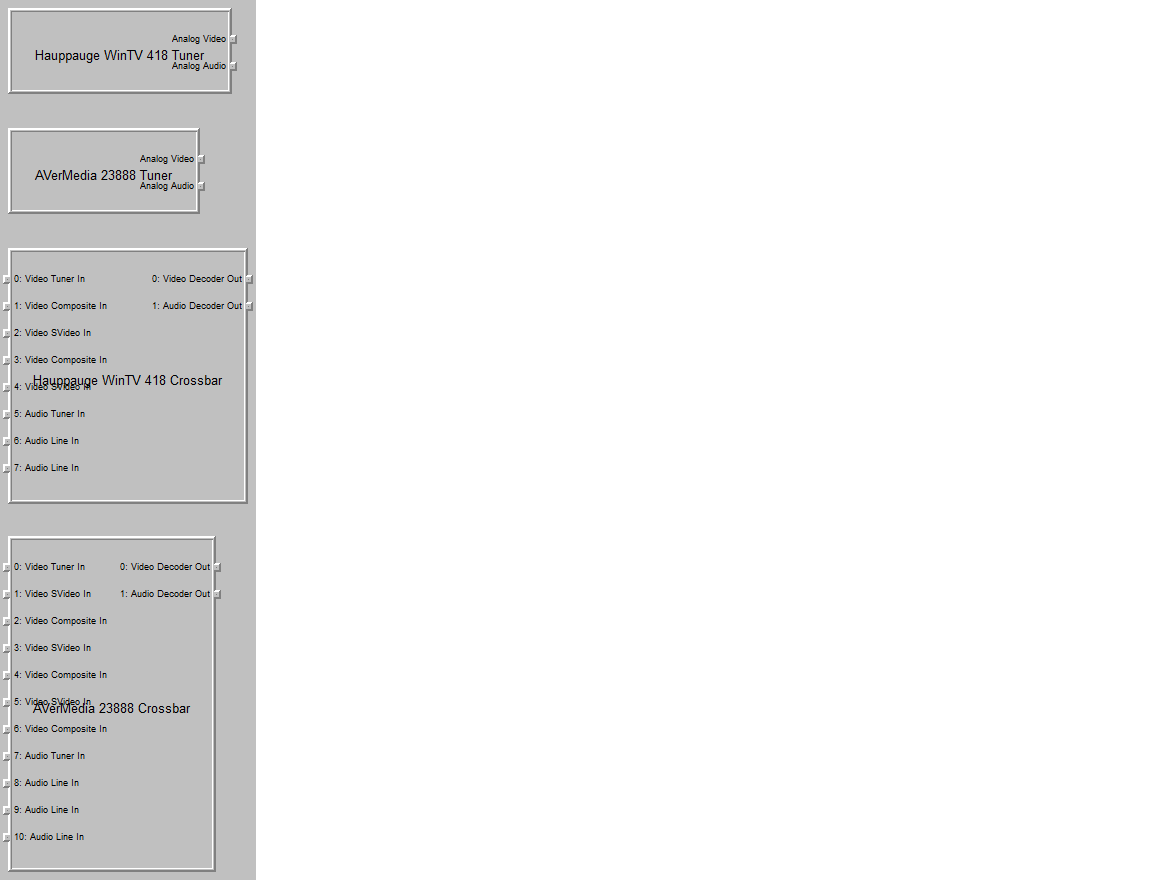
    Hmmm, what you're telling me about the card being a dual tuner doesn't match what I'm seeing in the screenshot. It could well have an independent digital (ATSC over-the-air and/or clear QAM cable) as well as the analog tuner/capture (eg. a Hauppauge HVR 1850)... but at least from the perspective of connecting the DirecTV boxes, the analog tuner/capture inputs are all that matters... and it looks like there is only one of them.

    The screenshot tells me that the card has one analog tuner and two composite/s-video inputs. You've told me that you've connected a DirecTV STB to each of the composite/s-video inputs and are not using the tuner/RF input. So far so good.
    My confusion comes from the fact that it looks like the card only has one output for those three analog inputs. In other words, it looks like you can only view/record from one of those three inputs at any given time. If I'm right I don't really understand the point of connecting both DirecTV boxes. Do the two DirecTV boxes have access to different channels or something?

    Putting that aside...
    I'm 99% sure IRSS only supports one STB (or more technically, one set of IR codes) per card. If I'm right, you won't be able to get IRSS to handle your STBs with the different IR codes connected to the two s-video inputs on the one card. It would be a different story if your STBs accepted the same remote codes, and it would also be a different story if you had another card... which brings me to the AVerMedia card.

    If the info above is correct, you're going to need to get this working if you want to be able to use both DirecTV boxes and/or view/record two channels independently/simultaneously.

    When I look in the SetupTv-Error log file, I see:
    [2014-05-24 11:38:07,668] [Log ] [Analog TV scan thread] [ERROR] - analog: DoTvScan error (missing software encoder)
    I read in the forums that this card is not supported, but I also read about installing the software encoders from here:
    https://forum.team-mediaportal.com/t...-software-encoder-based-tv-cards.90355/page-7
    Yes, that is the right place to be looking.
    If installing the encoders from that thread didn't help then I'm going to need to look at the log files to understand why.
    Could you please post all the log files.

    Thanks,
    mm
    :)
     

    gossman

    New Member
    May 24, 2014
    11
    0
    56
    Home Country
    United States of America United States of America
    Well that would explain why I never got the dual setup working in beyondTv and why I used the averMedia card as the second source. .

    You said all the files. Can you be more precise? In the TvServer config setup there is the open log file directory. Just those?
     

    mm1352000

    Retired Team Member
  • Premium Supporter
  • September 1, 2008
    21,544
    8,236
    Home Country
    New Zealand New Zealand
    Thanks (y)
    Looks like the problem has nothing to do with software encoders and everything to do with a bug.
    You can try the attached patch for MP 1.7.1.
     

    Attachments

    • TVLibrary[1.7.1_capture_inputs].zip
      202.2 KB

    gossman

    New Member
    May 24, 2014
    11
    0
    56
    Home Country
    United States of America United States of America
    nope. Same error. I renamed the original dll, copied this one over and brought up TvServer config. same message. Here are logs::
     

    mm1352000

    Retired Team Member
  • Premium Supporter
  • September 1, 2008
    21,544
    8,236
    Home Country
    New Zealand New Zealand
    nope. Same error. I renamed the original dll, copied this one over and brought up TvServer config.
    You have to stop the TV service too before replacing. That can be done in the "manual control" section of TV Server config (ie. stop the service in manual control, then close TV Server config, then replace the DLL, then reopen TV Server config... which will ask you to restart the service, so click yes at the prompt).
     

    Users who are viewing this thread

    Top Bottom