Help with recording (1 Viewer)

Julie L

Portal Member
January 15, 2012
10
0
Home Country
HI there, can someone please help me - this software looks great but I am missing something very basic - when I schedule recordings they are not working - I have tried all sorts of things and sometimes it works - always if I go to the guide and double click to record - but for scheduled recordings nothing is there on the drive when it is finished - the computer shows things are happening, and if I go into media portal when the show should be recorded the live TV says it is off as it will interfere with a recording - but there are no active recordings in the list - they are on the schedule with a red dot against the name though - this is what I am doing - go to schedule, click new, search for what I want to record, click it, a red light appears against the show I want to record - it has the right time etc on it, I then x out of the media portal and turn the TV off, but the eebox is still on. So as it has worked I assume my set up config is right - but I am clearly misunderstanding something basic and doing something right some of the time (given it records sometimes) - the wiki was useful and I thought I was following it.....so can anyone see what I am doing wrong - it is so frustrating getting something to work with the eebox and mini tuner from Asus - I am on 64 bit win 7

Julie :confused:
 

rekenaar

Retired Team Member
  • Premium Supporter
  • December 17, 2006
    4,421
    805
    Home Country
    South Africa South Africa
    Hi there and welcome :)

    After a failed recording, use Watchdog program (Debug Mode on Start menu) option 3 to collect and attach full log files please.
     

    Julie L

    Portal Member
    January 15, 2012
    10
    0
    Home Country
    OK thanks rekenaar I will do that this evening and report tomorrow, Julie

    oops sorry did not realise they would still be here - attached (I hope are the log files just to prove what a goose I am)
     

    elliottmc

    Retired Team Member
  • Premium Supporter
  • August 7, 2005
    14,927
    6,061
    Cardiff, UK
    Home Country
    United Kingdom United Kingdom
    Assuming you are using the default skin, do you have a red dot towards the top of the screen when MP should be recording? If so, it thinks it is recording.

    You say that there is nothing on your hard disk for the recording. Are you sure you are looking in the right place? Have you gone into recorded TV within MediaPortal and checked if there is a recording there?

    Mark
     

    Julie L

    Portal Member
    January 15, 2012
    10
    0
    Home Country
    HI Mark thanks, no have never seen a red dot at the top when I have interrupted a trial recording. Yes I know where to look for any recorded shows - I have set it to a partitioned drive - but when it does record there is a link in recorded TV as well. I went into record something tonight (not that it will matter but I keep trying!) and it said I had a recording conflict with something I have scheduled (last week it did not record - but clearly it thinks it is). Julie
     

    elliottmc

    Retired Team Member
  • Premium Supporter
  • August 7, 2005
    14,927
    6,061
    Cardiff, UK
    Home Country
    United Kingdom United Kingdom
    Does anything ever record?

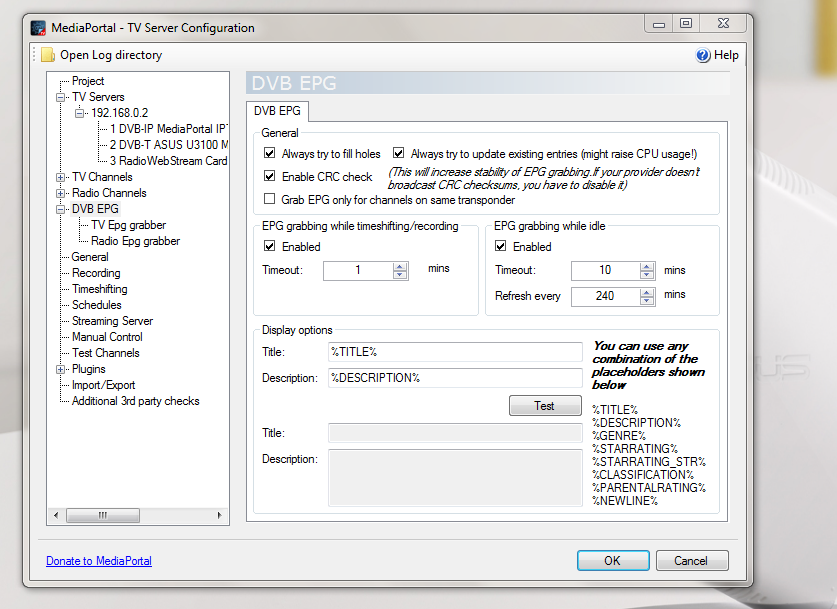
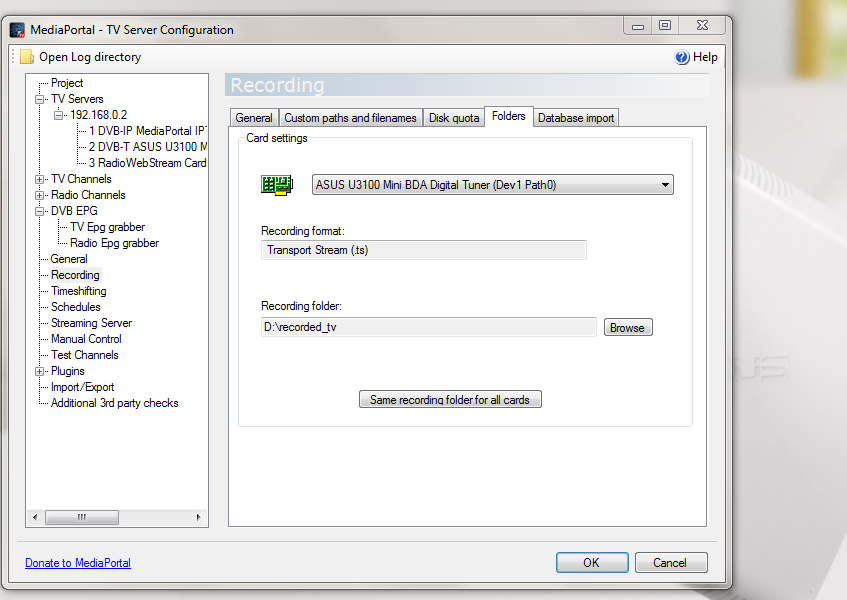
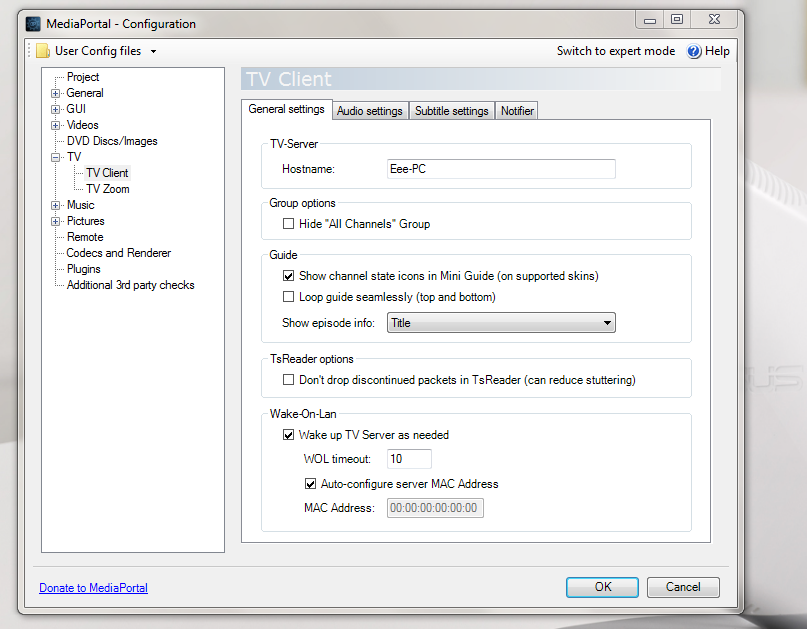
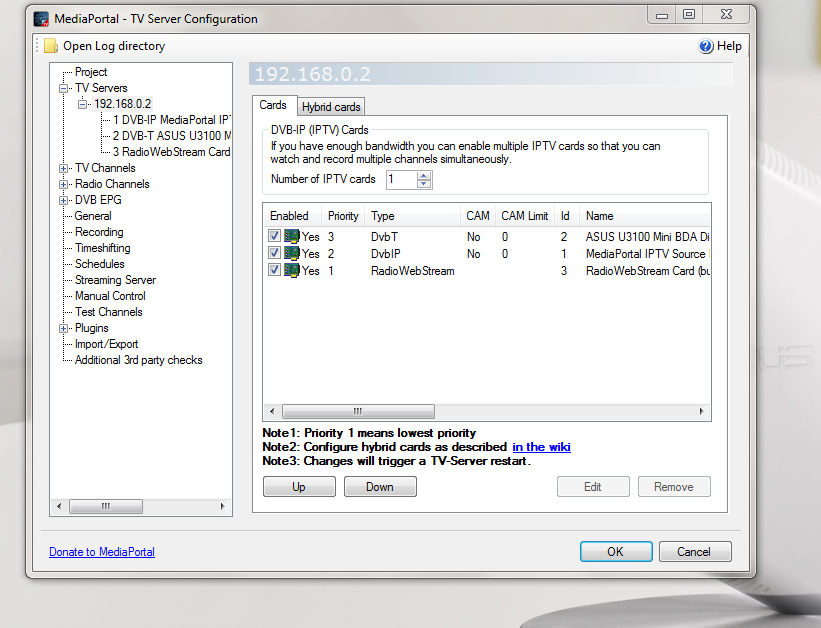
    You did not actually attach logs to your previous post. I suspect a configuration error, so screenshots from TV configuration might help us see what you are expecting as well.

    Mark
     

    Julie L

    Portal Member
    January 15, 2012
    10
    0
    Home Country
    thanks Mark, yes it has recorded sometimes but of late not at all. I thought I attached the log files last time - so please let me know if they are not here this time. Whether this is something else worth mentioning - now since this program has been installed my eebox computer does not go to sleep (I assume I have to go into the program and turn off the live tv - but at the moment it really is not working at all, so it may as well be off. I hope it is an error as you describe as the software seems very good to use. Julie

    ps I hope these are the screen shots you are suggesting I send
     

    Attachments

    • DVB.PNG
      DVB.PNG
      173.5 KB
    • recording.PNG
      recording.PNG
      159.3 KB
    • tvclient.PNG
      tvclient.PNG
      143.3 KB
    • tvserver conf.PNG
      tvserver conf.PNG
      183.4 KB

    elliottmc

    Retired Team Member
  • Premium Supporter
  • August 7, 2005
    14,927
    6,061
    Cardiff, UK
    Home Country
    United Kingdom United Kingdom
    On the 14th, it looks as though you had a failed recording

    Code:
    2012-01-14 22:09:06.882788 [scheduler thread(11)]: Scheduler : record to D:\recorded_tv\Duplicity - PRIME7 Newcastle - 2012-01-14.ts
    2012-01-14 22:09:06.913988 [scheduler thread(11)]: Recorder.start add audioVideoEventHandler
    2012-01-14 22:09:06.929589 [scheduler thread(11)]: card: StartRecording 2 D:\recorded_tv\Duplicity - PRIME7 Newcastle - 2012-01-14.ts
    2012-01-14 22:09:06.945189 [scheduler thread(11)]: StartRecording to D:\recorded_tv\Duplicity - PRIME7 Newcastle - 2012-01-14.ts
    2012-01-14 22:09:06.960789 [scheduler thread(11)]: subch:1 StartRecord(D:\recorded_tv\Duplicity - PRIME7 Newcastle - 2012-01-14.ts)
    2012-01-14 22:09:06.991989 [scheduler thread(11)]: subch:1-1 tswriter StartRecording...
    2012-01-14 22:09:07.007589 [scheduler thread(11)]: SetRecorderPids
    2012-01-14 22:09:07.179189 [scheduler thread(11)]: Set video / audio observer
    2012-01-14 22:09:07.225989 [scheduler thread(11)]: DVB subch:1 Started recording
    2012-01-14 22:09:07.241589 [scheduler thread(11)]: card: WaitForRecordingFile - waiting _eventAudio & _eventVideo
    2012-01-14 22:09:12.514398 [(15)]: WaitForPMT: Timed out waiting for PMT after 10.0308177 seconds. Increase the PMT timeout value?
    2012-01-14 22:09:12.529998 [(15)]: Setting to 0 to search for new PMT.
    2012-01-14 22:09:12.545598 [(15)]: tvcard:FreeSubChannel: subchannels count 2 subch#0 keep graph=False
    2012-01-14 22:09:12.561198 [(15)]: DVB subch:0 Decompose()
    2012-01-14 22:09:12.701599 [(15)]: FreeSubChannel CA: freeing sub channel : 0
    2012-01-14 22:09:22.264415 [scheduler thread(11)]: card: WaitForRecordingFile - no audio was found after 15.0228264 seconds
    2012-01-14 22:09:22.280015 [scheduler thread(11)]: card: Recording failed! 2 D:\recorded_tv\Duplicity - PRIME7 Newcastle - 2012-01-14.ts
    2012-01-14 22:09:22.295615 [scheduler thread(11)]: card: StopRecording card=2, user=scheduler77
    2012-01-14 22:09:22.311216 [scheduler thread(11)]: card: StopRecording for card:2

    you also seem (from TsWriter.log) to have had a successful recording

    Code:
    14-01-2012 10:13:03.547 Recorder: RECORD    set filename:D:\recorded_tv\SBS ONE\French News\French News - 2012-01-14.ts
    14-01-2012 10:13:03.625 Recorder: RECORD    Received from TvService: pmt pid:0x401 serviceId: 0x351 pmtlength:128
    14-01-2012 10:13:03.640 Recorder: RECORD    Old pids cleared
    14-01-2012 10:13:03.656 Recorder: RECORD    got pmt - tableid: 0x2 section_length: 128 sid: 0x351
    14-01-2012 10:13:03.672 Recorder: RECORD    PMT parsed  - Pid 0x401 ServiceId 0x351 stream count: 5
    14-01-2012 10:13:03.687 Recorder: RECORD    pcr pid:0xa1
    14-01-2012 10:13:03.703 Recorder: RECORD    SetPcrPid clear old PIDs
    14-01-2012 10:13:03.718 Recorder: RECORD    add video stream pid: 0xa1 fake pid: 0x30 stream type: 0x2 logical type: 0x2 descriptor length: 16
    14-01-2012 10:13:03.734 Recorder: RECORD    add audio stream pid: 0x51 fake pid: 0x40 stream type: 0x4 logical type: 0x4 descriptor length: 17
    14-01-2012 10:13:03.750 Recorder: RECORD    add teletext stream pid: 0x29 fake pid: 0x65 stream type: 0x6 logical type: 0x56 descriptor length: 15
    14-01-2012 10:13:03.765 Recorder: RECORD    stream rejected - pid: 0x33 stream type: 0x6 logical type: 0xffffffff descriptor length: 8
    14-01-2012 10:13:03.781 Recorder: RECORD    stream rejected - pid: 0x1388 stream type: 0xb logical type: 0xb descriptor length: 23
    14-01-2012 10:13:03.812 Recorder: RECORD    SetVideoAudioObserver observer ok
    14-01-2012 10:13:03.828 Recorder: RECORD    Start 'D:\recorded_tv\SBS ONE\French News\French News - 2012-01-14.ts'
    14-01-2012 10:13:03.937 Recorder: RECORD    start of audio detected
    14-01-2012 10:13:04.108 Recorder: RECORD    start of video detected
    14-01-2012 10:13:04.155 Recorder: RECORD    clear TS packet queue
    14-01-2012 10:13:04.171 CDiskRecorder::WriteToRecording() - Reset write buffer throttle
    14-01-2012 10:13:04.186 Recorder: RECORD    Info : Next broadcaster program clock reference rollover : 0 days 15:09:40 0
    14-01-2012 10:13:04.218 epg: set callback
    14-01-2012 10:13:04.233 EpgScanner::GrabEPG
    14-01-2012 10:13:04.249 epg:GrabEPG
    14-01-2012 10:13:04.264 epg:ResetEPG()
    14-01-2012 10:13:04.280 epg:GrabEPG()
    14-01-2012 10:13:04.296 EpgScanner::GrabMHW
    14-01-2012 10:13:04.311 mhw grab
    14-01-2012 10:13:04.327 mhw reset
    14-01-2012 10:13:04.342 mhw grabber started decoders:2
    14-01-2012 10:14:04.215 epg: abort grabbing
    14-01-2012 10:14:04.231 mhw abort grabbing
    14-01-2012 10:14:04.246 epg: do callback
    14-01-2012 10:14:04.262 mhw grabber ended
    14-01-2012 10:14:04.278 CMhwParser:GetTitleCount:0
    14-01-2012 10:14:04.293 EpgScanner::GetMHWTitleCount:0
    14-01-2012 10:14:04.449 epg: reset
    14-01-2012 10:14:04.465 epg:ResetEPG()
    14-01-2012 10:14:04.480 mhw reset
    14-01-2012 10:14:04.527 epg: reset
    14-01-2012 10:14:04.543 epg:ResetEPG()
    14-01-2012 10:14:04.574 mhw reset
    14-01-2012 11:10:05.444 Recorder: RECORD    Stop 'D:\recorded_tv\SBS ONE\French News\French News - 2012-01-14.ts'
    14-01-2012 11:10:05.475 Recorder: RECORD    Reset

    I would check that the channels where a recording fail actually work in normal TV. You might need to check that they are mapped to a card.

    Are these DVB-T channels? I notice that you have two other 'cards' enabled. I would try disabling everything except the card you want to use, and then see if things work.

    You could try re-scanning channels, possibly deleting all channels first (maybe a channel has stopped broadcasting.

    Fundamentally, if you can watch something, you should be able to record it.

    Best wishes,

    Mark
     

    Julie L

    Portal Member
    January 15, 2012
    10
    0
    Home Country
    thanks Mark - I did not enable any other cards so I am not sure what thats about but I will see what I can do there - All channels are digital and yes we can watch them on TV - there are no channel issues but I had rescanned the channels as one of the things when the recordings started to fail. With the cards - disable all but the Asus (the tv tuner)? Last evening I actually managed two recordings! BUT after I had captured the screen shots I went back into the config and noticed that the streaming server had an IP address rather than auto - we are not really on a network here (dont recall this being changed but probably I did when I was trying to fiddle) - anyway I shifted it back to auto and thats the only change I made before the recording yesterday....could that have done it?
     

    Users who are viewing this thread

    Top Bottom