Hibernation stopped working after installing MP (1 Viewer)

emilast

New Member
May 5, 2008
2
0
Home Country
Sweden Sweden
TV-Server Version:
MediaPortal Version: 1.0.0.0 RC1
MediaPortal Skin:
Windows Version: Windows XP Pro SP2
CPU Type: Intel Core Duo 6600 2.40 GHz
HDD:
Memory: 2 GB
Motherboard: Asus
Video Card: ATI Radeon XTX1950
Video Card Driver:
Sound Card:
Sound Card AC3:
Sound Card Driver:
1. TV Card: Terratec Cinergy Hybrid T USB XS FM
1. TV Card Type: DVB-T
1. TV Card Driver:
2. TV Card:
2. TV Card Type:
2. TV Card Driver:
3. TV Card:
3. TV Card Type:
3. TV Card Driver:
4. TV Card:
4. TV Card Type:
4. TV Card Driver:
MPEG2 Video Codec:
MPEG2 Audio Codec:
h.264 Video Codec:
Satelite/CableTV Provider:
HTPC Case:
Cooling:
Power Supply:
Remote:
TV:
TV - HTPC Connection:

Hi!

I recently installed MP and TV Server and after that my computer won't hibernate correctly anymore. It performs the hibernation but immediatelt awakens afterwards. Quite frustrating :)

I have now uninstalled MP and TV Server, but the problem remains.

During the original installation SQL Server Express was installed automatically, is that maybe what's causing the problems?

Any ideas are welcome, since I'm running out of them very fast :-(

Cheers,

Emil
 

SciDoctor

Retired Team Member
  • Premium Supporter
  • February 2, 2005
    1,465
    139
    England
    Not realy.

    I would look at wake from USB devices or WOL being active on your PC.

    Unless you configured the Powerschedular plugins while MP was installed then MP shouldn't be affecting the Hibernation process espeacialy since it is now not running/installed.

    Try posting logs of MP running, going into hibernation and returning so we can see what if anything is shown in the log-ing.
     

    emilast

    New Member
    May 5, 2008
    2
    0
    Home Country
    Sweden Sweden
    Hi again,

    I just found out about the MCE Standby Tool Slick Solutions - Home of the MCE Standby Tool (MST) in another forum post. I used it to disable my keyboard (a MS USB Digital Media Pro) as a device that can cause the computer to awake from standby (in the Devices tab of the tool). And now Hibernation works again!

    I have absolutely no idea whatsoever why I have to do this. Does MP fiddle with Hibernation settings during its installation?

    Anyway I'm glad I can hibernate again. Maybe this post can help other people as well, since I noticed I'm not alone in having hibernation-related problems.

    Cheers,

    Emil
     

    Paranoid Delusion

    Moderation Manager
  • Premium Supporter
  • June 13, 2005
    13,052
    2,978
    Cheshire
    Home Country
    United Kingdom United Kingdom
    The only thing that mediaportal does is confirm\enter the usb registry key for enabling +5vsb, allowing return from standby by remote.
     

    MdFolter

    MP Donator
  • Premium Supporter
  • December 7, 2005
    76
    2
    49
    Breugel
    Home Country
    Netherlands Netherlands
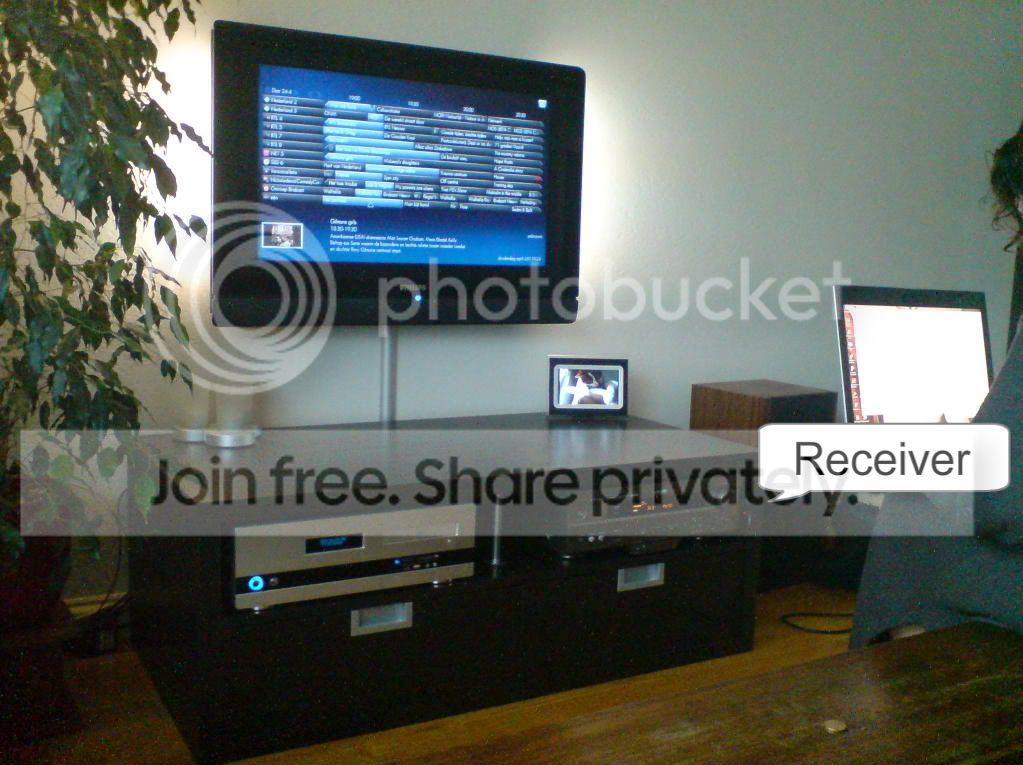
    The red led in the MCE remote receiver is blinking all the time. May be that device is the problem because it is enabled to get the computer out of its hibernate/stand-by mode...

    Anyway the MST works very good! thanks for that because I suffered the same problem

    regards Marcel
     

    MdFolter

    MP Donator
  • Premium Supporter
  • December 7, 2005
    76
    2
    49
    Breugel
    Home Country
    Netherlands Netherlands
    Hmmm not many IR sources here, except for my remote. The receiver did not blink at first but now it is blinking randomly (it got worse). Anyway with the MST tool you can turn off waking up from IR receiver and that works most of the time for me. :D
    BTW Stand-by worked very good in MP 0.2.3.0 and it stopped working in RC1 with TV-server.
     

    cybrmage

    Portal Pro
    May 30, 2007
    498
    86
    Home Country
    Canada Canada
    The red led in the MCE remote receiver is blinking all the time.

    Are you using a plasma TV??? Plasma TV sets are notorious for emitting IR radiation that will interfere with an IR receiver... try to move the IR receiver so that is is outside the "radiation zone" (the area in front of, and expanding out at a 50 degree angle from the edges of the screen on most plasma sets).
     

    MdFolter

    MP Donator
  • Premium Supporter
  • December 7, 2005
    76
    2
    49
    Breugel
    Home Country
    Netherlands Netherlands
    I have a 32" LCD tv. and the receiver is placed out of sight for the TV. As you can see on the right side of the (right side placed) audio receiver, that is where the IR receiver is placed (you can notice the red led which is blinking)
    DSC00216.jpg
     

    Paranoid Delusion

    Moderation Manager
  • Premium Supporter
  • June 13, 2005
    13,052
    2,978
    Cheshire
    Home Country
    United Kingdom United Kingdom
    Is this connected by any wireless networking, try disconnecting if it has.

    I know it does not sound IRish, but remember reading a couple of comments about this with the effect you stated.

    Sorry did not mention it earlier, had totally forgotten about it till now.
     

    Users who are viewing this thread

    Top Bottom