HW acceleration not working correctly for HD content (in RC1) (1 Viewer)

Spooky

MP Donator
  • Premium Supporter
  • February 14, 2005
    1,187
    47
    void 4tl
    Home Country
    Austria Austria
    Ok.. short story: it works now ;)


    Long story: after reinstalling PowerDVD 7.3 I had no Hardware Acceleration anymore (neither on MPEG2 nor on H.264/AVC content). It was a long time ago when I installed PowerDVD 7.3 and I didn't remember all the steps I took to get HW accel. for HD content running in the first place. So I looked for any updates of PDVD I might have been missed but then I decided to give the trial of PowerDVD 8 a try.

    The first test was fine, I had HW acceleration on HD content (even in MediaPortal), until the HTPC completely hung up. In every other try the PC hung up in a couple of settings, when viewing HD content. I noticed in the Catalyst Control Center, that the GPU load was at 100% before everything went to hell. Given that I still used Catalyst 7.11 driver (due to the fact, that no official Catalyst driver from ATi actually "support" the ATi Radeon HD 2400 Pro AGP), I thought that updating might be a good idea ;). No easy task though. I followed the instructions on ATI HD Registry Tweaks and then started the setup routine, but after a reboot, Windows couldn't load the graphics driver properly (had 640x480 and 8bit colors). However after uninstalling the drivers again, with the .inf changes still in place, I tried installing the drivers (completely) manually, which worked (fortunately). Then I deactivated HW acceleration again and restarted (in order to reset the HW accelerations settings completely), added the registry tweaks, activated HW accerlation in the PDVD config again, restarted and then... everything worked fine in Media Portal :). Smooth, hardware accelerated HD in Media Portal.

    Well I hope it stays that way for now :)
     

    ianc

    MP Donator
  • Premium Supporter
  • December 29, 2007
    132
    1
    wicklow
    Home Country
    Ireland Ireland
    Spooky,
    I also have a 2400 and a FireDTV DVBS2 and have not been able to get HD working at all never mind with acceleration. So could I ask u to go through that list again giving the exact version numbers and the steps taken.


    Please.....

    Ian
     

    Spooky

    MP Donator
  • Premium Supporter
  • February 14, 2005
    1,187
    47
    void 4tl
    Home Country
    Austria Austria
    • First of all, update your driver to Catalyst 8.3. If your card is on PCI-e, this should be an easy task. I recommend to use Driver Cleaner, just to be sure.
      • Uninstall your current driver via the ATi uninstallation utility under Control Panel - Software and restart
      • cancel all attempts of Windows to install the new driver and run Driver Cleaner for ATI and restart
      • then simply use the setup routine of Catalyst 8.3

      If yours is an AGP card too, things are bit more difficult.
      • simply use the instructions on ATI HD Registry Tweaks #AGP after you used Driver Cleaner
      • In my case, the setup routine didn't install the driver correctly after the changes. So I had to unistall everything again and install the driver manually
      • to do this, go into Win+Pause (System) - Hardware - Device Manager under Video Cards double click the 2400 and go to Driver - Update...
      • now you need to to a fully manual installation of the driver. On the first page select "Install software from a list or source", then "do not search and select the driver manually", then select "from disk...", then "search" then navigate to C:\ATI\SUPPORT\[Current Version]\Driver\Driver\XP_INF\. With the changes to the .inf still in place, it should show you the ATi Radeon HD 2400 Pro AGP. Then click ok to install the driver and restart.
      • Run the setup.exe of the CCC manually too (if CCC is not installed yet).
      .
    • Apply the registry tweaks from ATI HD Registry Tweaks. Read every tweak carefully, when it asks you to apply them. Some of them aren't needed, depending on your setup. Restart.
    • Install PowerDVD 8. After installation start PowerDVD and go into the configuration. Under Video activate "Enable Hardware Acceleration (ATi Avivo)". Maybe restart here too to be sure.
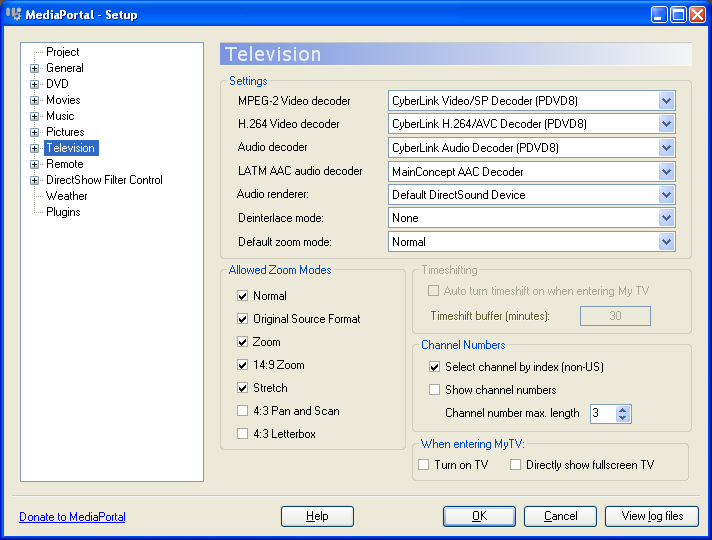
    • Go into the MediaPortal configuration. Under Television select the right codecs (see screenshot).
    • That should be it. I suggest to run MediaPortal in windowed mode for testing. Open the Task Manager and the Catalyst Control Center (and go to "Overdrive" there). Select an HD channel and watch the CPU load of MediaPortal.exe and also watch the GPU load in the CCC. Depending on your CPU, the CPU load of MediaPortal.exe should be around... let's say 20% and the GPU load should be at around 20%.

    In addition, I recommend to force enable VSync (under 3D) and Vector Adaptive Deinterlacing (under Avivo) in the driver
     

    Attachments

    • codecs.PNG
      codecs.PNG
      37.2 KB

    Spooky

    MP Donator
  • Premium Supporter
  • February 14, 2005
    1,187
    47
    void 4tl
    Home Country
    Austria Austria
    Aww crap. I tried RC1 today and now everything is messed up again. I get no correct HW acceleration for HD content (not even SD content I believe). When I try to view an HD channel, the CPU load of MP.exe goes up to 100% at times and there is no fluid playback of the HD video. Strangely the GPU load also goes up between 15% and 30%, as it would normally do with correct HW acceleration.

    RC1 is the only change. Codecs are set correctly and the graph is building up correctly. I also tried to deactivate the HW accerlation in the PowerDVD config again, restarting, activating again, restarting, but with no effect. Hardware Acceleration works fine in FireDTV and Media Player Classic (playing local h.264 files). Now I am back to quare one again :(
     

    Spooky

    MP Donator
  • Premium Supporter
  • February 14, 2005
    1,187
    47
    void 4tl
    Home Country
    Austria Austria
    I reverted back to MediaPortal 0.2.3 #18584 and TVE 0.3 #18584 and everything works perfect again. The graphs and settings are exactly the same, yet I get no HW acceleration in RC1. So what should I do now to find out what's wrong here? I don't wanna be stuck with this old SVN build forever ;)
     

    bigj

    Portal Pro
    January 10, 2005
    245
    1
    When I updated to rc1 I found the graph building changed so I had ffdshow raw filter injected after the nvideo purevideo decoder I use. i,e, as if postprocessing was enabled, although it wasn't. This breaks the HW accel path. In my case I disabled the 'raw' option in ffdshow. I didn't remove ffdshow entirely as I still want it for h264 decode. Take a look at your graph using graphedit (connect to remote graph).
     

    Spooky

    MP Donator
  • Premium Supporter
  • February 14, 2005
    1,187
    47
    void 4tl
    Home Country
    Austria Austria
    As I mentioned, the graph in RC1 looks exactly the same as in 0.2.3, with the PowerDVD codecs in place everywhere. The output of the Cyberlink H.264/AVC decoder is directly sent to VMR9.
     

    jallahman

    Portal Member
    September 12, 2007
    20
    0
    Home Country
    Norway Norway
    I am having the exact same problems as you using the latest svn of RC1. However I use a NVIDIA card..

    The picture is crystal clear and fluid using only 10% CPU in FireDTV viewer (or media player), but in MediaPortal I get a terrible framerate (15-20 fps) using the same amount of CPU.

    Have you found a solution to this yet? :confused:
     

    Users who are viewing this thread

    Top Bottom