
I have an issue with MP121 an dFFDshow audio decoder (1 Viewer)

Mitchan81

Portal Member
October 12, 2011
11
0
44
When i set Codecs and Renderer -> Viedo Codecs -> MPEG/AC3 Audio Decoder with FFDshow Audio Decoder i have an issue:

MediaPortal continues to use the default MPA Audio Decoder

(Both audio codecs are configured to decode in PCM 5.1 audio stream using the HDMI output)

Why?
 

mm1352000

Retired Team Member
  • Premium Supporter
  • September 1, 2008
    21,544
    8,236
    Home Country
    New Zealand New Zealand
    Hi Mitchan81

    MP will usually only use alternative codecs when the one that you select is not able to decode the stream. In this case, it *might* be because you've disabled or not enabled the appropriate audio codec in the FFDShow settings... but that would be guessing. Please post logs showing an example of when this happens:

    1. Find the "debug mode" link in the "Team MediaPortal" folder in your start menu and start it.
    2. Select option 1 "report a bug...".
    3. Click proceed.
    4. Reproduce the problem.
    5. Close MP - this will trigger the watchdog to create a zip file on your desktop.
    6. Post the zip file here.

    Help is in the wiki -->here<-- if you get stuck.

    mm

    PS: we require logs and system info for support threads. Please don't ignore our support forum rules.
     

    mm1352000

    Retired Team Member
  • Premium Supporter
  • September 1, 2008
    21,544
    8,236
    Home Country
    New Zealand New Zealand
    Hi again

    The FFDShow codec *is* being inserted:

    [COLLAPSE]2011-10-14 19:04:07.073841 [Info.][MPMain(1)]: MediaInfoWrapper.MediaInfoWrapper: DLL Version : MediaInfoLib - v0.7.36BETA
    2011-10-14 19:04:07.073841 [Info.][MPMain(1)]: MediaInfoWrapper.MediaInfoWrapper: Inspecting media : E:\VIDEO\FILM\FILM HD ITA\[BluRay Rip 1080p - ITA-ENG DTS-AC3-SUB] Bastardi senza gloria LiFE [m@rcomem].mkv
    2011-10-14 19:04:07.074841 [Info.][MPMain(1)]: MediaInfoWrapper.MediaInfoWrapper: Parse speed : 0.3
    2011-10-14 19:04:07.074841 [Info.][MPMain(1)]: MediaInfoWrapper.MediaInfoWrapper: FrameRate : 25
    2011-10-14 19:04:07.074841 [Info.][MPMain(1)]: MediaInfoWrapper.MediaInfoWrapper: Width : 1920
    2011-10-14 19:04:07.074841 [Info.][MPMain(1)]: MediaInfoWrapper.MediaInfoWrapper: Height : 800
    2011-10-14 19:04:07.075841 [Info.][MPMain(1)]: MediaInfoWrapper.MediaInfoWrapper: AspectRatio : widescreen
    2011-10-14 19:04:07.075841 [Info.][MPMain(1)]: MediaInfoWrapper.MediaInfoWrapper: VideoCodec : AVC [ "avc.png" ]
    2011-10-14 19:04:07.075841 [Info.][MPMain(1)]: MediaInfoWrapper.MediaInfoWrapper: Scan type : progressive
    2011-10-14 19:04:07.076841 [Info.][MPMain(1)]: MediaInfoWrapper.MediaInfoWrapper: IsInterlaced : False
    2011-10-14 19:04:07.076841 [Info.][MPMain(1)]: MediaInfoWrapper.MediaInfoWrapper: VideoResolution : 1080P
    2011-10-14 19:04:07.076841 [Info.][MPMain(1)]: MediaInfoWrapper.MediaInfoWrapper: VideoDuration : 8803600
    2011-10-14 19:04:07.076841 [Info.][MPMain(1)]: MediaInfoWrapper.MediaInfoWrapper: AudioRate : 48000
    2011-10-14 19:04:07.077841 [Info.][MPMain(1)]: MediaInfoWrapper.MediaInfoWrapper: AudioChannels : 6 [ "5.1.png" ]
    2011-10-14 19:04:07.077841 [Info.][MPMain(1)]: MediaInfoWrapper.MediaInfoWrapper: AudioCodec : AC-3 [ "ac-3.png" ]
    2011-10-14 19:04:07.077841 [Info.][MPMain(1)]: MediaInfoWrapper.MediaInfoWrapper: HasAudio : True
    2011-10-14 19:04:07.077841 [Info.][MPMain(1)]: MediaInfoWrapper.MediaInfoWrapper: HasVideo : True
    2011-10-14 19:04:07.078841 [Info.][MPMain(1)]: MediaInfoWrapper.MediaInfoWrapper: HasSubtitles : True
    2011-10-14 19:04:07.078841 [Info.][MPMain(1)]: MediaInfoWrapper.MediaInfoWrapper: NumSubtitles : 3
    2011-10-14 19:04:07.111843 [Info.][MPMain(1)]: MediaInfoWrapper.MediaInfoWrapper: DLL Version : MediaInfoLib - v0.7.36BETA
    2011-10-14 19:04:07.111843 [Info.][MPMain(1)]: MediaInfoWrapper.MediaInfoWrapper: Inspecting media : E:\VIDEO\FILM\FILM HD ITA\[BluRay Rip 1080p - ITA-ENG DTS-AC3-SUB] Bastardi senza gloria LiFE [m@rcomem].mkv
    2011-10-14 19:04:07.112843 [Info.][MPMain(1)]: MediaInfoWrapper.MediaInfoWrapper: Parse speed : 0.3
    2011-10-14 19:04:07.112843 [Info.][MPMain(1)]: MediaInfoWrapper.MediaInfoWrapper: FrameRate : 25
    2011-10-14 19:04:07.112843 [Info.][MPMain(1)]: MediaInfoWrapper.MediaInfoWrapper: Width : 1920
    2011-10-14 19:04:07.112843 [Info.][MPMain(1)]: MediaInfoWrapper.MediaInfoWrapper: Height : 800
    2011-10-14 19:04:07.113843 [Info.][MPMain(1)]: MediaInfoWrapper.MediaInfoWrapper: AspectRatio : widescreen
    2011-10-14 19:04:07.113843 [Info.][MPMain(1)]: MediaInfoWrapper.MediaInfoWrapper: VideoCodec : AVC [ "avc.png" ]
    2011-10-14 19:04:07.113843 [Info.][MPMain(1)]: MediaInfoWrapper.MediaInfoWrapper: Scan type : progressive
    2011-10-14 19:04:07.113843 [Info.][MPMain(1)]: MediaInfoWrapper.MediaInfoWrapper: IsInterlaced : False
    2011-10-14 19:04:07.114843 [Info.][MPMain(1)]: MediaInfoWrapper.MediaInfoWrapper: VideoResolution : 1080P
    2011-10-14 19:04:07.114843 [Info.][MPMain(1)]: MediaInfoWrapper.MediaInfoWrapper: VideoDuration : 8803600
    2011-10-14 19:04:07.114843 [Info.][MPMain(1)]: MediaInfoWrapper.MediaInfoWrapper: AudioRate : 48000
    2011-10-14 19:04:07.115843 [Info.][MPMain(1)]: MediaInfoWrapper.MediaInfoWrapper: AudioChannels : 6 [ "5.1.png" ]
    2011-10-14 19:04:07.115843 [Info.][MPMain(1)]: MediaInfoWrapper.MediaInfoWrapper: AudioCodec : AC-3 [ "ac-3.png" ]
    2011-10-14 19:04:07.115843 [Info.][MPMain(1)]: MediaInfoWrapper.MediaInfoWrapper: HasAudio : True
    2011-10-14 19:04:07.115843 [Info.][MPMain(1)]: MediaInfoWrapper.MediaInfoWrapper: HasVideo : True
    2011-10-14 19:04:07.116843 [Info.][MPMain(1)]: MediaInfoWrapper.MediaInfoWrapper: HasSubtitles : True
    2011-10-14 19:04:07.116843 [Info.][MPMain(1)]: MediaInfoWrapper.MediaInfoWrapper: NumSubtitles : 3
    2011-10-14 19:04:07.116843 [Debug][MPMain(1)]: g_Player.Play - Mediatype Unknown, forcing detection as Video
    2011-10-14 19:04:07.140844 [Info.][MPMain(1)]: RefreshRateChanger.AdaptRefreshRate: framerate on file E:\VIDEO\FILM\FILM HD ITA\[BluRay Rip 1080p - ITA-ENG DTS-AC3-SUB] Bastardi senza gloria LiFE [m@rcomem].mkv is 25
    2011-10-14 19:04:07.144845 [Info.][MPMain(1)]: RefreshRateChanger.SetRefreshRateBasedOnFPS: current refreshrate is 24hz - changing it to 50hz
    2011-10-14 19:04:07.144845 [Info.][MPMain(1)]: RefreshRateChanger.SetRefreshRateBasedOnFPS: using internal win32 method for changing refreshrate. current is 24hz, desired is 50
    2011-10-14 19:04:07.150845 [Debug][MPMain(1)]: W7RefreshRateHelper.SetDisplayConfig(...): SDC_VALIDATE of 50000/1000 succesful
    2011-10-14 19:04:07.420860 [Debug][MPMain(1)]: W7RefreshRateHelper.GetRefreshRate: QueryDisplayConfig returned 148500000/2970000
    2011-10-14 19:04:07.420860 [Debug][MPMain(1)]: CycleRefreshRate: successfully changed refresh rate to 50Hz (50Hz requested)
    2011-10-14 19:04:07.421861 [Debug][MPMain(1)]: CycleRefresh: DWM Detected, performing shenanigans
    2011-10-14 19:04:07.466863 [Info.][MPMain(1)]: g_Player.Play(E:\VIDEO\FILM\FILM HD ITA\[BluRay Rip 1080p - ITA-ENG DTS-AC3-SUB] Bastardi senza gloria LiFE [m@rcomem].mkv Video)
    2011-10-14 19:04:07.537867 [Info.][MPMain(1)]: Loading external players plugins
    2011-10-14 19:04:07.538867 [Info.][MPMain(1)]: found plugin:MediaPortal.ITunesPlayer.ITunesPlugin in C:\Program Files (x86)\Team MediaPortal\MediaPortal\Plugins\ExternalPlayers\ExternalPlayers.dll
    2011-10-14 19:04:07.539867 [Info.][MPMain(1)]: player:iTunes. author: Frodo
    2011-10-14 19:04:07.539867 [Info.][MPMain(1)]: found plugin:MediaPortal.WinampPlayer.WinampPlugin in C:\Program Files (x86)\Team MediaPortal\MediaPortal\Plugins\ExternalPlayers\ExternalPlayers.dll
    2011-10-14 19:04:07.540867 [Info.][MPMain(1)]: player:Winamp. author: int_20h
    2011-10-14 19:04:07.540867 [Debug][MPMain(1)]: PlayerFactory: Successfully created player instance for file - E:\VIDEO\FILM\FILM HD ITA\[BluRay Rip 1080p - ITA-ENG DTS-AC3-SUB] Bastardi senza gloria LiFE [m@rcomem].mkv
    2011-10-14 19:04:07.562869 [Info.][MPMain(1)]: VideoPlayer:play E:\VIDEO\FILM\FILM HD ITA\[BluRay Rip 1080p - ITA-ENG DTS-AC3-SUB] Bastardi senza gloria LiFE [m@rcomem].mkv
    2011-10-14 19:04:07.689876 [Info.][MPMain(1)]: VideoPlayerVMR9: Enabling DX9 exclusive mode
    2011-10-14 19:04:07.701877 [Info.][MPMain(1)]: VMR9: added EVR Renderer to graph
    2011-10-14 19:04:08.892945 [Debug][MPMain(1)]: VMR9: Now active
    2011-10-14 19:04:08.892945 [Debug][MPMain(1)]: VMR9: Renderer successfully added
    2011-10-14 19:04:09.271966 [Info.][MPMain(1)]: Added filter: CoreAVC Video Decoder to graph
    2011-10-14 19:04:09.287967 [Info.][MPMain(1)]: Added filter: ffdshow Audio Decoder to graph
    2011-10-14 19:04:09.291967 [Info.][MPMain(1)]: Added filter: MPC - MPA Decoder Filter to graph

    2011-10-14 19:04:09.301968 [Info.][MPMain(1)]: DirectShowUtils: First try to insert new audio renderer ReClock Audio Renderer
    2011-10-14 19:04:09.301968 [Info.][MPMain(1)]: DirectShowUtils: Found audio renderer
    2011-10-14 19:04:09.362972 [Debug][MPMain(1)]: DirectShowUtils: added filter:ReClock Audio Renderer to graph
    2011-10-14 19:04:09.364972 [Debug][MPMain(1)]: Filter: E:\VIDEO\FILM\FILM HD ITA\[BluRay Rip 1080p - ITA-ENG DTS-AC3-SUB] Bastardi senza gloria LiFE [m@rcomem].mkv - try to connect: Video
    2011-10-14 19:04:09.376972 [Debug][MPMain(1)]: PlaneScene: PresentImage() dispose surfaces
    2011-10-14 19:04:09.377972 [Debug][MPMain(1)]: Filter: E:\VIDEO\FILM\FILM HD ITA\[BluRay Rip 1080p - ITA-ENG DTS-AC3-SUB] Bastardi senza gloria LiFE [m@rcomem].mkv - try to connect: Audio
    2011-10-14 19:04:10.105014 [Debug][MPMain(1)]: Filter: E:\VIDEO\FILM\FILM HD ITA\[BluRay Rip 1080p - ITA-ENG DTS-AC3-SUB] Bastardi senza gloria LiFE [m@rcomem].mkv - try to connect: Subtitle
    2011-10-14 19:04:10.120015 [Debug][MPMain(1)]: - failed
    2011-10-14 19:04:10.122015 [Debug][MPMain(1)]: Check graph connections for: ReClock Audio Renderer
    2011-10-14 19:04:10.122015 [Debug][MPMain(1)]: Check graph connections for: ffdshow Audio Decoder
    2011-10-14 19:04:10.122015 [Debug][MPMain(1)]: - remove done

    2011-10-14 19:04:10.123015 [Debug][MPMain(1)]: Check graph connections for: Enhanced Video Renderer
    2011-10-14 19:04:10.123015 [Debug][MPMain(1)]: Check graph connections for: MPC - MPA Decoder Filter
    2011-10-14 19:04:10.123015 [Debug][MPMain(1)]: Check graph connections for: CoreAVC Video Decoder
    2011-10-14 19:04:10.123015 [Debug][MPMain(1)]: Check graph connections for: E:\VIDEO\FILM\FILM HD ITA\[BluRay Rip 1080p - ITA-ENG DTS-AC3-SUB] Bastardi senza gloria LiFE [m@rcomem].mkv[/COLLAPSE]

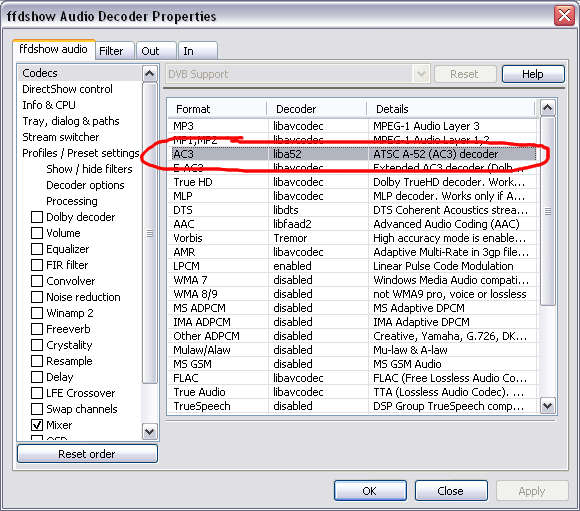
    I'm guessing it is just not able to be used because you have disabled the particular audio format that is being played (see the attached screenshot to see what I'm talking about) or there is a compatibility issue that you need to sort out with reclock. I could be wrong, but the MediaPortal log is not enough to tell. If you want me to look further into this then you need to post *full* logs. The easiest way to do that is to use the watchdog:

    1. Find the "debug mode" link in the "Team MediaPortal" folder in your start menu.
    2. Start it.
    3. Select option 1 "report a bug...".
    4. Click "proceed" - this starts MP in debug mode (meaning there is extra information in your logs, plugins are disabled, and the default skin is used).
    5. Reproduce the problem (in your case play a video).
    6. Stop the video after 15 seconds or so.
    7. Close MP - this will trigger the watchdog to compile a zip file on your desktop with all your logs, MP configuration and other system logs.
    8. Post the zip file here.

    Wiki information about the watchdog is -->here<--.

    mm
     

    Attachments

    • 1.jpg
      1.jpg
      77.6 KB

    Mitchan81

    Portal Member
    October 12, 2011
    11
    0
    44
    it isn't an issue of FFDShow configuration because if i set FFDShow audio decoder in both parts (MPEG/AC3 and AAC) everything work work properly

    but with AC3 filter i have the issue that i can't set it as AAC decoder....

    i will post full logs as soon as possible

    thx a lot
     

    mm1352000

    Retired Team Member
  • Premium Supporter
  • September 1, 2008
    21,544
    8,236
    Home Country
    New Zealand New Zealand
    Hi again Mitchan81

    You should take a look at -->this thread<-- too. Somebody reported a similar problem and that prompted me to look at the code and figure out how it works. You can try the solution I suggest in the second post too (reduce the merit of the MPC MPA filter).

    mm
     

    Users who are viewing this thread

    Top Bottom