Italy
Italy
If you want to have iMON handle all the keys of your remote, follow this simple steps:
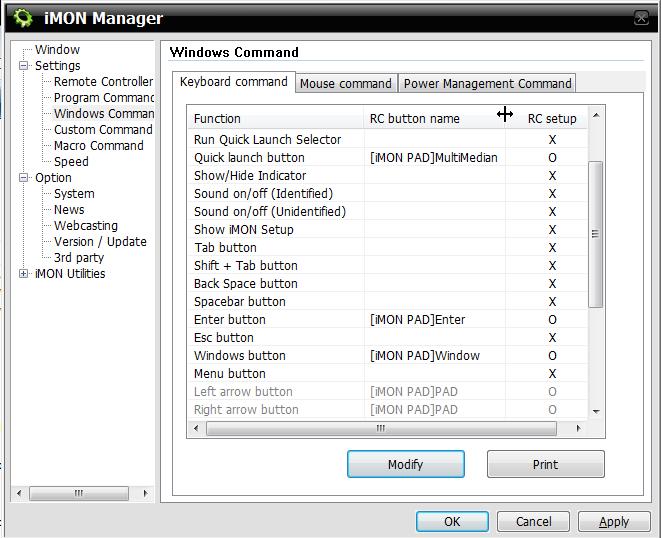
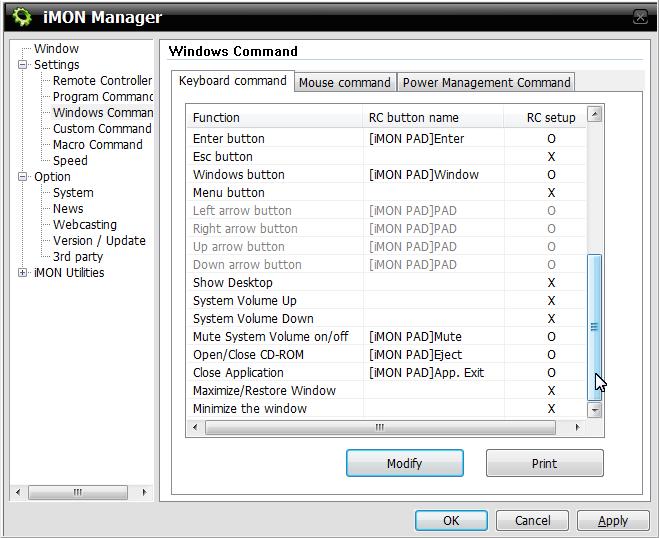
1. Under "Settings"->"Windows Command" remove default mapping: leave only those that are highlighted on attached pictures named "Windows Command Settings".
2. Under "Settings"->"Program Command" add MediaPortal.exe and import the attached MediaPortal_imo_12_04_2008.zip.
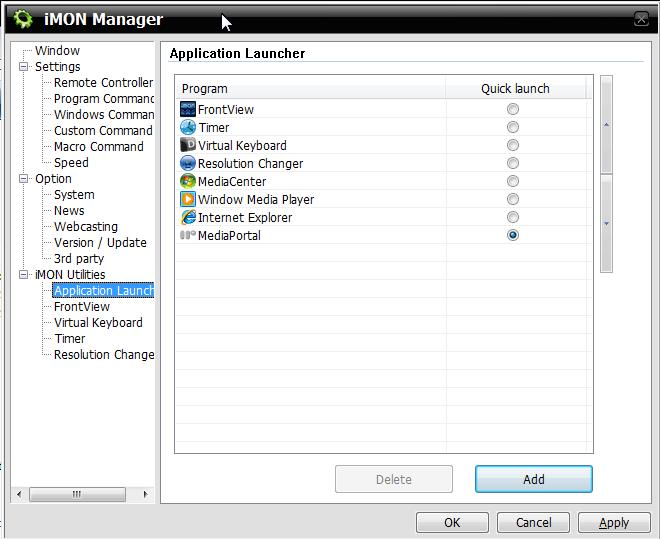
3. Under "iMON Utilities"->"Application Launcher" add MediaPortal.exe as default program (see attached picture named "Application Launcher").
4. Download Shortcuter plugin. Once enabled, click "Reset configuration" and then "Update and close".
5. Enjoy your full working remote
If you find any issue with this config please reply to this thread.
Simone
1. Under "Settings"->"Windows Command" remove default mapping: leave only those that are highlighted on attached pictures named "Windows Command Settings".
2. Under "Settings"->"Program Command" add MediaPortal.exe and import the attached MediaPortal_imo_12_04_2008.zip.
3. Under "iMON Utilities"->"Application Launcher" add MediaPortal.exe as default program (see attached picture named "Application Launcher").
4. Download Shortcuter plugin. Once enabled, click "Reset configuration" and then "Update and close".
5. Enjoy your full working remote
If you find any issue with this config please reply to this thread.
Simone