Hi all,
I was wondering if anyone had seen this error before when running the TV-Series install executable in Win7 Ultimate as the local administrator (as can be seen in the attachments).
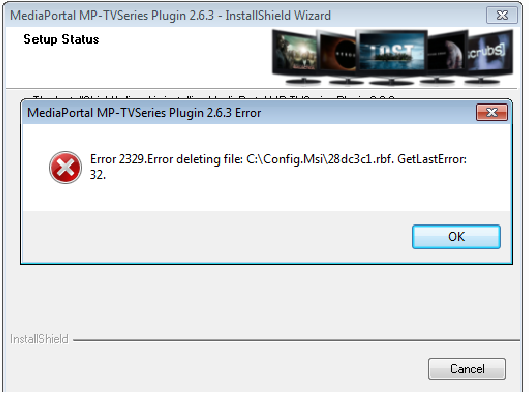
I have searched everywhere for Error 2329 with not much luck.
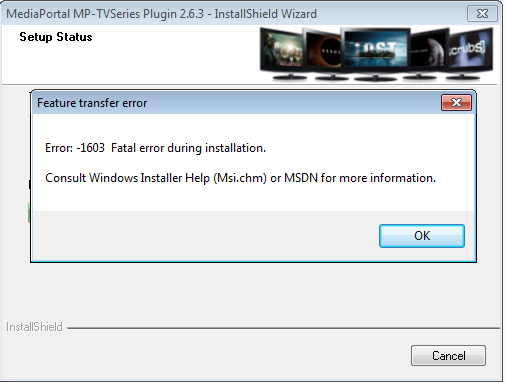
What appears to be happening is that Windows Installer is writing .rbs and .rbf files to the Config.msi folder, but partway through the installation it writes one of the .rbf files which is 0 bytes, and then hangs with the first error. (TV-SERIES.png) Clicking OK starts a rollback process, then throws error 2 (TV-SERIES2.png).
I recall having run into this 3 builds ago, but realized that I wasn't right clicking and running as administrator (even though logged in as the local admin).
Doing this that time resolved the issue, but now it happens regardless.
Anyways, I have run full updates (as I definitely suspect it is the Windows Installer on my system that is screwing up and not TV-Series installer) as well as searched out other methods (re-installing Windows Installer 4.5 (which in the end I couldn't) changing temporarily permissions to full for everyone on Config.msi, apparently there used to be a tool called Windows Installer Cleanup Tool - but no more, and ran CCleaner hoping it may be a registry issue or a half installed application)
The one thing I haven't attempted as I really don't want to, is complete removal of Media Portal and fresh installation
Any advice about this would be much appreciated and thank you all for the years of fantastic software..
I was wondering if anyone had seen this error before when running the TV-Series install executable in Win7 Ultimate as the local administrator (as can be seen in the attachments).
I have searched everywhere for Error 2329 with not much luck.
What appears to be happening is that Windows Installer is writing .rbs and .rbf files to the Config.msi folder, but partway through the installation it writes one of the .rbf files which is 0 bytes, and then hangs with the first error. (TV-SERIES.png) Clicking OK starts a rollback process, then throws error 2 (TV-SERIES2.png).
I recall having run into this 3 builds ago, but realized that I wasn't right clicking and running as administrator (even though logged in as the local admin).
Doing this that time resolved the issue, but now it happens regardless.
Anyways, I have run full updates (as I definitely suspect it is the Windows Installer on my system that is screwing up and not TV-Series installer) as well as searched out other methods (re-installing Windows Installer 4.5 (which in the end I couldn't) changing temporarily permissions to full for everyone on Config.msi, apparently there used to be a tool called Windows Installer Cleanup Tool - but no more, and ran CCleaner hoping it may be a registry issue or a half installed application)
The one thing I haven't attempted as I really don't want to, is complete removal of Media Portal and fresh installation
Any advice about this would be much appreciated and thank you all for the years of fantastic software..