Intelligent Frame Correction - PlugIn (1 Viewer)

Reg

Portal Pro
November 22, 2008
163
29
Christchurch
Home Country
New Zealand New Zealand
Marvin,
Then I want to uninstall your plugin, to reinstall an older version, but that is not possible. (MP message: "Invalid package !").

De-install the package with the MediaPortal Extention Installer you can find it in the Team Mediaportal / Mediaportal Start menu.
Don't know why the developers don't fix this issue or get rit of the de-install option in the configuration as it does not work for any package.

I tried to de-install via that and it says no de-installation file found. I have also tried re-installing, which it does ok but the program just doesnt work for me. In MP config / plugins it is not present. When MP is running it is not shown as an installed plugin. The only evidence of it existing on my system is in MP config / install tab.
 

Marvman

Retired Team Member
  • Premium Supporter
  • November 14, 2007
    1,163
    735
    Bavaria
    Home Country
    Germany Germany
    Marvin,
    Then I want to uninstall your plugin, to reinstall an older version, but that is not possible. (MP message: "Invalid package !").

    De-install the package with the MediaPortal Extention Installer you can find it in the Team Mediaportal / Mediaportal Start menu.
    Don't know why the developers don't fix this issue or get rit of the de-install option in the configuration as it does not work for any package.

    I tried to de-install via that and it says no de-installation file found. I have also tried re-installing, which it does ok but the program just doesnt work for me. In MP config / plugins it is not present. When MP is running it is not shown as an installed plugin. The only evidence of it existing on my system is in MP config / install tab.

    the plug-in should exists in the mp installation folder/plugins/process if you can't install it right I'll attach the two needed files here.
     

    Reg

    Portal Pro
    November 22, 2008
    163
    29
    Christchurch
    Home Country
    New Zealand New Zealand
    De-install the package with the MediaPortal Extention Installer you can find it in the Team Mediaportal / Mediaportal Start menu.
    Don't know why the developers don't fix this issue or get rit of the de-install option in the configuration as it does not work for any package.

    I tried to de-install via that and it says no de-installation file found. I have also tried re-installing, which it does ok but the program just doesnt work for me. In MP config / plugins it is not present. When MP is running it is not shown as an installed plugin. The only evidence of it existing on my system is in MP config / install tab.

    the plug-in should exists in the mp installation folder/plugins/process if you can't install it right I'll attach the two needed files here.


    In my /plugins/process folder it has put : IntelligentFrameCorrection.dll

    what is the other file and where should it be ?
     

    Owlsroost

    Retired Team Member
  • Premium Supporter
  • October 28, 2008
    5,539
    5,038
    Cambridge
    Home Country
    United Kingdom United Kingdom
    Hi Marvin

    Thanks for the new version with the "left/right bar" flag. Maybe one additional suggestion regarding usability: Shouldn't IFC be activated by default even if you make use of the option to de-/activate it manually"? I mean, if you use IFC, it will cover 95% of all movies and perhaps there are rare videos, where you would like to deactivate the functionlity in order to select a display mode manually. In this case you could deactivate IFC by using "F4".

    Regards

    Oliver

    I already finished the next version :D, but didn't uploaded yet.

    Your suggestion is good for all who want to skip some movies etc, but for 95% they don't have to deactivate IFC.

    What about the other side, some people might want to activate IFC for some movies, they have to press F4 every time.

    Maybe we should make a poll or somthing about it, what do you guys think?

    Why not change the function of the 'Manual activation' tickbox to be 'Off at startup'. So if it is ticked IFC is off until toggled on using F4, if the box is not ticked IFC is on until toggled off using F4. IFC should revert to the preferred startup state on a channel change/file open etc.

    That way people can chose the 'normally on' or 'normally off' preference themselves.

    Tony

    Hi Marvin,

    can you find an method for 14:9 (letter boxed) content? The 16:9 cutter cut too big. :(

    thx

    First I want to fix all reported issues and then, we will speak about the 14:9 format, then I'll need you help, so stay tuned.

    What MP really needs is a user-specified zoom mode - could IFC provide this (since it can already crop and zoom the video) ?

    Tony
     

    regeszter

    Retired Team Member
  • Premium Supporter
  • October 29, 2005
    5,335
    4,954
    Home Country
    Hungary Hungary
    Hi Marvin
    Why not change the function of the 'Manual activation' tickbox to be 'Off at startup'. So if it is ticked IFC is off until toggled on using F4, if the box is not ticked IFC is on until toggled off using F4. IFC should revert to the preferred startup state on a channel change/file open etc.

    That way people can chose the 'normally on' or 'normally off' preference themselves.

    Tony

    Good idea!
     

    sdf

    Portal Pro
    September 29, 2006
    292
    42
    Home Country
    Italy Italy
    It would be wonderful a custom zoon mode.
    It would be more wonderful the possibility via some keyboard shortcuts to fine tune the zoom (horizontally and vertically), like in dvbviewer and progdvb, and then save several zoom presets.
    bye,
    sdf
     

    fmulders

    MP Donator
  • Premium Supporter
  • June 3, 2009
    99
    14
    52
    Home Country
    Netherlands Netherlands
    I try to reproduce the issue tomorro. (my wife is watching TV:rolleyes:)
    When I have the same problem again, I will send the configuration.log

    Marvin,

    I reproduced it after complete deinstallation of the other versions.
    I did a fresh install and changed only one setting as you can see here in blue:

    <profile>
    - <section name="Config">
    <entry name="4:3">False</entry>
    <entry name="16:9">True</entry>
    <entry name="21:9">False</entry>
    <entry name="blacklevel">39</entry>
    <entry name="scaninterval">3000</entry>
    <entry name="blacklevelMax">39</entry>
    <entry name="detectioncount">3</entry>
    <entry name="autoSwitchOff4HD">0</entry>
    <entry name="useInMyVideo">True</entry>
    <entry name="manualActivation">False</entry>
    <entry name="useVideoCrop">True</entry>
    <entry name="blackbardetection">True</entry>
    <entry name="blackbardetectionHD">True</entry>
    <entry name="blackbardetectionLR">True</entry>
    </section>
    - <section name="Black Area One">
    <entry name="height">9</entry>
    <entry name="width">30</entry>
    <entry name="y">2</entry>
    <entry name="x">31</entry>
    </section>
    - <section name="Black Area Two">
    <entry name="height">10</entry>
    <entry name="width">30</entry>
    <entry name="y">10</entry>
    <entry name="x">31</entry>
    </section>
    - <section name="Control Area">
    <entry name="height">10</entry>
    <entry name="width">10</entry>
    <entry name="y">46</entry>
    <entry name="x">41</entry>
    </section>
    - <section name="View Mode">
    <entry name="4:3">Stretch</entry>
    <entry name="16:9">Stretch</entry>
    <entry name="21:9">Normal</entry>
    <entry name="4:3 in 16:9">Stretch</entry>
    <entry name="4:3 Letterbox">Stretch</entry>
    </section>
    - <section name="Video Crop">
    <entry name="left">1</entry>
    <entry name="right">1</entry>
    <entry name="top">1</entry>
    <entry name="bottom">1</entry>
    </section>
    - <section name="Overscan Crop">
    <entry name="top">2</entry>
    <entry name="bottom">2</entry>
    </section>
    - <section name="Black Area LR">
    <entry name="height">83</entry>
    <entry name="width">8</entry>
    <entry name="y">13</entry>
    <entry name="x">2</entry>
    </section>
    </profile>

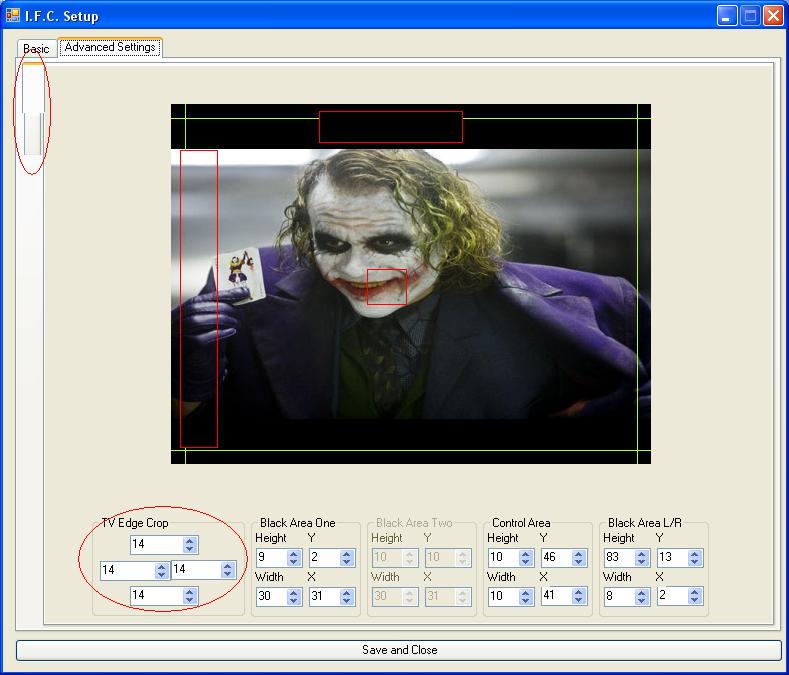
    The section name "TV Edge crop" is not in the xml file! (the standard 14 ,14, 14, 14 does the trick for me)
    So when you want to change the 14 in a diverend number, it is not saved.
    As you can see in the picture some tekst on the tabs is missing too.


    I hope this makes things clear for you.
     

    Attachments

    • problem-ifc.JPG
      problem-ifc.JPG
      69.8 KB

    Marvman

    Retired Team Member
  • Premium Supporter
  • November 14, 2007
    1,163
    735
    Bavaria
    Home Country
    Germany Germany
    Hi Marvin

    Thanks for the new version with the "left/right bar" flag. Maybe one additional suggestion regarding usability: Shouldn't IFC be activated by default even if you make use of the option to de-/activate it manually"? I mean, if you use IFC, it will cover 95% of all movies and perhaps there are rare videos, where you would like to deactivate the functionlity in order to select a display mode manually. In this case you could deactivate IFC by using "F4".

    Regards

    Oliver

    I already finished the next version :D, but didn't uploaded yet.

    Your suggestion is good for all who want to skip some movies etc, but for 95% they don't have to deactivate IFC.

    What about the other side, some people might want to activate IFC for some movies, they have to press F4 every time.

    Maybe we should make a poll or somthing about it, what do you guys think?

    Why not change the function of the 'Manual activation' tickbox to be 'Off at startup'. So if it is ticked IFC is off until toggled on using F4, if the box is not ticked IFC is on until toggled off using F4. IFC should revert to the preferred startup state on a channel change/file open etc.

    That way people can chose the 'normally on' or 'normally off' preference themselves.

    Tony

    I'll think about it, thats a good compromise.

    Hi Marvin,

    can you find an method for 14:9 (letter boxed) content? The 16:9 cutter cut too big. :(

    thx

    First I want to fix all reported issues and then, we will speak about the 14:9 format, then I'll need you help, so stay tuned.

    What MP really needs is a user-specified zoom mode - could IFC provide this (since it can already crop and zoom the video) ?

    Tony

    It would be wonderful a custom zoon mode.
    It would be more wonderful the possibility via some keyboard shortcuts to fine tune the zoom (horizontally and vertically), like in dvbviewer and progdvb, and then save several zoom presets.
    bye,
    sdf

    What do you guys mean with custom zoom mode how should it looks like an example would be nice.

    I try to reproduce the issue tomorro. (my wife is watching TV:rolleyes:)
    When I have the same problem again, I will send the configuration.log
    Marvin,

    I reproduced it after complete deinstallation of the other versions.
    I did a fresh install and changed only one setting as you can see here in blue:

    <profile>
    - <section name="Config">
    <entry name="4:3">False</entry>
    <entry name="16:9">True</entry>
    <entry name="21:9">False</entry>
    <entry name="blacklevel">39</entry>
    <entry name="scaninterval">3000</entry>
    <entry name="blacklevelMax">39</entry>
    <entry name="detectioncount">3</entry>
    <entry name="autoSwitchOff4HD">0</entry>
    <entry name="useInMyVideo">True</entry>
    <entry name="manualActivation">False</entry>
    <entry name="useVideoCrop">True</entry>
    <entry name="blackbardetection">True</entry>
    <entry name="blackbardetectionHD">True</entry>
    <entry name="blackbardetectionLR">True</entry>
    </section>
    - <section name="Black Area One">
    <entry name="height">9</entry>
    <entry name="width">30</entry>
    <entry name="y">2</entry>
    <entry name="x">31</entry>
    </section>
    - <section name="Black Area Two">
    <entry name="height">10</entry>
    <entry name="width">30</entry>
    <entry name="y">10</entry>
    <entry name="x">31</entry>
    </section>
    - <section name="Control Area">
    <entry name="height">10</entry>
    <entry name="width">10</entry>
    <entry name="y">46</entry>
    <entry name="x">41</entry>
    </section>
    - <section name="View Mode">
    <entry name="4:3">Stretch</entry>
    <entry name="16:9">Stretch</entry>
    <entry name="21:9">Normal</entry>
    <entry name="4:3 in 16:9">Stretch</entry>
    <entry name="4:3 Letterbox">Stretch</entry>
    </section>
    - <section name="Video Crop">
    <entry name="left">1</entry>
    <entry name="right">1</entry>
    <entry name="top">1</entry>
    <entry name="bottom">1</entry>
    </section>
    - <section name="Overscan Crop">
    <entry name="top">2</entry>
    <entry name="bottom">2</entry>
    </section>
    - <section name="Black Area LR">
    <entry name="height">83</entry>
    <entry name="width">8</entry>
    <entry name="y">13</entry>
    <entry name="x">2</entry>
    </section>
    </profile>

    The section name "TV Edge crop" is not in the xml file! (the standard 14 ,14, 14, 14 does the trick for me)
    So when you want to change the 14 in a diverend number, it is not saved.
    As you can see in the picture some tekst on the tabs is missing too.


    I hope this makes things clear for you.

    The TV Edge Crop settings arn't stored in the ifc xml file, they are stored in the mediaportal.xml, cause you can set the crop settings within mp (watch tv->menu-> crop settings), so have a look in the mediaportal.xml please and tell me whether they are stored or not. The graphic issue is really strange, the same is already posted in this thread, mybe an update of the .Net framework could help.
     

    sdf

    Portal Pro
    September 29, 2006
    292
    42
    Home Country
    Italy Italy
    What do you guys mean with custom zoom mode how should it looks like an example would be nice.

    For example, some custom presets that we can recall with a shortcut that store some crop and zoom values, without searching for black bars, etc.
    [zoom 1]
    crop left=10
    crop right=10
    crop bottom=15
    crop top=15
    zoom horizontal=1,2
    zoom vertical=1,2
    [zoom 2]
    and so on
    Maybe this is a start.
    bye,
    sdf
     

    Users who are viewing this thread

    Top Bottom