
interlaced source to progressive output (1 Viewer)

charli181

Retired Team Member
  • Premium Supporter
  • August 3, 2007
    800
    111
    Sydney
    Home Country
    Australia Australia
    I have a question about de-interlacing and progressive signals.

    first off I have three output options to my 40" Sony LCD TV from my pc
    1. VGA -1360x768@60HZ
    2. HDMI - 1080i@50Hz
    3. HDMI - 720p@50hz

    my DTV source is PAL (so 25/50Hz) provided by TVServer an seperate machine.

    I am trying to work out what my best options is to resolve blurriness on fast moving TV (car racing, football,soccer/etc)

    1. If My DTV source is an interlaced source and my output is set to say - HDMI720p, what component in the path will resolve the miss match (Codecs/Video card/LCD TV).


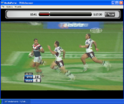
    I have added a screen shot of one of my current problems (ghosting???). The other is horizontal clipping....no screen shot

    sorry if this is a vague question but having difficulties explaining and trying to work out where my problem is...Please help
     

    Attachments

    • untitled.PNG
      untitled.PNG
      553.7 KB

    Spragleknas

    Moderator
  • Team MediaPortal
  • December 21, 2005
    9,471
    1,822
    Located
    Home Country
    Norway Norway
    Newcomers forum? :D

    Anyway, one tip I can give is to use a decoder with DXVA capabilities (or at least use hardware deinterlacing), like PDVD, WinDVD, ATi AVIVO etc. (@720p50 off course). In other words: drop FFDShow (you state to use this in "My System"), or get it to use HW deinterlacing (saw a post about it somewhere)
     

    jameson_uk

    Retired Team Member
  • Premium Supporter
  • January 27, 2005
    7,257
    2,533
    Birmingham
    Home Country
    United Kingdom United Kingdom
    I have a question about de-interlacing and progressive signals.

    first off I have three output options to my 40" Sony LCD TV from my pc
    1. VGA -1360x768@60HZ
    2. HDMI - 1080i@50Hz
    3. HDMI - 720p@50hz

    my DTV source is PAL (so 25/50Hz) provided by TVServer an seperate machine.
    First of my experience... after a fair bit of testing I decided that feeding my 32" Sony LCD at 1360x768@ 60Hz via VGA gave the best picture quality.

    Remember that the native res of your screen is 1366x768 so if you feed a PAL source 576i to it at 1080i or 720p you are scaling once on the PC to get your PAL into that size then again on the TV to make it fit the screen.

    I am not sure of your interlacing question exactly but it must have been converted at some point prior to getting to the LCD so it is either the GPU or codec which is doing the fixing. I would recomend playing about with different codecs. One thing to be wary of is that I have always found it is the actual signal of footy on ITV which is bad and there is not much you can do about that. Also seem to recall Setanta being pretty poor when I had this the other year.

    All in all trial and error is the way forward. Try different codecs to see if any help you out. (you may also want to look at post processing using ffdshow)
     

    Spragleknas

    Moderator
  • Team MediaPortal
  • December 21, 2005
    9,471
    1,822
    Located
    Home Country
    Norway Norway
    I agree that 1366x768p is best option (@50Hz), but getting 1366 is not always very easy. If you feed the LCD 576i the LCD still would do a scaling - and deinterlacing. If you play other material then PAL (like DL-ed films and series) then you would still do multiple scaling - and HD is off course out of the question.

    There are some improvements for the ATi HD series to avoid blur (reg. tweaks), but I don't think they will work on x1250 (690G)
     

    jameson_uk

    Retired Team Member
  • Premium Supporter
  • January 27, 2005
    7,257
    2,533
    Birmingham
    Home Country
    United Kingdom United Kingdom
    I agree that 1366x768p is best option (@50Hz), but getting 1366 is not always very easy. If you feed the LCD 576i the LCD still would do a scaling - and deinterlacing. If you play other material then PAL (like DL-ed films and series) then you would still do multiple scaling - and HD is off course out of the question.

    There are some improvements for the ATi HD series to avoid blur (reg. tweaks), but I don't think they will work on x1250 (690G)

    Desktop will actually be 1360x768 as it can't handle dimensions which are not multiples of 8. Also you are need going to be feeding the LCD with an interlaced signal via VGA as this is progressive in its nature. If you are feeding the screen at it's native res then you will almost always get no scaling or de-interlacing on the screen.

    576i would be 1024x576 and interlaced.... HD is not out of the question. Screens with 1366x768 native res will accept 720p / 1080i via HDMI. I feed my screen at this res with some HD content and it is good.

    Out of interest do you get any issues watching DVDs ?
     

    Spragleknas

    Moderator
  • Team MediaPortal
  • December 21, 2005
    9,471
    1,822
    Located
    Home Country
    Norway Norway
    Desktop will actually be 1360x768 as it can't handle dimensions which are not multiples of 8.
    I've heard this before, but I have also read many plases that it can be done, like:
    Can my computer output 1366x768?
    That depends on your graphics card. Using DVI NVidia and ATi X1x00 cards can output 1366x768. Over VGA only theATi X1x00's and some Matrox cards can do it.

    The reason for this lackluster support is that 1366 is not a multiple of 8 ( for an explanation of why this is a problem see http://forums.entechtaiwan.net/viewtopic.php?t=20). However, most Nvidia cards and the recent ATI X1k series are capable of outputting 1366x768 over DVI-HDMI.
    Source: pixelmapping Guide to 1366x768
     

    jameson_uk

    Retired Team Member
  • Premium Supporter
  • January 27, 2005
    7,257
    2,533
    Birmingham
    Home Country
    United Kingdom United Kingdom
    Desktop will actually be 1360x768 as it can't handle dimensions which are not multiples of 8.
    I've heard this before, but I have also read many plases that it can be done, like:
    Can my computer output 1366x768?
    That depends on your graphics card. Using DVI NVidia and ATi X1x00 cards can output 1366x768. Over VGA only theATi X1x00's and some Matrox cards can do it.

    The reason for this lackluster support is that 1366 is not a multiple of 8 ( for an explanation of why this is a problem see EnTech Taiwan :: View topic - Horizontal timing and pixel-perfect resolutions). However, most Nvidia cards and the recent ATI X1k series are capable of outputting 1366x768 over DVI-HDMI.
    Source: pixelmapping Guide to 1366x768

    Indeed it can. I think this involves custom timings etc using powerstrip. I believe both NVidia and ATI drivers now support 1360x768 straight out the box anyway. I would have thought it possible that going to 1366x768 via VGA might actually stop you getting 1:1 pixel mapping? I did look initially at playing around with 1366 but the missing 3 pixels on either side of the screen has never really bothered me so I just live with it :)

    However, most Nvidia cards and the recent ATI X1k series are capable of outputting 1366x768 over DVI-HDMI.
    One afterthought... my set only accept 480i/p 576i. 720p and 1080i via HDMI which I think is a reasonably common situation.
     

    charli181

    Retired Team Member
  • Premium Supporter
  • August 3, 2007
    800
    111
    Sydney
    Home Country
    Australia Australia
    All,
    thanks for your replies,

    from all the comments posted, my understanding is this in a simplified way (correct me if wrong).

    1. TV Server provides the stream to MP as it was broadcast from the TV Station.

    2. MPClient uses codec specified to deinterlace (Software or Hardware[DXVA])

    3. Video Card will output stream to TV scaling it to the screen resolution specified


    If I have a Progressive signal from TV Station, de-interlacing is turned on, will it be de-interlaced. How can I stop it, if this is the case?

    I have stopped using ffdshow, since RC2 now has it coded to not use it if it is a MPEG2 stream. All Aussie FTA stuff is this (SD & HD) so I am going through codec hell again. Until then my system specs will stay as is:(

    The best picture so far I have is VGA 1360x768@60Hz (strangely I have no stutter-why?) but still get that ghosting - using PDVD Ultra 8 with no DXVA as HD provides black screen using ATI 8.1 with no CCC.

    I am not sure if it is the chipset (690G) that is giving me the grief, but do not want to spend money to find out that it wasn't hardware.

    Another thing I have noticed is that with the Shift-1 option, it always shows 25fps, no matter what I do in the settings for codec,MP or video card
     

    robyf

    Retired Team Member
  • Premium Supporter
  • June 20, 2005
    1,076
    278
    54
    Bolzano
    Home Country
    Italy Italy
    The best picture so far I have is VGA 1360x768@60Hz (strangely I have no stutter-why?) but still get that ghosting - using PDVD Ultra 8 with no DXVA as HD provides black screen using ATI 8.1 with no CCC.

    If you use vista try to disable denoise filter in ccc. You have to enable it and slide the setting to 0. This filter is causing ghosting if signal is already denoised at source.
     

    Users who are viewing this thread

    Top Bottom