IR Server Suite - Version 1.4.2 Test Build 3158/3281 (7 Viewers)

Status
Not open for further replies.

Inker

Retired Team Member
  • Premium Supporter
  • December 6, 2004
    2,055
    318
    Hi guys,

    I'm pretty new and so far have used two remotes, but I want to change that. I really have only very limited needs, all I would like to do is map two buttons from my tv-remote to the mce remote and blast them back out to my tv (on/off and sleep).

    So I've installed IR-Server Suite 1.0.4.2. I have opened Service Config and ticked MCE receive/send. Then I went to Translater, clicked on new (under system-wide) - When it asked me to press the button, I pressed the TV button on my MCE remote, then under Button Maping and Blast IR I clicked on Learn... and learn again so that It says "Press button to learn now...."

    And that's where I'm stuck, no matter what button I press on my TV remote (or even a different tv remote) it simply stays at that window telling me to press the button. But if I open the debug utility, click connect, and then click on learn ir, then press buttons on my TV-remote it tells me stuff like:

    Received Message: "RemoteEvent, Notify"
    Remote Event "57408"

    ....can anyone help me?
     

    and-81

    Retired Team Member
  • Premium Supporter
  • March 7, 2005
    2,257
    183
    Melbourne
    Home Country
    Australia Australia
    Hey Inker,

    The Learn method needs you to place your remote within an inch or two of the receiver. Otherwise it just doesn't see it...

    When it's learning a button for blasting it uses the short range (accurate) receiver.

    When you're mapping a button in Translator you can have the remote further away because it is using its long range (less accurate) receiver.

    Does that help?

    EDIT: I've just looked at the IR learn and button mapping sections and I believe they really could be improved. So I'll try to improve it and make it more intuitive for the next version.
     

    Inker

    Retired Team Member
  • Premium Supporter
  • December 6, 2004
    2,055
    318
    Hey Inker,

    The Learn method needs you to place your remote within an inch or two of the receiver. Otherwise it just doesn't see it...

    When it's learning a button for blasting it uses the short range (accurate) receiver.

    When you're mapping a button in Translator you can have the remote further away because it is using its long range (less accurate) receiver.

    Does that help?

    EDIT: I've just looked at the IR learn and button mapping sections and I believe they really could be improved. So I'll try to improve it and make it more intuitive for the next version.

    I'm not sure :) I'll try tonight, but from what I can remember I went pretty close to the receiver with the tv-remote, maybe 10-20 cm. But I'll give it another shot tonight and let you know.
    Thnx for your response in the meantime.

    Hey Aaron,

    Just tried again, even when I'm almost touching the receiver with the remote, there is no reaction at all. The receiver does light up, so it is seeing it (I already mentioned it seems to to receive them in the debug tool). Is there I way I can manually add a blast command? "57408" seems to be my TV on/off button?

    Even more interesting, the log(s) tell me the learning was successfull (but the whole ui stays greyed out and there is no reaction at all), lol :)
     

    blobo

    Portal Member
    March 3, 2008
    35
    0
    hey,
    When I try to re-map my MCE remote buttons and create a new rule, I cannot change the "condition, window: home" value. Whichever window I choose, it stays as "home". I probably have misunderstood how the system works or then some setting is wrong. I tried with both versions listed in the first post of the thread.

    I was hoping to get the remote to work so that OK-button would work as "select item" everywhere else in MP besides "videos" window. In videos window the button would bring up "show info" window. This way clicking a file or a folder would first bring up the imdb info, and the second click start the movie.

    I removed the keys from the registry and i have added full version of MCE. The changes that i make to the mapping work in MP, only the home value cannot be changed anywhere.


    E: And when i try to change a value that exists already for some button in the default mapping(eg. slideshow), i can't change that either, nothing happens. So the first value that shows up in the value field stays there for good.
     

    and-81

    Retired Team Member
  • Premium Supporter
  • March 7, 2005
    2,257
    183
    Melbourne
    Home Country
    Australia Australia
    Inker:

    hmmm, that's odd...

    I'll take a look at the logs and try to fix it for the next release.

    blobo:

    Try pressing enter after you've made the change... the input mapper works a little bit different in my plugin to the one built into mediaportal... I changed it so you could put in window id's and things ...
     

    nachttier

    Portal Pro
    March 31, 2006
    86
    1
    Viernheim
    Home Country
    Germany Germany
    Problem after Standby

    Hi there!

    I could not see the problem I am experiencing being mentioned before. Therefore, I decided to report it here. If a fix has already been found, I would be very grateful for a link or short explanation.

    I use the Input Service together with Winlirc and a self-made serial IR receiver. It works pretty good except for when the machine resumes from standby. It seems as if somehow the service receives the messages from Winlirc more than once. The attached log shows this behavior: at the end of the file there are two button_down events, which should only be one.
    A restart of the service fixes this.
    Of course I could write a batch file for restarting the service on each resume, but maybe this bug could be fixed in the Input Service (if it actually is a bug).

    Additional information: Vista Business, TVE3, MP SVN 17544
    Tell me if you need more information.

    Regards,
    Sven
     

    TheBatfink

    MP Donator
  • Premium Supporter
  • June 11, 2007
    1,286
    222
    Nottingham
    Home Country
    United Kingdom United Kingdom
    fwal:

    TheBatfink:

    Try the Keyboard Input plugin and Custom HID Receiver in Input Service Configuration ... Keyboard Input will let you map any key on your keyboard and some remotes should work with it as well I think. The Custom HID Receiver will let you use ANY HID remote, but the version in the last preview doesn't have all the features it will in the next version. But give it a try anyway.

    Use the MP Control Plugin. Go to the plugin's configuration screen and select a button in the list on the main config dialog for MP Control Plugin that you want to add a button mapping for. You can add more buttons to the list to map from one of the templates listed in the combo box below. Muck around with it and I think you'll figure it out. Once you've associated a button code to a virtual button name you can map a mediaportal command to it by clicking "Map Buttons"... This is not the most user friendly setup, but until I re-write the input mapper you're stuck with it :)

    Or, you could use Translator, it's button mapping process is a little simpler.

    Cheers,

    I'm having real difficulty with this.. I think my main problem may lie with the fact that I use a learning remote and it doesn't have the exact same buttons or send the same remote codes as the remotes listed in the MP Control Plugin. Is there a way I can create my own remote config with the buttons I have on my remote, and the codes it sends for those buttons? Rather than selecting FusionRemote or MCE Remote etc etc from the drop down..

    Or am I totally getting this messed up in my head?
     

    and-81

    Retired Team Member
  • Premium Supporter
  • March 7, 2005
    2,257
    183
    Melbourne
    Home Country
    Australia Australia
    nachttier:

    Is there any way I can support your device directly, instead of going through WinLirc?

    The thing is, I have no idea why the input service would duplicate a button press ... that's quite strange. I'll try a couple of things for the next release, but I'm at a bit of a loss.

    TheBatfink:

    You can map any remote, just select the button in the MP Control Plugin main config screen and press the button on your remote you want to use for that button... this adds your remote's code to the accepted codes for that button ... this will be a lot easier in the coming versions of the IR Server Suite.

    Hope that helps,
     

    TheBatfink

    MP Donator
  • Premium Supporter
  • June 11, 2007
    1,286
    222
    Nottingham
    Home Country
    United Kingdom United Kingdom
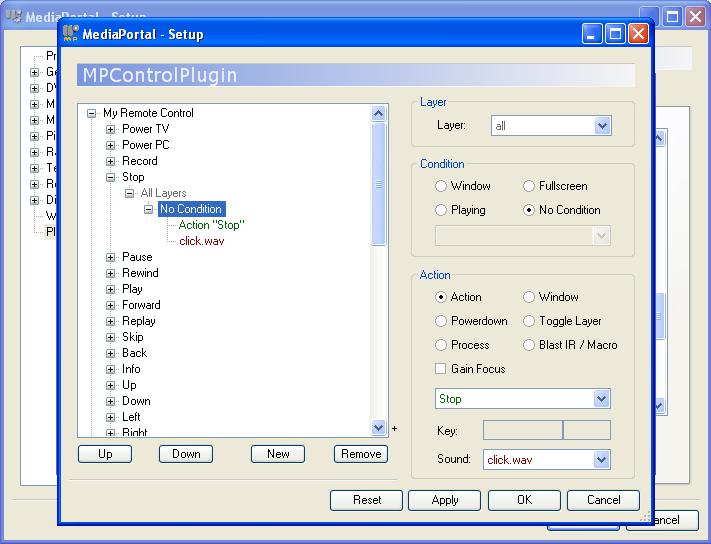
    Do you mean in this screen???

    If so, when I press buttons on my remote, they don't do anything?? How can I check that the new General HID option is actually working for my setup? Maybe it isn't even working!

    Thanks
     

    Attachments

    • mpplugin.JPG
      mpplugin.JPG
      61.6 KB

    nachttier

    Portal Pro
    March 31, 2006
    86
    1
    Viernheim
    Home Country
    Germany Germany
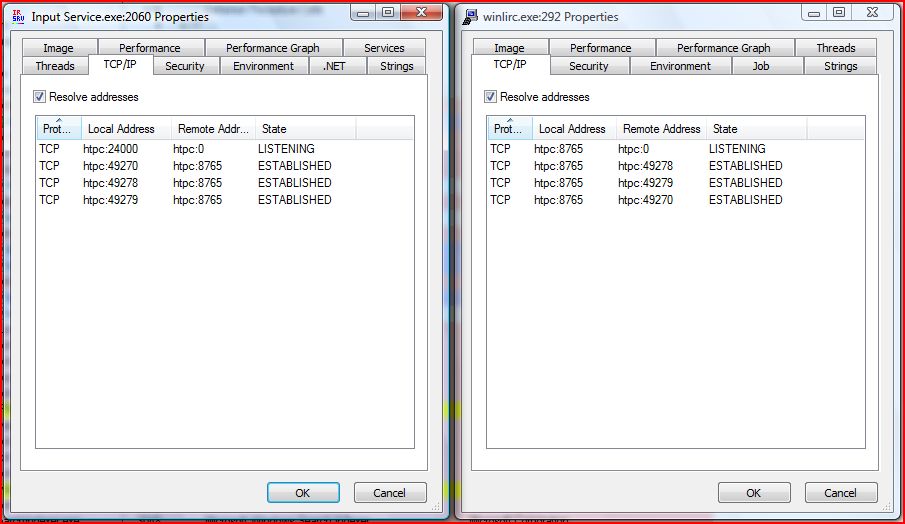
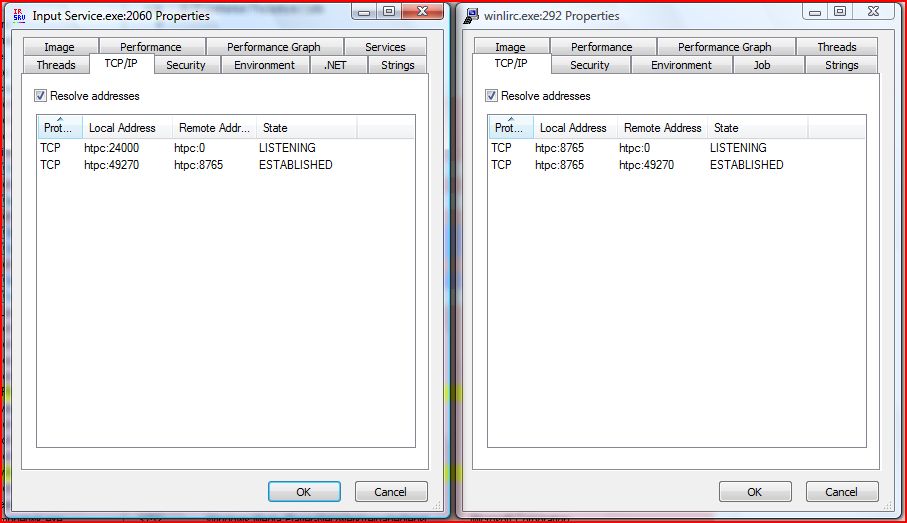
    I think I found the cause for the duplication of the commands. Using Sysinternals Process Explorer I found out that each time the machine resumes from standby, 2 additional connections are established between the Input service and Winlirc. See the images below.
    Before Standby
    https://forum.team-mediaportal.com/attachment.php?attachmentid=18043&stc=1&d=1204892117
    After Standby
    https://forum.team-mediaportal.com/attachment.php?attachmentid=18044&stc=1&d=1204892298

    I assume that Winlirc sends a button press event to each connection, therefore the Input Service receives the events more than once. But I have no idea why the duplication does not scale in a linear way with the numbers of connections.
    But now the question is who establishes the additional connection and can this be avoided?

    What do you think?
     

    Attachments

    • IS-WL_before_sb.JPG
      IS-WL_before_sb.JPG
      78.1 KB
    • IS-WL_after_sb.JPG
      IS-WL_after_sb.JPG
      83.9 KB
    Status
    Not open for further replies.

    Users who are viewing this thread

    Top Bottom