Is surround sound working?? (1 Viewer)

porky996t

MP Donator
  • Premium Supporter
  • May 21, 2008
    1,016
    81
    Bolton, Lancashire, England
    Home Country
    England England
    Hi Guys,

    I have been wondering how to work out if I'm getting surround sound?

    I am using the Gigabyte GA-MA78GM-DS2H motherboard and taking the optical out into my Sony cinema system unit. This set up works great, certainly receiving the optical out etc.

    I have looked at the onboard soundcard settings but cannot see anything related to optical output - there are settings relating to 5.1 output, but this is using the various 3.5mm outlets on the rear panel of the motherboard.

    Are there any MP settings to check? I am using SAF 5.0 codec pack.


    Many thanks in advance!


    M.
     

    g0rsq

    Portal Member
    August 18, 2010
    45
    3
    Home Country
    United Kingdom United Kingdom
    I am new to Mediaportal, and HTPC generaly, but as I understand:-

    You need to configure your soundcard to "passthrough" the digital (PCM) audio unchanged to the optical output.

    All the 5.1 etc. setting for your soundcard will decode the digital signal for playback on external speakers connected to the PC.

    I think most soundcards do this by default, hence no settings.

    You need to allow your AV amplifier to decode the digital signal for playback on speakers connected to the amplifier.

    Of course you can use the PC soundcard to do the decoding, and feed the decoded signal to the amplifier via a connection for each channel, but not via optical. Usually better to let the AV amp hardware decoders do the work.

    Most AV amplifiers with Dolby decoders indicate when they are docoding multichannel streams by a dolby indication, or sometimes "locked" appears.

    I dont know of any other way to verify you have correctly sent the digital signal to the amplifier, and it is correctly decoding all the channels.

    Sorry not a well qualified answer, so maybe someone will correct me, or add more to the response.

    Peter
     

    kaigame

    MP Donator
  • Premium Supporter
  • September 9, 2005
    67
    8
    Home Country
    Great Britain (UK) Great Britain (UK)
    The best way to check to 'see' if the sound is coming through correctly is to examine pretty much two things:

    1) Your receiver/amplifier - It should switch and probably 'click' when a movie with a dolby digital/dts sound track is played, it will then display the appropriate format.

    2) FFDshow audio decoder - you would have to set MP to windowed mode and not to stay on top to do this properly, check the ffdshow tray icon when playing a movie(double click it), as you are only using ffdshow, it's all you should be concerned with, it should have in the info page(near the top) what audio is coming in, and how it's going back out again, i'd take a screenie, but my MP is in the living room, and people are watching TV :)

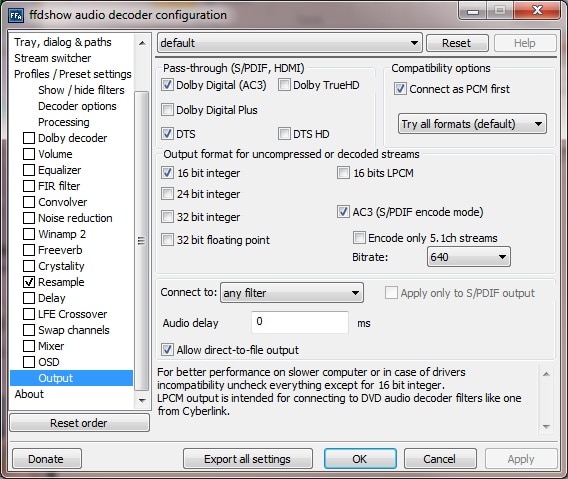
    in the output tab for ffdshow, make sure that the bitsream audio formats(passthrough) that your amp can decode(through SPDIF it will be DTS and Dolby Digital) are ticked, everything else should be at default, i think.

    As you are connected via SPDIF and sound is working, i have to assume that the correct audio device is being used, SAF would have prompted you to make your SPDIF output default(the choice is manual, the window pops up automatically). ffdshow can mix stereo to 5.1, works quite well, there is an option on the output tab to only encode 5.1 streams, untick it, see if it works out, i don't seem to be able to use it at the moment, but as my setup is working after a rebuild(failed hdd), i'm not fiddling with it :). You don't really want your card to do any audio processing, let ffdshow handle the output options.

    That should make sense.
     

    BBloke

    Portal Member
    November 6, 2009
    15
    2
    Home Country
    United Kingdom United Kingdom
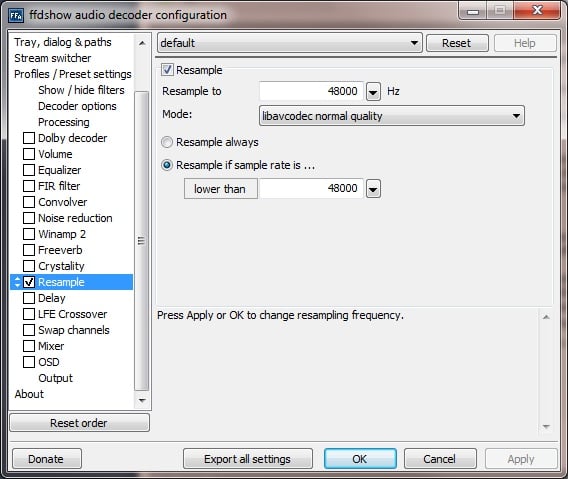
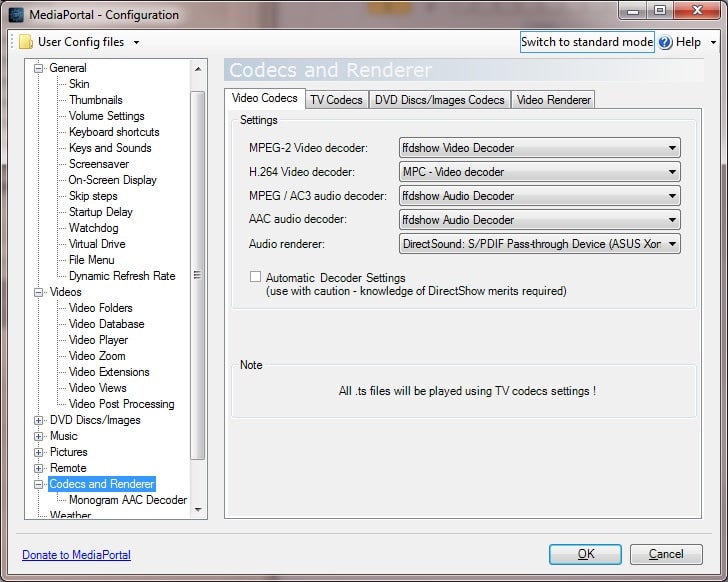
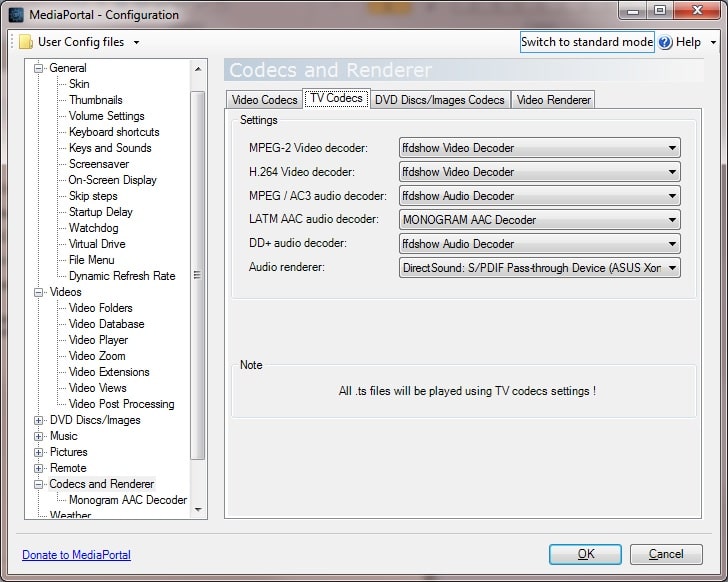
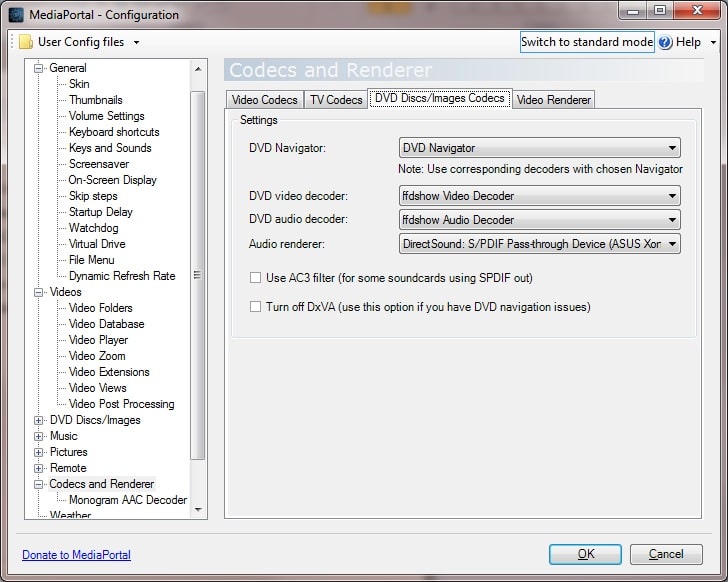
    I use MP that way. Here's some shots to show you how I set mine up. I've set resample to 48000 to make sure the signals remain consistant.

    attachment.php

    ffdshow1 - Resample settings

    attachment.php

    ffdshow2 - Output settings

    attachment.php

    attachment.php

    attachment.php

    mp1 - 3 - Codec settings.

    attachment.php

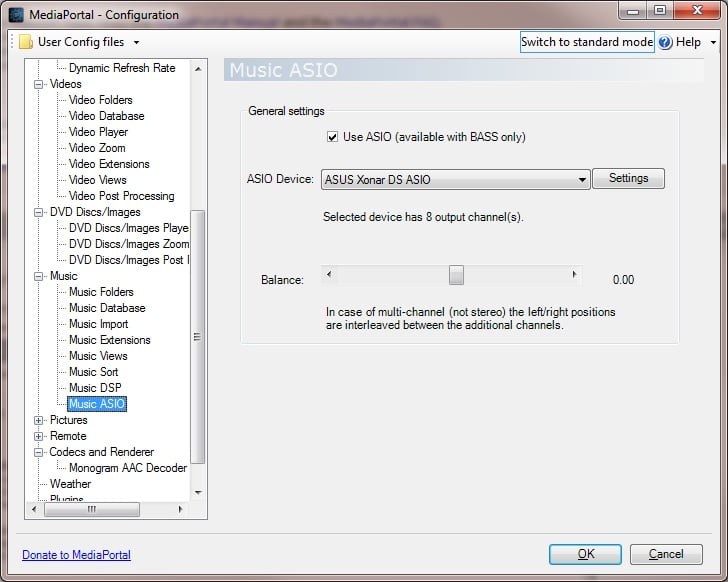
    mp4 - Music Audio settings (just incase)

    I set MP codecs to specific output via the optical out too. DD and DTS signals are passed through and anything 2 channel is re-encoded to 5.1. Setting it up that way stops MP from being used to control volume levels. I had one issue before checking the resampling setting where some files would playback but the audio would constantly drop off at the amp. The digital signal light would flicker and sound would be garbled.

    I hope the above helps. I recently changed my sound card which had another minor glitch with getting the DD and DTS signals over to the amp but I'm hoping the above works out. If you feel you are not getting one or the other post up and I post back what I did to try and correct it

    I found when using ASIO for the music there was a faint crackling sound so I changed the settings and increased the latency to 200ms

    I'm currently using SAFv4 and they are working great.
     

    Attachments

    • ffdshow1.jpg
      ffdshow1.jpg
      73.9 KB
    • ffdshow2.jpg
      ffdshow2.jpg
      111.2 KB
    • mp1.jpg
      mp1.jpg
      120.8 KB
    • mp2.jpg
      mp2.jpg
      120.3 KB
    • mp3.jpg
      mp3.jpg
      117.6 KB
    • mp4.jpg
      mp4.jpg
      101.2 KB

    hoborg

    Portal Pro
    June 13, 2008
    4,413
    1,644
    Nový Jičín
    Home Country
    Czech Republic Czech Republic
    If anybody wants to test or have problems with passthrough of for example AAC, FLAC, WMA, etc... (encoding to AC3).

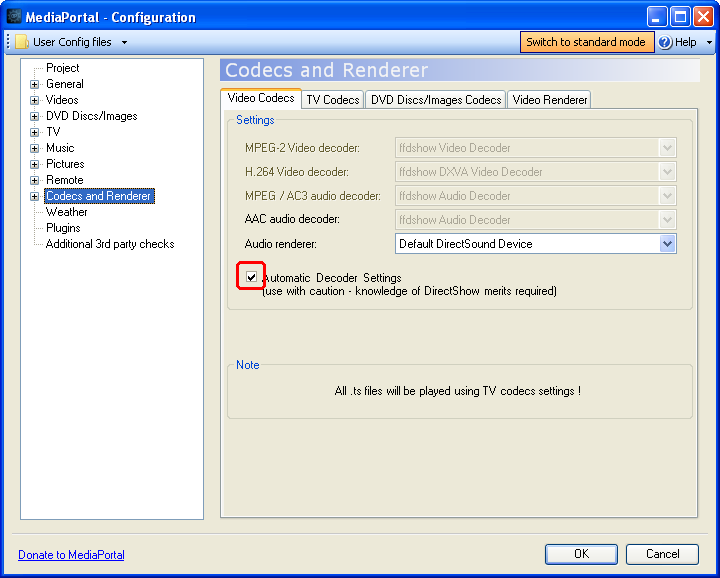
    Install latest SAF5 and try setup MePo this way:
    saf5_video2.png


    Durning SAF install - if Passsthrough was enabled, there will popup window, where you should change default audio output, so there is no need to specify it in MePo (should be like on screenshot above).

    I do not have reciever, so i cannot test it at all :(

    NOTE:
    You should have Resample enabled to all audio, not only <48000 - for example FLAC can be 96000 and it needs to be resampled to 48000 to be able to passthrough it.

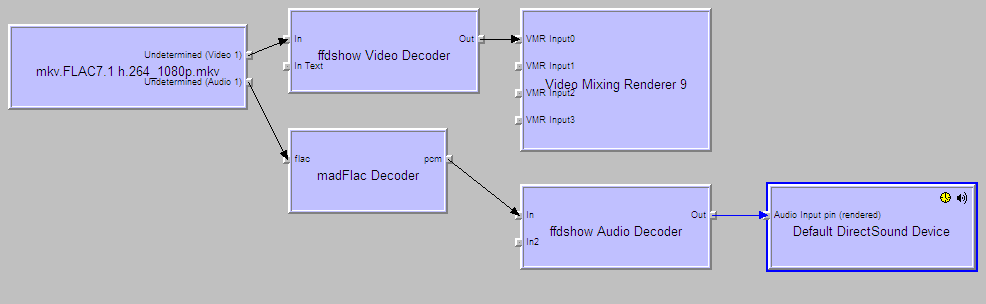
    Graphs should looks like this (source = FLAC 7.1 96000 24bit, output = AC3 5.1, 48000 16bit)
    flac1.png
     

    Users who are viewing this thread

    Top Bottom