Is there a way to hibernate MePo from WMC Remote? (1 Viewer)

nzdreamer55

MP Donator
  • Premium Supporter
  • August 31, 2010
    465
    28
    San Luis Obispo, CA
    Home Country
    United States of America United States of America
    Hello everyone,

    So I have just got MePo 1.3.Alpha set up and it is great. I use a harmony one remote to emulate a WMC Remote. Rather than going to the little power button at the top of the GUI, is there a button that will put MePo into sleep or hibernation? I need to have my harmony remote do several things to get my home theater turned on or shut down so it would be nice to include this with the shut down script on the remote. I have looked at the power scheduler +++, but it does not seem to have a feature like this.

    Thanks
    -S
     

    HomeY

    Test Group
  • Team MediaPortal
  • February 23, 2008
    6,418
    4,717
    51
    ::1
    Home Country
    Netherlands Netherlands
    I've mapped a Power Toggle to my Harmony and set the Windows Power Options so that the system goes to Sleep when i press the power button. In the BIOS i've selected Suspend (S3) as sleep state.

    Control Panel\Hardware and Sound\Power Options\System Settings for Windows 7

    Windows_Power_Options.JPG
     
    Last edited:

    nzdreamer55

    MP Donator
  • Premium Supporter
  • August 31, 2010
    465
    28
    San Luis Obispo, CA
    Home Country
    United States of America United States of America
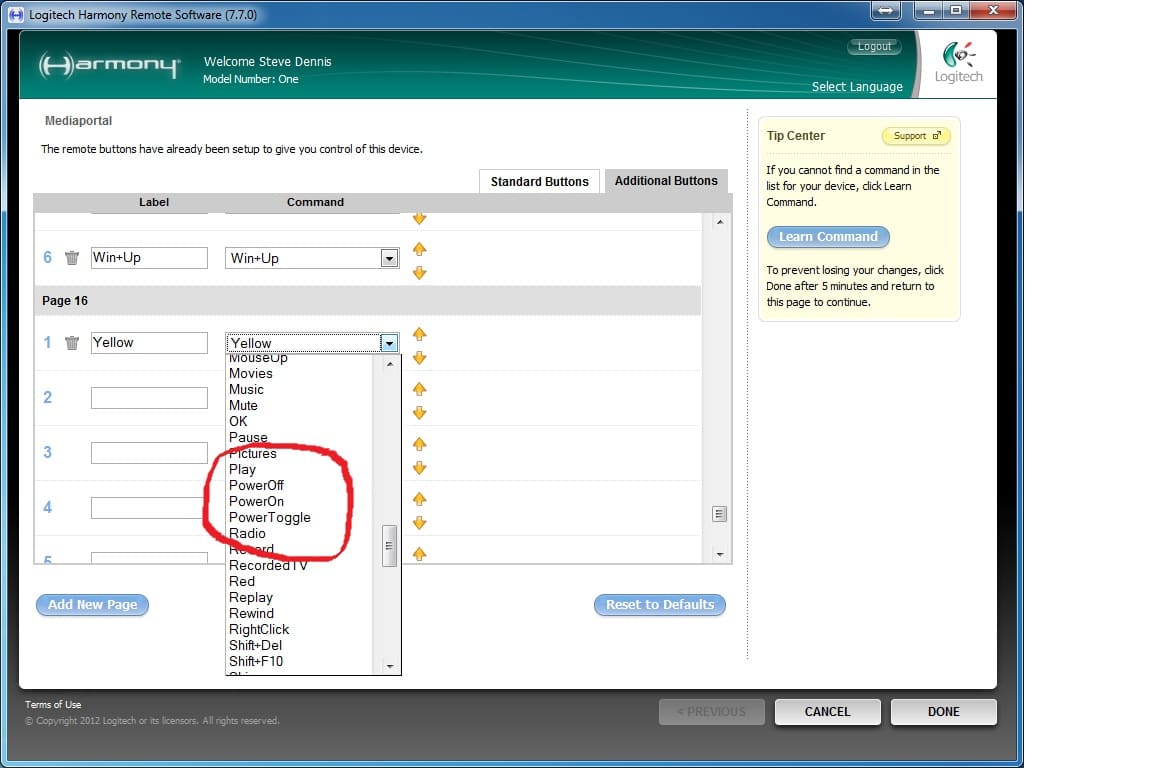
    Thanks again HomeY for idea. I can set my bios to S3, and I get the windows setting part, but I don't get how you map a Power Toggle to your Harmony. Could you tell me a little more about how this is done? On the harmony remote I think that there are three choices that have the word power in them for buttons, are these what you used (see photo)? Also can you tell me when you set up your harmony and added a device for MePo, did you use the Device called "Media Center PC" and for the manufacturer "Microsoft" and for Model "MCE Keyboard"?
     

    Attachments

    • Harmony Power toggle.jpg
      Harmony Power toggle.jpg
      168.9 KB

    nzdreamer55

    MP Donator
  • Premium Supporter
  • August 31, 2010
    465
    28
    San Luis Obispo, CA
    Home Country
    United States of America United States of America
    OK I guess I should have just tried it. So the Power off or the Power Toggle works to send it into sleep mode.....now I am sure you are wondering what the next question is, How do I wake it back from this sleep with the remote? I tried the power on and the power toggle and it didn't wake it up :-(
    -S[DOUBLEPOST=1342364327][/DOUBLEPOST]I hope this helps someone else in the future, so on my system the PowerOn will NOT wake the HTPC, but the PowerToggle will wake the HTPC. Weird (y)
    -S
     

    hafblade

    Portal Pro
    January 19, 2011
    675
    290
    Trier, Germany
    Home Country
    Germany Germany
    Try all usb ports for your remote. On most motherboards only some usb ports can wake up the pc.

    Furthermore you have to activate wake on usb in your motherboard bios.

    And as last the usb remote receiver has to be configured in windows so that he can wake up. But most time this is the standard configuration.
     

    nzdreamer55

    MP Donator
  • Premium Supporter
  • August 31, 2010
    465
    28
    San Luis Obispo, CA
    Home Country
    United States of America United States of America
    Thanks for the help. Got it working with the Powertoggle command rather than the PowerOn command that comes with my Harmony One. My Bios is kind of hard to figure out in that it is ASUS's EFI BIOS and I cannot find any settings where I can chose if the USB ports will wake the computer.

    Bottom line for me it works and maybe for some others they will need to do what you recommend.

    Thanks for the reply to my question.
    -S
     

    Users who are viewing this thread

    Top Bottom