Leadtek Winfast DTV1000S Detection (1 Viewer)

fromaron

Portal Pro
October 18, 2007
174
3
Home Country
I thought I share my experience with you. I do have a different Leadtek card (DTV2000H) which wouldn't be recognised by MP initially, even though I was using CardsDefinition.xml file provided by other members. This was happening until I realise that Leadtek has a nasty habit of changing driver name. You might find different versions of the driver called as 2000 H (with space) or 2000H (with space). Some versions I found had even the card tuner chip in the name. And the CardsDefinition.xml file formatting is critical as well.
The best course of action in your stuation would be to do all of the following:
1. Use notepad to edit the xml file;
2. Insert your card definition inside the file, to avoid placing the information outside of tag;
3. Check the card driver information from withing windows hardware manager. The string there will contain some important characters used in the moniker;
4. Follow the provided tut on the new card definition creation to the letter, it actually works.

Good luck :)

Almost forgot to add, if you give up on the configuration, install TV server single seat, it will most likely find your card straight away.
 

StarTV

Portal Member
February 17, 2008
24
0
Home Country
Success!!

And thankyou all for your help.

The original definition file was fine. I checked the devid in device manager and it was the same as the one in this thread. The problem was the formatting. I must have put a space or omitted one somewhere in the cardcapture.xml file :oops:

Anyhow, I opened MP config and added the card. Next I started MP navigated to setup and the card was there ready for the channel scan which it did sans any burps or farts. Now it's time to begin with the tinkering to see if MP has the features I require. The fun (or grief) now begins.

A couple of things first off:

I did notice that the channel changes are way slower than the leadtek software. I counted up to five seconds for some changes. Leadtek software was ~ two secs. Anyone else notice this?

On a sort of positive note the leadtek remote had a Vista MCE setting. I selected it and to my surprise the cursor buttons worked and I could navigate through MP menus with this. Unfortunately a lot of buttons didn’t work including the back button which was really annoying. I'll have to see how I could remedy this or just buy a boni fide MCE remote and be done with it. Funny that the standby and power button worked on this remote as I definitely thought they wouldn’t.

I also notice that flipping between full and standard screens in TV mode that it would lock up the app.

I suppose over time I’ll learn the programs idiosyncrasies.

There are other things I noticed but I’ll trawl through the forum to see if I can fix these glitches.
 

Jemson

Portal Member
January 4, 2007
7
0
40
Geelong
Home Country
Glad to hear you got it working!

I personally have not had any issues with channel changing delays, however another fried of mine did have the same issues your reported. (We both use the DTV1000T cards however.)

As far as changing from full to standard screens, I have not had any issues... There is a momentary pause but that is less than one or two seconds, so I can't help you there.

As far as the Vista MCE remote goes, I think the problems you are having could be due to the fact that its a Vista remote running under XP, therefore some of the keypress codes are not recognised.
 

jforjimmy

Portal Member
February 6, 2010
16
0
Home Country
Hi all,

I noticed its been a while since last reply to this thread.. I ran into same problem and was hoping to get some answers....

I am having same problem as mentioned above by starTV..

My system specs are: For detail go to: https://forum.team-mediaportal.com/...tion-support-53/cannot-start-tvservice-77412/
XP Pro SP3
MediaPortal beta 1.1.0 rev23491 - SingleSeat Installation
TVServer version: 1.0.4.23491
TVCard: Leadtek Winfast DTV1000 S

I am using beta version because if I use MediaPortal 1.0.2 (Stable version) TVService does not run on my system: Refer to: https://forum.team-mediaportal.com/...tion-support-53/cannot-start-tvservice-77412/

So I installed beta version and after alot of sweat TVService did started and I moved on to this next step. My progress so far while trying to fix is:

1. Open TV-Server configuration -> Click on TV Servers - It shows my system fine.
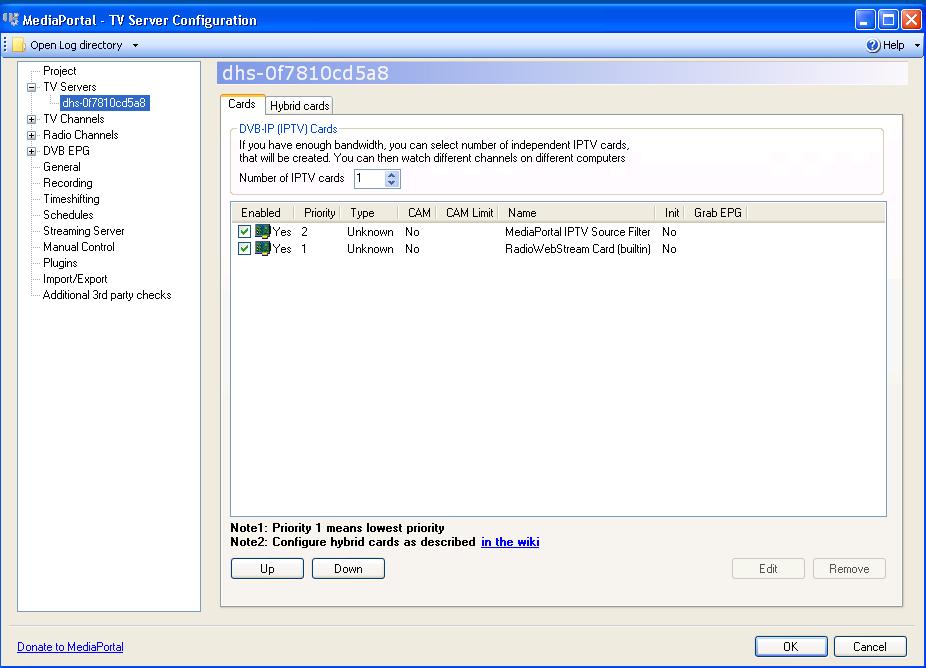
2. Expand TV Servers and click on my system -> to see Cards installed on my computer and they are only iptv cards and it does not detect my card. See attached picture of my TV Server Coniguration.
3. One thing that I would like to mention that when I installed this beta version. CaptureCardDefinitions.xml was not present in MediaPortal default installation directory. So I copied it from one of threads and and put it in default installation folder. Although I did try to open TVServer even without this file but was the as now when I have put the file in with DTV1000s definition in it.
4. I checked everything posed in this thread - Caputer card def for 1000s is within the tags and device id is same as in device manager.

I dont know what I am doing wrong or there is another way to get it to handle this problem in beta??????

Please advice if any one has handled this problem to success with beta version....??????????? :confused:
 

Attachments

  • TVServerConfgution-ServerDetails.JPG
    TVServerConfgution-ServerDetails.JPG
    82 KB

jforjimmy

Portal Member
February 6, 2010
16
0
Home Country
After getting no luck with beta version... I got MediaPortal 1.0.2 working with TVService.. Now TVService works fine with MP 1.0.2..

Since I installed MP 1.0.2, I can see file CaptureCardDefinitions.xml in C:\Documents and Settings\All Users\Application Data\Team MediaPortal\MediaPortal..
I have updated my file for Winfast DTV1000 S as explained previously in this thread.. But still TV Server Conf. cant see my card...

Is that the right path for this file???

I also downloaded file Called TVLibrary.dll from one of forums and I have replced the original file in C:\Program Files\Team MediaPortal\MediaPortal TV Server with downloaded file.. Still problem not fixed....

Any help would be appreciated.....

One more thing... I just noticed that I installed Winfast PVR2 which with the card...

After installation it makes a icon in right hand side of task bar.. When I right on the icon and click on 'Settings'

It pop ups a dialog which has two selection combo boxes.. One says 'Capture Card' and other says 'Remote Controller'

When I dropped down 'Capture Card' combo.. It showed Card name 'Winfast DTV1000 S BDA Analog Capture' and on CaptureCardDefinitions.xml the text for this card to add in says ---- capturename"Winfast DTV1000 S BDA Digital Capture"

I changed Digital to Analog but still card cannot be detected....

Is there is any way to get this card working???? Is there is something I am missing????
 

Users who are viewing this thread

Top Bottom