Germany
Hi community!
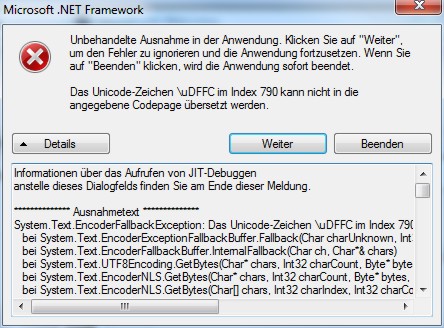
Log-Collector/Debug-Mode crashes here with this message:
Could you please help?
Best regards
Helios
Log-Collector/Debug-Mode crashes here with this message:
Informationen über das Aufrufen von JIT-Debuggen
anstelle dieses Dialogfelds finden Sie am Ende dieser Meldung.
************** Ausnahmetext **************
System.Text.EncoderFallbackException: Das Unicode-Zeichen \uDFFC im Index 790 kann nicht in die angegebene Codepage übersetzt werden.
bei System.Text.EncoderExceptionFallbackBuffer.Fallback(Char charUnknown, Int32 index)
bei System.Text.EncoderFallbackBuffer.InternalFallback(Char ch, Char*& chars)
bei System.Text.UTF8Encoding.GetBytes(Char* chars, Int32 charCount, Byte* bytes, Int32 byteCount, EncoderNLS baseEncoder)
bei System.Text.EncoderNLS.GetBytes(Char* chars, Int32 charCount, Byte* bytes, Int32 byteCount, Boolean flush)
bei System.Text.EncoderNLS.GetBytes(Char[] chars, Int32 charIndex, Int32 charCount, Byte[] bytes, Int32 byteIndex, Boolean flush)
bei System.IO.StreamWriter.Flush(Boolean flushStream, Boolean flushEncoder)
bei System.IO.StreamWriter.Dispose(Boolean disposing)
bei System.IO.TextWriter.Dispose()
bei MediaPortal.Support.EventLogCsvLogger.CreateLogs(String destinationFolder)
bei WatchDog.PostTestActions.PerformActions()
bei WatchDog.MPWatchDog.PerformPostTestActions(Boolean autoClose)
bei WatchDog.MPWatchDog.tmrMPWatcher_Tick(Object sender, EventArgs e)
bei System.Windows.Forms.Timer.OnTick(EventArgs e)
bei System.Windows.Forms.Timer.TimerNativeWindow.WndProc(Message& m)
bei System.Windows.Forms.NativeWindow.Callback(IntPtr hWnd, Int32 msg, IntPtr wparam, IntPtr lparam)
************** Geladene Assemblys **************
mscorlib
Assembly-Version: 2.0.0.0.
Win32-Version: 2.0.50727.4952 (win7RTMGDR.050727-4900).
CodeBase: file:///C:/Windows/Microsoft.NET/Framework/v2.0.50727/mscorlib.dll.
----------------------------------------
WatchDog
Assembly-Version: 1.1.2.20595.
Win32-Version: 1.1.2.0.
CodeBase: file:///C:/Program%20Files/Team%20MediaPortal/MediaPortal/WatchDog.exe.
----------------------------------------
System.Windows.Forms
Assembly-Version: 2.0.0.0.
Win32-Version: 2.0.50727.4927 (NetFXspW7.050727-4900).
CodeBase: file:///C:/Windows/assembly/GAC_MSIL/System.Windows.Forms/2.0.0.0__b77a5c561934e089/System.Windows.Forms.dll.
----------------------------------------
System
Assembly-Version: 2.0.0.0.
Win32-Version: 2.0.50727.4927 (NetFXspW7.050727-4900).
CodeBase: file:///C:/Windows/assembly/GAC_MSIL/System/2.0.0.0__b77a5c561934e089/System.dll.
----------------------------------------
System.Drawing
Assembly-Version: 2.0.0.0.
Win32-Version: 2.0.50727.4927 (NetFXspW7.050727-4900).
CodeBase: file:///C:/Windows/assembly/GAC_MSIL/System.Drawing/2.0.0.0__b03f5f7f11d50a3a/System.Drawing.dll.
----------------------------------------
Utils
Assembly-Version: 2.2.7.20588.
Win32-Version: 2.2.7.0.
CodeBase: file:///C:/Program%20Files/Team%20MediaPortal/MediaPortal/Utils.DLL.
----------------------------------------
System.Xml
Assembly-Version: 2.0.0.0.
Win32-Version: 2.0.50727.4927 (NetFXspW7.050727-4900).
CodeBase: file:///C:/Windows/assembly/GAC_MSIL/System.Xml/2.0.0.0__b77a5c561934e089/System.Xml.dll.
----------------------------------------
mscorlib.resources
Assembly-Version: 2.0.0.0.
Win32-Version: 2.0.50727.4952 (win7RTMGDR.050727-4900).
CodeBase: file:///C:/Windows/Microsoft.NET/Framework/v2.0.50727/mscorlib.dll.
----------------------------------------
DaggerLib.DSGraphEdit
Assembly-Version: 1.0.2866.28351.
Win32-Version: 1.0.0.0.
CodeBase: file:///C:/Program%20Files/Team%20MediaPortal/MediaPortal/DaggerLib.DSGraphEdit.DLL.
----------------------------------------
DirectShowLib-2005
Assembly-Version: 2.0.0.0.
Win32-Version: 2.0.0.0.
CodeBase: file:///C:/Program%20Files/Team%20MediaPortal/MediaPortal/DirectShowLib-2005.DLL.
----------------------------------------
DaggerLib
Assembly-Version: 1.0.2856.27998.
Win32-Version: 1.0.0.0.
CodeBase: file:///C:/Program%20Files/Team%20MediaPortal/MediaPortal/DaggerLib.DLL.
----------------------------------------
MediaPortal.Support
Assembly-Version: 1.1.2.20586.
Win32-Version: 1.1.2.0.
CodeBase: file:///C:/Program%20Files/Team%20MediaPortal/MediaPortal/MediaPortal.Support.DLL.
----------------------------------------
System.resources
Assembly-Version: 2.0.0.0.
Win32-Version: 2.0.50727.4927 (NetFXspW7.050727-4900).
CodeBase: file:///C:/Windows/assembly/GAC_MSIL/System.resources/2.0.0.0_de_b77a5c561934e089/System.resources.dll.
----------------------------------------
System.Windows.Forms.resources
Assembly-Version: 2.0.0.0.
Win32-Version: 2.0.50727.4927 (NetFXspW7.050727-4900).
CodeBase: file:///C:/Windows/assembly/GAC_MSIL/System.Windows.Forms.resources/2.0.0.0_de_b77a5c561934e089/System.Windows.Forms.resources.dll.
----------------------------------------
************** JIT-Debuggen **************
Um das JIT-Debuggen (Just-In-Time) zu aktivieren, muss in der
Konfigurationsdatei der Anwendung oder des Computers
(machine.config) der jitDebugging-Wert im Abschnitt system.windows.forms festgelegt werden.
Die Anwendung muss mit aktiviertem Debuggen kompiliert werden.
Zum Beispiel:
<configuration>
<system.windows.forms jitDebugging="true" />
</configuration>
Wenn das JIT-Debuggen aktiviert ist, werden alle nicht behandelten
Ausnahmen an den JIT-Debugger gesendet, der auf dem
Computer registriert ist, und nicht in diesem Dialogfeld behandelt.
Could you please help?
Best regards
Helios