Macros: Variables available? (1 Viewer)

GoldenEye

MP Donator
  • Premium Supporter
  • October 26, 2005
    299
    26
    Switzerland
    Home Country
    Switzerland Switzerland
    I have a beamer attached to my MP PC. I'd like to write a makro, which turns the beamer off before I send the computer into standby. However, this should only happen if the beamer had been turned on before (otherwise the beamer would be turned on, since turning the beamer on or off are the same IR blast commands). So, the system should know whether this has happened or not.

    Is there an easy way of doing that?

    G.
     

    and-81

    Retired Team Member
  • Premium Supporter
  • March 7, 2005
    2,257
    183
    Melbourne
    Home Country
    Australia Australia
    A couple of days ago I was playing around with Girder 3.3 (due to my trying to utilize the old plugins), and while I still think Girder is far too complicated for the average user (at least 3.3 is, I haven't looked at the newer versions) I do think it has some very nice features that I might also implement.

    One of those features is variables. I think I will try to implement a variables feature for maybe the next version or the version after that.

    I've got a few "big" changes I want to make so variables might not get done for a few weeks.

    It will take a fair bit of work to make it usable because I'd need to add all sorts of functions (if ... then ... else, goto, labels, set variable, get variable) and all sorts of built-in variables to compare against... things like the time, date, environment variables, the clipboard, etc...

    To do it right will take a lot of work ... but I might put in a basic version with just if, goto, labels and set/get variable functions.

    Keep an eye on the forum and hopefully I will have something for you soon.

    Cheers,
     

    GoldenEye

    MP Donator
  • Premium Supporter
  • October 26, 2005
    299
    26
    Switzerland
    Home Country
    Switzerland Switzerland
    Thanks a lot Aaron - for your answer as well as for your time and dedication to your software. This sounds very promising. Take your time to add the mentioned features.

    G.
     

    and-81

    Retired Team Member
  • Premium Supporter
  • March 7, 2005
    2,257
    183
    Melbourne
    Home Country
    Australia Australia
    I can tell you now that the next version of the IR Server Suite will have variables, it will be a pretty simple implementation but it will actually be quite powerful if used imaginatively.

    Here are the commands it will support to begin with:

    (this stuff is really for those people who already understand it, but I'll try to explain it for everyone)

    Label
    Labels are just markers within the macro that you can jump to with a "goto" or "if" command. Usually a macro is run one command at a time starting at the top and working it's way down. Labels let you mark out different areas of the macro so you can jump around inside the macro and change the order that commands are executed in, or jump past areas of the macro all-together.

    Goto ( Label )
    The goto label command lets you use the labels you have marked out to jump around inside your macro, changing the order the commands are executed in. By itself this is not very useful at all, but combined with a couple of other commands it becomes quite powerful.

    Set Variable ( Variable Name, Value )
    With Set Variable you can assign a value to a variable that will hold that value until you shut down the program/plugin that created it. All variable names must start with "var_" so the macro can tell the difference between a variable and a value you want to compare/assign.

    The Value assigned to a variable can be anything you like, and it will be up to you, the macro programmer, to keep track of what the different variables you create mean. When assigning a value to a variable you can use escape codes, environment variables (eg. "%PATH%"), and a few special codes that will be described in more detail later but which include "%$CLIPBOARD_TEXT$%", "%$DATE$%", "%$TIME$%" and a few more. If you have any suggestions for data you'd like to store in a variable then please let me know.

    If ( Value1, Comparison Type, Value2, Goto Label )
    This is a simple "if statement" that will execute a Goto command if the condition is met.
    Available comparison types are:
    == (equals)
    != (does not equal)
    > (greater than)
    < (less than)
    >= (greater than or equal to)
    <= (less than or equal to)
    contains (Value1 contains the text in Value2)
    starts with (Value1 starts with the text in Value2)
    ends with (Value1 ends with the text in Value2)

    All variables and values are considered to be strings (eg. "hello") unless you use a >, <, >=, or <= comparison in which case they are converted to a number and then compared. If the string does not translate to a number then the if statement will fail but will not interrupt the macro.

    Some examples:

    If "10" > "8" goto foo
    This command will always goto the label "foo" because 10 and 8 are numbers and 10 is greater than (>) 8.

    If "10" <= "goodbye" goto bar
    This command will not work because "hello" and "goodbye" have no number representation, this if command (and any if command that tries to compare a number with a non-number) can never evaluate true and so will never execute the goto portion of the command.

    If "var_test" contains "hello" goto hello
    Now we see the use of a variable (var_test) and the "contains" comparison. There is no way to predict the outcome of this command without knowing what is contained within the variable var_test. If var_test = "I say, hello world." then the goto command would be executed because the "contains" comparison would be true.

    If "var_ABC" != "var_XYZ" goto ABYZ
    Here we see the use of two variables (var_ABC and var_XYZ) and the "does not equal" comparison type (!=). If var_ABC = "true" and var_XYZ = "false" then the goto command will execute because var_ABC does not equal var_XYZ.

    if "var_notset" == "" goto NotSetYet
    If you try to use a variable in an if statement and that variable has not been Set then it will evaluate and the variable will be considered to be empty. So the above example will execute the goto portion.


    What's left to do:

    The first release of variables will probably only include the above commands, but I plan to add some more commands ... as follows (please suggest any you think I'm missing) ...

    Clear Variables - To completely wipe clean the variables list that is in memory.
    Save Variables ( file ) - To save all variables to a file so that they can be loaded back at another time.
    Load Variables ( file ) - To load variables that were previously saved with the Save Variables command.
    Swap Variables (var1, var2) - Takes two variables and swaps their values.
    String operations - Concatenate two strings, To Upper Case, To Lower Case, etc ...
    Integer maths - Add, Subtract, Multiply, Divide, Modulo, etc...

    More advanced programming statements (switch, while...do, for loop, etc ...) might get included later but are already able to be created through clever use of the existing functions. So I will most likely concentrate on adding commands that are not currently available. The most important commands to include are probably the Integer maths commands because they can make looping (especially) a lot easier to code.

    I will post back a few example macros when I release the next version, I'm not at home right now so I can't attach my first example (a toggle macro) until later.

    All feedback welcome.

    Cheers,
     

    and-81

    Retired Team Member
  • Premium Supporter
  • March 7, 2005
    2,257
    183
    Melbourne
    Home Country
    Australia Australia
    Update:

    I've decided to hold over all the new variable and macro enhancements for the next major version update.

    I've made so many architectural changes to make the most out of the new features that I don't want to bring it in just yet.

    The next version (1.0.4.2) will be a small step forward. It will include some of the smaller updates and bug fixes I've been working on. Then I will start integrating my reworked command processing architecture for version 1.0.5.0.

    1.0.5.0 will be a big step up from a source code point of view and will break all backwards compatibility with older macros as an unfortunate consequence.

    Sorry for the delay, but it's either delay this feature for 1.0.5.0 or wait a long time for 1.0.4.2 (which is needed due to some important bug fixes).

    Cheers,
     

    and-81

    Retired Team Member
  • Premium Supporter
  • March 7, 2005
    2,257
    183
    Melbourne
    Home Country
    Australia Australia
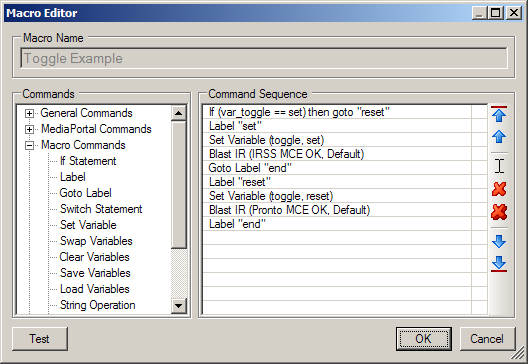
    Figured I'd attach a screenshot of the new macro editor for 1.0.5.0.

    As you can see, commands are now grouped on the left by their "Category"... Different categories can be added later and the new structure will mean that anyone can write a simple C# dll file to add a new command type.

    In this example you can see a very simple (but effective) toggle macro. But of course there are many possibilities for the uses of variables...

    I'm currently working on improving all the existing commands so they can use variables in their parameters ...

    This is a huge change to the way things work behind the scenes, and that's why it wont be in until after 1.0.4.2

    Expect to see a 1.0.4.2 release soon.

    Cheers,
     

    Attachments

    • 1.0.5.0 Macro Example.png
      1.0.5.0 Macro Example.png
      19.3 KB

    GoldenEye

    MP Donator
  • Premium Supporter
  • October 26, 2005
    299
    26
    Switzerland
    Home Country
    Switzerland Switzerland
    Aaron, you are incredible... I have never expected such fast progress.

    Unfortunately, it is hard for me to give you substantial feedback to the macro commands because I am not a programmer. But from a layman's point of view, your description sounds great.

    G.
     

    Automate

    Portal Pro
    December 14, 2008
    55
    1
    Home Country
    United States of America United States of America
    Any update on the enhanced macro functionality? I need some simple sting manipulation/compare so that I can look at the first digit of the channel number and based on it send the command to two different set top boxes.
     

    Users who are viewing this thread

    Top Bottom