Mce remote (1 Viewer)

jona78

Portal Pro
May 4, 2010
90
2
Home Country
United Kingdom United Kingdom
Please could someone let me know how the f*ck you get media portal to launch via the home button? I've been trying for about 3 days!!!:confused:
Every other button/function works fine. I have checked the MP Tray option in the MP configuration but this hasn't made any difference. Please could someone tell me what I am doing wrong?

Many thanks in advance.
 

jona78

Portal Pro
May 4, 2010
90
2
Home Country
United Kingdom United Kingdom
Hi Jameson_uk

I have set the options as in the tutorial and it is the same remote as illustrated. Will posting logs help? Wasn't sure IF it was a bug or I'd just done something wrong.

Thanks for your response.
 

jameson_uk

Retired Team Member
  • Premium Supporter
  • January 27, 2005
    7,257
    2,533
    Birmingham
    Home Country
    United Kingdom United Kingdom
    Well would certainly help if you filled in system specs etc. Does your remote say microsoft inside the battery compartment? Many remotes look like this but few are true MS remotes.

    This works fine on two machines I have bte
     

    jona78

    Portal Pro
    May 4, 2010
    90
    2
    Home Country
    United Kingdom United Kingdom
    It says Microsoft on the remote. I've just realised that once media portal is running I can minimise to tray with the remote and start in up again with the home button. I have configured media portal to start up when I boot up my pc, it loads fine and minimises to tray. It's when I hit the home button then it refuses to load. If I start MP with the mouse or keyboard then minimize to tray the home button works then. Hope this makes sense because I'm confusing myself here!!!
     

    Paranoid Delusion

    Moderation Manager
  • Premium Supporter
  • June 13, 2005
    13,052
    2,978
    Cheshire
    Home Country
    United Kingdom United Kingdom
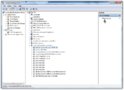
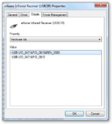
    Can you get a snapshot of the remotes hardware id, this can be found in device manager, under usb controllers\ehome infrared receiver (usncir), right click and select properties\details, choose hw id in drop down box, lets see if it is in our list of MS mce remotes supported hw list, if its MS mce i'd be surprised if it is not.

    sshot-3.jpgsshot-2.jpg
     

    Jay_UK

    Test Group
  • Team MediaPortal
  • October 6, 2009
    1,780
    283
    Derby
    Home Country
    United Kingdom United Kingdom
    Hi there,

    I have three "MS MCE" remotes/receviers... one genuine, two copies. Both the copies look identical..both the transmitter and receiver.

    But only one of the "copies" works properly. Thats becuase one appears as a eHome receiver, the other as a HID device. Even internally the receivers look the same.

    I think as PD is elluding too, some may have a deviceID that the OS is not detecting as a eHome type device.

    This area of MePo is a nightmare (not MePo's fault) - Mainly becuase you can't get the original MCE remotes anymore, and there are lots of copies/versions out there.

    J.
     

    jona78

    Portal Pro
    May 4, 2010
    90
    2
    Home Country
    United Kingdom United Kingdom
    Hi Ray

    I've attached a screen shot. The thing I don't understand is that I've had this remote for around 4 years and it's worked fine. It was working fine last week on my old pc. I've upgraded my pc this week installed MP and now it's stopped working correctly. I've also attached logs and system spec, hope this helps.

    Many thanks for your replies
     

    Attachments

    • 21-10-2011 16-40-06.jpg
      21-10-2011 16-40-06.jpg
      45.1 KB
    • DxDiag.txt
      32.9 KB

    Jay_UK

    Test Group
  • Team MediaPortal
  • October 6, 2009
    1,780
    283
    Derby
    Home Country
    United Kingdom United Kingdom
    Jona78,

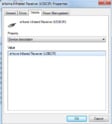
    You need to change the property (dropdown box) to Hardware IDs (not Device Description), and then do a screen capture for us (and post here)

    Thanks,

    J.
     

    Paranoid Delusion

    Moderation Manager
  • Premium Supporter
  • June 13, 2005
    13,052
    2,978
    Cheshire
    Home Country
    United Kingdom United Kingdom
    Please could someone let me know how the f*ck you get media portal to launch via the home button? I've been trying for about 3 days!!!:confused:
    Every other button/function works fine. I have checked the MP Tray option in the MP configuration but this hasn't made any difference. Please could someone tell me what I am doing wrong?

    Many thanks in advance.

    And not one mention of, it was working last week, so we know it is a MS MCE remote.

    Can you please fill in System specs under usercp and enable them to be viewed.

    Thanks
     

    Users who are viewing this thread

    Top Bottom