Hi All,
I tried upgrading my MediaPortal server from 1.02 which it was working perfectly under 2003 R2 x64 with XP clients on 1.02 to 1.1RC1 and i've had nothing but problems. I know you don't have it on your supported list, but i've always been able to run it perfectly and it sounds like a DB issue. I've tried re-installing both configs multiple times, cleaning up old settings and always rebooting, but the issues are common:
Here's the common settings:
- Firewall - Off
- AV - Not installed
- Windows Patches - Current
- Dedicated TV Server Install Selected with TV Option Selected (Yes i'll be watching TV)
When doing a fresh install with the MS SQL Setup:
- Default Password Set, Configure Windows Firewall Option left on, Default Install Directory
- DotNetFix v2.0 installed (http://www.microsoft.com/downloads/...00-acf8-4fa1-affb-40e78d788b00&DisplayLang=en)
- x64 ver downloaded as per provided webpage - Important note: When moving it from the desktop to the relevant location, make sure you UnBlock the file (2K3 R2 functionality) otherwise the install won't complete properly
- During the install, it errors with "Failed to create the database". it then goes on to say "Congratulations you successfully complete the setup of MediPortal"
I had a look through the log file and it was erroring with this issue:
2010-03-02 23:45:30.140625 [SetupTv(1)]: ********* Error reason: CREATE DATABASE failed. Some file names listed could not be created. Check related errors.
Cannot create file 'C:\Program Files (x86)\Microsoft SQL Server\MSSQL.1\MSSQL\DATA\MpTvDb.mdf' because it already exists. Change the file path or the file name, and retry the operation.
2010-03-02 23:45:30.140625 [SetupTv(1)]: ********* Error code: 1802, Line: 1 *********
- I then uninstalled it all again, manually removed SQL, rebooted and the SQL Install component now worked
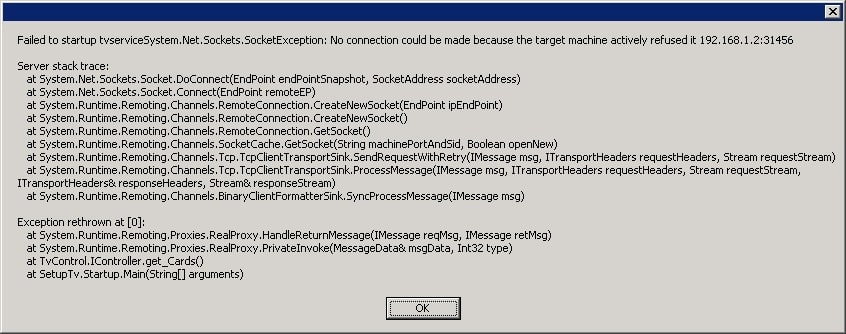
- Continued the install and then got the attached error
- MediaPortal then advised that it had installed correctly - /sigh
- Checked that the TVService was running - it was
- Reviewed the AppEvent Logs - Services started fine, no obvious problems although there was a SQL sa login error (Login failed for user 'sa'. [CLIENT: <local machine>]) but the database has been added fine as far as I can tell
- Start the TV-Server Configuration App - the same error message is displayed
- Restart (figure it can't hurt) - Service started fine, no obvious EventLog errors
- Checked TCP/IP settings for SQL database - Local and Remote using TCP and named pipes
- Looked through the event logs again - noted : "The configuration of the AdminConnection\TCP protocol in the SQL instance SQLEXPRESS is not valid." - reviewed it on the net, doesn't appear to be a problem and my ip
- /sigh - removed it all again, making sure to manually clean up the folders
- Installed again, deciding to turn on the firewall and changing the MediaPortal password to password
- Made changes as per above, installed to C:\Program Files (x86)\MediaPortal TV Server
- Same problem
- Tried the fix as per https://forum.team-mediaportal.com/...nd-tv-server-90/failed-start-tvservice-56167/ but there was no joy
Finally though - found a way to make it work!
- Reviewed the error.log file and found the following entry:
2010-03-03 00:26:47.812500 [(1)]: Exception ystem.Runtime.Remoting.RemotingException: .Config file 'C:\Program Files (x86)\MediaPortal TV Server\TVService.config' cannot be read successfully due to exception 'System.IO.FileNotFoundException: The system cannot find the file specified. (Exception from HRESULT: 0x80070002)
at System.ConfigServer.RunParser(IConfigHandler factory, String fileName)
- Had a look, sure enough, there wasn't a default file there so I just copied/pasted the tvservice.exe.config and renamed it to tvservice.config and now it launches!
- Seems to be working fine now - will test and see how I go
Suggestions
- Check for the file name existance and then prompt the user to remove or other appropriate action
- Create the file if its not present or provide a default file for use
MediaPortal Version: 1.1RC1
MediaPortal Skin: Default
Windows Version: Windows 2003 R2 Server x64 SP2
CPU Type: Core2 Duo
HDD: 300GB / 250GB free
Memory: 4GB
Motherboard:
Video Card: NvDieo GeForce 7050
Video Card Driver: WHQL 2003 Driver
Sound Card: Realtek Onboard
Sound Card AC3:
Sound Card Driver: WHQL 2003 Driver
1. TV Card: DVB-TV 878
1. TV Card Type:
1. TV Card Driver: WHQL Driver
2. TV Card: DVB-TV 878
2. TV Card Type:
2. TV Card Driver: WHQL Driver
3. TV Card:
3. TV Card Type:
3. TV Card Driver:
4. TV Card:
4. TV Card Type:
4. TV Card Driver:
MPEG2 Video Codec:
MPEG2 Audio Codec:
h.264 Video Codec:
Satelite/CableTV Provider:
HTPC Case:
Cooling:
Power Supply:
Remote:
TV:
TV - HTPC Connection: Server
I tried upgrading my MediaPortal server from 1.02 which it was working perfectly under 2003 R2 x64 with XP clients on 1.02 to 1.1RC1 and i've had nothing but problems. I know you don't have it on your supported list, but i've always been able to run it perfectly and it sounds like a DB issue. I've tried re-installing both configs multiple times, cleaning up old settings and always rebooting, but the issues are common:
Here's the common settings:
- Firewall - Off
- AV - Not installed
- Windows Patches - Current
- Dedicated TV Server Install Selected with TV Option Selected (Yes i'll be watching TV)
When doing a fresh install with the MS SQL Setup:
- Default Password Set, Configure Windows Firewall Option left on, Default Install Directory
- DotNetFix v2.0 installed (http://www.microsoft.com/downloads/...00-acf8-4fa1-affb-40e78d788b00&DisplayLang=en)
- x64 ver downloaded as per provided webpage - Important note: When moving it from the desktop to the relevant location, make sure you UnBlock the file (2K3 R2 functionality) otherwise the install won't complete properly
- During the install, it errors with "Failed to create the database". it then goes on to say "Congratulations you successfully complete the setup of MediPortal"
I had a look through the log file and it was erroring with this issue:
2010-03-02 23:45:30.140625 [SetupTv(1)]: ********* Error reason: CREATE DATABASE failed. Some file names listed could not be created. Check related errors.
Cannot create file 'C:\Program Files (x86)\Microsoft SQL Server\MSSQL.1\MSSQL\DATA\MpTvDb.mdf' because it already exists. Change the file path or the file name, and retry the operation.
2010-03-02 23:45:30.140625 [SetupTv(1)]: ********* Error code: 1802, Line: 1 *********
- I then uninstalled it all again, manually removed SQL, rebooted and the SQL Install component now worked
- Continued the install and then got the attached error
- MediaPortal then advised that it had installed correctly - /sigh
- Checked that the TVService was running - it was
- Reviewed the AppEvent Logs - Services started fine, no obvious problems although there was a SQL sa login error (Login failed for user 'sa'. [CLIENT: <local machine>]) but the database has been added fine as far as I can tell
- Start the TV-Server Configuration App - the same error message is displayed
- Restart (figure it can't hurt) - Service started fine, no obvious EventLog errors
- Checked TCP/IP settings for SQL database - Local and Remote using TCP and named pipes
- Looked through the event logs again - noted : "The configuration of the AdminConnection\TCP protocol in the SQL instance SQLEXPRESS is not valid." - reviewed it on the net, doesn't appear to be a problem and my ip
- /sigh - removed it all again, making sure to manually clean up the folders
- Installed again, deciding to turn on the firewall and changing the MediaPortal password to password
- Made changes as per above, installed to C:\Program Files (x86)\MediaPortal TV Server
- Same problem
- Tried the fix as per https://forum.team-mediaportal.com/...nd-tv-server-90/failed-start-tvservice-56167/ but there was no joy
Finally though - found a way to make it work!
- Reviewed the error.log file and found the following entry:
2010-03-03 00:26:47.812500 [(1)]: Exception
ystem.Runtime.Remoting.RemotingException: .Config file 'C:\Program Files (x86)\MediaPortal TV Server\TVService.config' cannot be read successfully due to exception 'System.IO.FileNotFoundException: The system cannot find the file specified. (Exception from HRESULT: 0x80070002)at System.ConfigServer.RunParser(IConfigHandler factory, String fileName)
- Had a look, sure enough, there wasn't a default file there so I just copied/pasted the tvservice.exe.config and renamed it to tvservice.config and now it launches!
- Seems to be working fine now - will test and see how I go
Suggestions
- Check for the file name existance and then prompt the user to remove or other appropriate action
- Create the file if its not present or provide a default file for use
MediaPortal Version: 1.1RC1
MediaPortal Skin: Default
Windows Version: Windows 2003 R2 Server x64 SP2
CPU Type: Core2 Duo
HDD: 300GB / 250GB free
Memory: 4GB
Motherboard:
Video Card: NvDieo GeForce 7050
Video Card Driver: WHQL 2003 Driver
Sound Card: Realtek Onboard
Sound Card AC3:
Sound Card Driver: WHQL 2003 Driver
1. TV Card: DVB-TV 878
1. TV Card Type:
1. TV Card Driver: WHQL Driver
2. TV Card: DVB-TV 878
2. TV Card Type:
2. TV Card Driver: WHQL Driver
3. TV Card:
3. TV Card Type:
3. TV Card Driver:
4. TV Card:
4. TV Card Type:
4. TV Card Driver:
MPEG2 Video Codec:
MPEG2 Audio Codec:
h.264 Video Codec:
Satelite/CableTV Provider:
HTPC Case:
Cooling:
Power Supply:
Remote:
TV:
TV - HTPC Connection: Server