Germany
I've used Mediaportal for years on a Windows Host with restricted online-access.
Lately I reinstalled MediaPortalSetup_x64_1.38.003_2025-09-12-12-43 in an Win11 with virtualbox 7.1.14 under Mint 22 as Host,
imported the TV-Server settings and it generally works fine
I'm passing through my Hauppauge WinTV-dualHD DVB
USB-filter is configured, but I have to set the hook for the USB-device when I start or reactivate the virtual machine.
I don't use 3D, but PAE und VT-x/AMD-V are activated.
For better performance I reduce resolution on Host to FHD instead of 4k and use virtual Win 11 in Fullscreen-mode - processor is an AMD Ryzen 5 3600
Strangely Mediaportal doesn't show files in directories redirected as network-folders. I configured the access for video-folders.
I can access the files via Explorer with no problems.
Mediaportal configuration, recordings, timeshift-directory - all work on network-folders flawlessly.
My first attempt was to configure the video-folders with the network-adresses \\VBOXSVR...
in this configuration not even folder-names were shown.
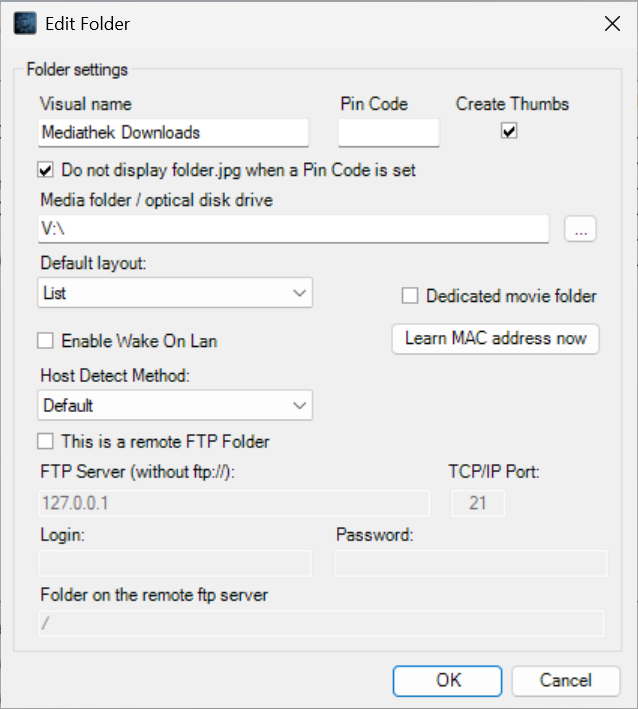
Then I configured video-folders with automaticly assigned drive-letters. Now Folder-names are shown but no content :-/
I show one example as screenshot
Any Idea, why mediaportal doesn' show the contents of the released folders?
Lately I reinstalled MediaPortalSetup_x64_1.38.003_2025-09-12-12-43 in an Win11 with virtualbox 7.1.14 under Mint 22 as Host,
imported the TV-Server settings and it generally works fine
I'm passing through my Hauppauge WinTV-dualHD DVB
USB-filter is configured, but I have to set the hook for the USB-device when I start or reactivate the virtual machine.
I don't use 3D, but PAE und VT-x/AMD-V are activated.
For better performance I reduce resolution on Host to FHD instead of 4k and use virtual Win 11 in Fullscreen-mode - processor is an AMD Ryzen 5 3600
Strangely Mediaportal doesn't show files in directories redirected as network-folders. I configured the access for video-folders.
I can access the files via Explorer with no problems.
Mediaportal configuration, recordings, timeshift-directory - all work on network-folders flawlessly.
My first attempt was to configure the video-folders with the network-adresses \\VBOXSVR...
in this configuration not even folder-names were shown.
Then I configured video-folders with automaticly assigned drive-letters. Now Folder-names are shown but no content :-/
I show one example as screenshot
Any Idea, why mediaportal doesn' show the contents of the released folders?