Mediaportal Recording on NAS failed (1 Viewer)

dyamant

Portal Pro
July 31, 2007
401
36
61
Castrop-Rauxel
Home Country
Germany Germany
I have get a new NAS Synology 213j. (2*WD Red 4TB HDD)
I create on this NAS a Folder for my records. but now when i start the record it start short and stop and start.........
If i use an internal folder it works.
I use the NAS over Gigabit Network.
THE NAS is very fast: 65MB write and around 90MB read so whats happen.
I hope anyone can help.
 

Attachments

  • Log 14032014 tvserver.zip
    37.3 KB

mr viggo

MP Donator
  • Premium Supporter
  • March 1, 2008
    500
    68
    Home Country
    Sweden Sweden
    What I did was to change the service "tv server" to run as my default login user instead of "localsystem". You'll find it by win+r
    Services.msc
     

    dyamant

    Portal Pro
    July 31, 2007
    401
    36
    61
    Castrop-Rauxel
    Home Country
    Germany Germany
    What I did was to change the service "tv server" to run as my default login user instead of "localsystem". You'll find it by win+r
    Services.msc
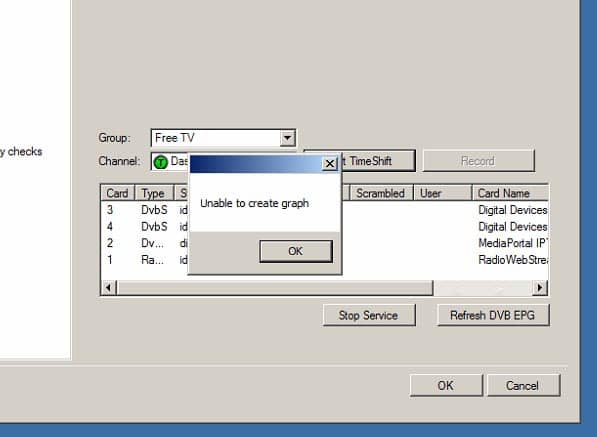
    I do what you write me. But now i get an error message "Graph can not be build" when i start a TV Stream with MediaPortal.
    Any Idea ?
     

    mr viggo

    MP Donator
  • Premium Supporter
  • March 1, 2008
    500
    68
    Home Country
    Sweden Sweden
    no, tried reboot after changing logon method? Is tvservice running after boot?
     

    dyamant

    Portal Pro
    July 31, 2007
    401
    36
    61
    Castrop-Rauxel
    Home Country
    Germany Germany
    no, tried reboot after changing logon method? Is tvservice running after boot?
    Yes i do a reboot and yes the tvservice runs.
     

    Attachments

    • ScreenShot030.jpg
      ScreenShot030.jpg
      52.9 KB

    mr viggo

    MP Donator
  • Premium Supporter
  • March 1, 2008
    500
    68
    Home Country
    Sweden Sweden
    This is what I did on win8:

    First, make sure you can see your NAS from windows explorer and use "other account" and your NAS login (probably admin) and your password, tick the box to make sure that windows remember your login things.

    1.PNG


    Second...
    open up your services.msc and select tvservice and properties
    select login tab and tick the box for "use this account"
    press "browse"
    press "advanced"
    press "search now"
    a few names pop up
    select the one that you log in to windows with (not the nas admin user), in my case it was the second in line that I blurred
    now you'll come back to the login tab, here you type in the password 2 times that you use for logging in to windows
    press "OK"


    2.PNG


    Try that, it works for me, if it fails, then I'm out of ideas
     

    dyamant

    Portal Pro
    July 31, 2007
    401
    36
    61
    Castrop-Rauxel
    Home Country
    Germany Germany
    1st thnx for your assistance and the nice workshop.
    But thats what i have done. I do the same way and i can see the folder with the explorer and can copy in what i want.
    Hmm. Thnx a lot
     

    mm1352000

    Retired Team Member
  • Premium Supporter
  • September 1, 2008
    21,544
    8,236
    Home Country
    New Zealand New Zealand
    But now i get an error message "Graph can not be build" when i start a TV Stream with MediaPortal.
    Any Idea ?
    ^^ new log files for this please. :)

    [edit: At least for the original problem mr viggo is almost certainly right:
    [2014-03-14 19:19:49,585] [7d4c588] [1e8] - Recorder:unable to create file:'E:\\2014-03-14 Sportschau live.ts' 3

    TsWriter couldn't create a file => recording failed. The user account running TV service must have permission to read and write from/to the share.]
     

    Users who are viewing this thread

    Top Bottom